
Pinned

4d •
Signup for Alerts from Anthropic & OpenAI
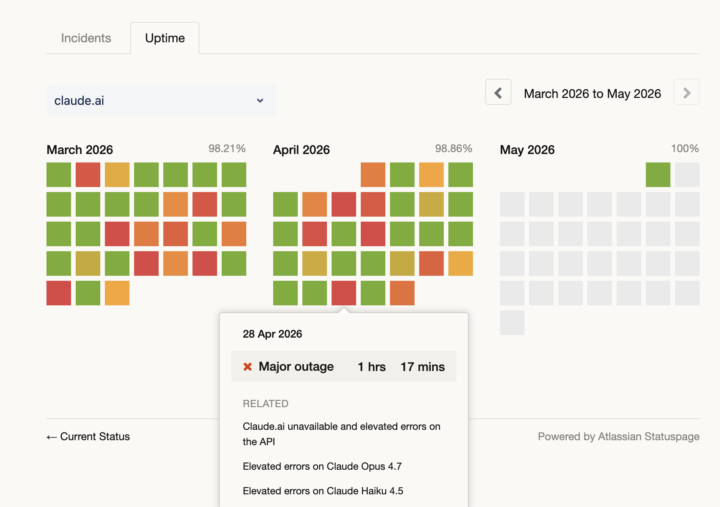
Something I highly recommend... Signup to receive alerts directly from Anthropic (Claude Sonnet, Haiku, Opus) and OpenAI (ChatGPT). (I'd also bookmark https://status.claude.com and https://status.openai.com) For instance, there was a "Major outage" effecting Anthropic that lasted just over an hour the other day. Effected Haiku 4.5 - the LLM many of us have moved to. Before posting something like "Assistable down? Assistable isn't doing XYZ correctly", sometimes its because the actual LLM models that basically power everything were down or experiencing intermittent outages. Getting notifications also can help you be proactive with your own clients. You could shoot off a quick email "Hey, one of the major AI providers, Anthropic (maybe you've heard of Claude or Claude Code), is experiencing a major outage. It's possible some of your chats will be experiencing less then ideal responses while they get this fixed. These outages do occur, although usually they do not last very long." Anyways, I mentioned getting notifications directly from the LLM providers the other day on the Wed Workshop call and thought I'd reiterate it here. Have a great weekend ya'll!
Pinned

11d •
Dropping soon
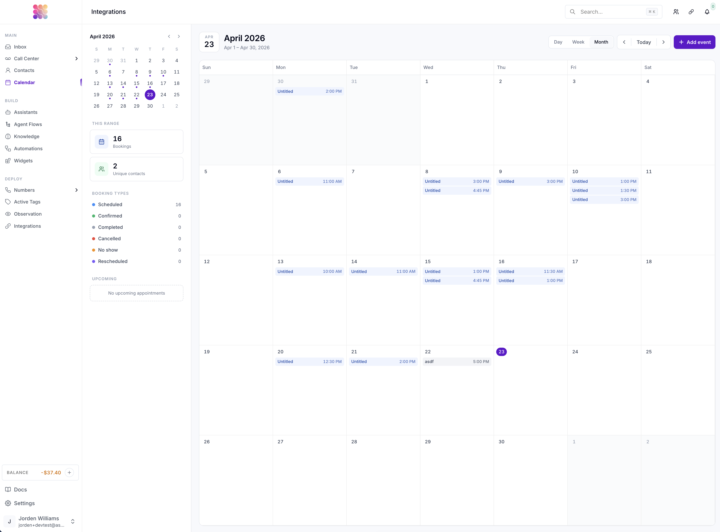
Long awaited *huff* finally here - Native calendar to show you your AI appointments AND self-scheduled actions which allow you to edit, view, and delete both - and sync with cal tools like cal.com and calendly. - Agent flows - scaffolded AI agent building thats super lightning fast and hard to crack on voice and chat. - Automation - we are big builders in custom tools and middleware so we decided to bring it in house for handling things like calls end automation, automation-as-a-tool, and simple integration automation. - Observation - When managing a large deployment, its very hard to observe without watching it 24/7 so you can set up conditions that you would like to observe / get notified for and send them to slack, email or webhook when that condition happens in a call or chat. - Integrations - Hubspot, Gleap, Zendesk, Cal.com, Slack, Calendly, OpenRouter, etc... - White labeled no brand docs over everything in the portal - Mutli-agent transfer live during call - IVR trees for your assistable numbers to route for mulitple assistants - Multi-modal chat - Recursive session chats (tool call while conversing async) etc etc etc All have been put through the ringer on testing, most have been deployed for enterprise customers Tons of UI / UX revamp GCP -> AWS More decoupled from GHL More agent building opportunities One cool place Thanks yall
Pinned
Feb '25 •
👋 Welcome: Start Here, Resources & Introduce Yourself
Hey everyone, So thrilled to have you aboard and welcome to the community. I have a couple rules, some resources and one ask of you before diving in. First, some resources: 🖥️ Your Workspace 📄 Documentation 📹 Videos & How-tos 🎓 Courses 🛟 Help Center 🗺️ Roadmap Next, some rules: 🚫 No self-promotion: Don't share posts, links or lead magnets - you'll be banned immediately. 🤝 Be helpful, be helped: Be kind, respectful, and inclusive - treat others as you wish to be treated. 🌱 Iron sharpens iron: Share cool stuff, take advantage of cool stuff thats shared. 🔍 Think before posting: Before starting a thread, take just 30 seconds to search. Lastly, intro yourself: 1. How long have you been slangin' AI? 2. Niche or niches? 3. Any cool wins? (your chance to brag) 4. Where you from? 5. Main goals for the year?



1h •
🚨 Can’t Identify Which Assistant Is Responding — Trace Keeps Timing Out
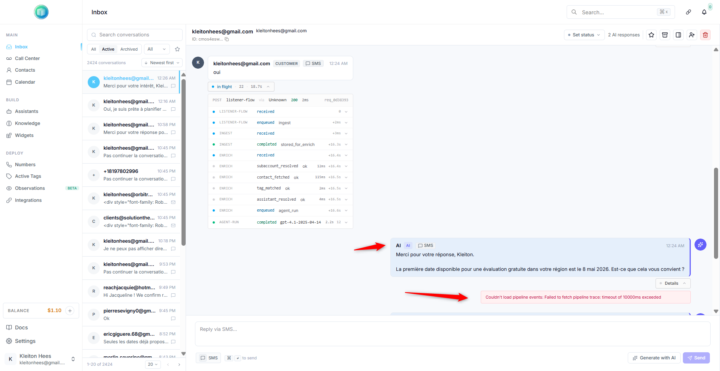
🚨 Need help debugging Assistable/GHL AI responses Hi everyone, I’m currently testing a new assistant in Assistable/GHL, but I’m stuck on one important issue: 👉 I can’t identify which assistant is actually responding to the user. When I click the AI response details to check the assistant, prompt, tools, IDs, and trace information, the details keep loading for a long time and then show this error: Couldn't load pipeline events: Failed to fetch pipeline trace: timeout of 10000ms exceeded Because of this, I can’t confirm whether the correct assistant is being triggered during my tests. Has anyone experienced this before? Is there another way to verify which assistant generated a specific AI response when the pipeline trace/details fail to load? Any help would be really appreciated 🙏 Thanks!
0
0
1-30 of 9,077

skool.com/assistable
We give you the most dominantly unfair advantage in the agency space. The most installed GoHighLevel AI ever.
Leaderboard (30-day)
1

+31
2
+17
3

+16
4

+14
5

+12
Powered by