Activity
Mon
Wed
Fri
Sun
Jun
Jul
Aug
Sep
Oct
Nov
Dec
Jan
Feb
Mar
Apr
May
What is this?
Less
More
Memberships
AI Video Creators Community
4.9k members • $9/month
2DAnimation101
690 members • $9/month
مجتمع ابوصوت
1.4k members • Free
Build SMARTER Faster
89 members • Free
The ADHD Musician
18 members • Free
Le Chéile Music Piano Group
473 members • $12/month
8 contributions to 2DAnimation101

7d •
Baby shark animation
Hello 2D animators✨️, I am working on this new video for the song "baby shark". The song is in arabic and the goal is to teach toddlers arabic with songs. All images and videos are created with Google Flow. First, I generate images. Once I like them, then I generate animation. For this video, the background is animated and fixed. All characters animations are created with a green screen. I then integrate the characters on top of the background. This gives me for now some consistency and control. You Feedback and suggestions are most welcome🤗💐🙏
1
0

9d •
🖼Upcoming YT video: Animatics
Hello 2D animators 🤗✨️, As I am new joiner, I wanted to start implementing my learnings fast🚀 Thanks to guidance from Mark, I started the course on Animation Production Mastery. I really loved the content especially the "animatics". For the upcoming video of my YouTube channel (arabic), I am working on this song. I created some animations with AI as well as this animatics. If you have suggestions or (friendly, gentle 🙏) Feedback for improvemens, I am open and very thankful 🤗 PS. THANK YOU @Mark Diaz for your guidance and kind advice 👋😃

1 like • 9d
@Mark Diaz Thank you so much Mark for your encouragement, it means really a lot 🙏✨️🤗 yes, it's a song to teach the body parts to kids while keeping them engaged and dancing 🐣🕺💃 let's see how this goes 😃

12d •
Restults of the Test
@Thomas Jennings @Arlene Dilworth @Ernesto Guerrero @Simona Adelina @Helene J @G. Vern Morris @Nancy Moon CONCLUSION 1: Kling Motion Control 3.0 can't animate if your video reference is an animation of rigged characters (like those from Cartoon Animator) - it has to be either live footage or 3D (like iClone) CONCLUSION 2: Kling Motion Control 3.0 struggles in getting the Character to be animated as traditional animation, still kept it 3D - I am attaching both videos here. When I used only Kling 3.0 (not motion control) to animate an image addint the text "Make this is a 2D traditional Animation animated at 12 fps" - it did a better job. Also Kling Motion Control 3.0 can't follow Cartoon Animator motions, I assume it is becase 2D motion from rigged characters could be too abstract for Kling - it kept crashing and not doing the job. - We kept burning credits testing multiple approaches for 1.5+ hrs, and nothing. - When we used 3D motion from iClone (thanks @Helene J for providing this simple clip), it worked on the first try. For this, I followed 5 steps. ✅ 1. Get a motion video ✅ 2. Get the first frame rendered as an image of the motion video ✅ 3. Get the character you need ✅ 4. Create the first frame with your character and your background in the position of the first frame ✅ 5. Use Kling Motion Control 3.0 - have the image move the same way as in the video

0 likes • 11d
@Thomas Jennings Dear Thomas, I am new here. Would you mind telling me which class you are referring to? Is this test part of a lesson in the classroom space here in Skool? Many thanks for your help🤗
1 like • 10d
@Thomas Jennings many thanks Thomas for your reply 🤗✨️

23d •
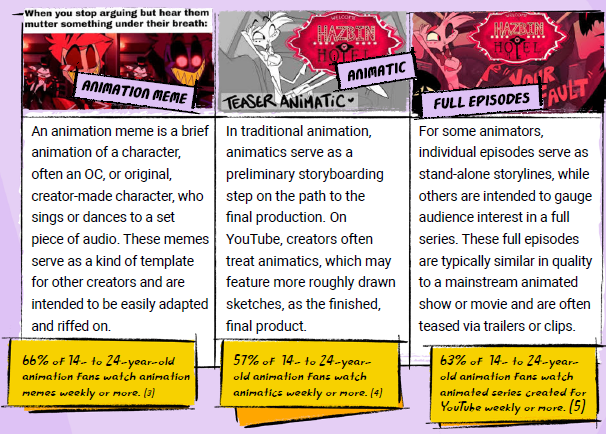
YouTube Culture & Trends Report
Creators often treat animatics as the finished, final product and animatics are a hit with YouTubers. 57% of 14 - 24-year-old animation fans watch animatics weekly or more. Independent creators on YouTube are more popular than the big animation studios.
0 likes • 10d
@Nancy Moon thank you so much for sharing 🙏 I wasn't aware of these reports, I look forward to exploring these possibilities 💐✨️🤗


1 like • 10d
@Divinia-Ann Howe well done for the animatic. I love it as it already gives an idea of the story, the rythme and the visual identity. Also, it's a view behind the scenes for me as a learning animator so that's very helpful. Bravo and thank you for sharing it with us 🤗✨️💐🙏
1-8 of 8
Active 10h ago
Joined Apr 25, 2026
Powered by