Activity
Mon
Wed
Fri
Sun
Sep
Oct
Nov
Dec
Jan
Feb
Mar
Apr
May
Jun
Jul
Aug
What is this?
Less
More
Memberships
2DAnimation101
704 members • $9/month
222 contributions to 2DAnimation101

May 26 •
No more Galaxy free credits?
I've taken advantage of the free daily credits from Galaxy just for checking in since I joined. But today for the first time that option did not appear. I wonder if this is a glitch, or just me, or if they have discontinued it. That was a fantastic way to double monthly credits!

2 likes • May 28
@Cathy Ferguson I'm hoping this is just a temporary promotional event that will soon end with the free daily points offered again.
2 likes • May 30
@Duane McNulty Strange. I've never been able to collect free credits from my Android app. In my profile, it does say I will get 15M monthly credits on June 4th.

Apr 11 •
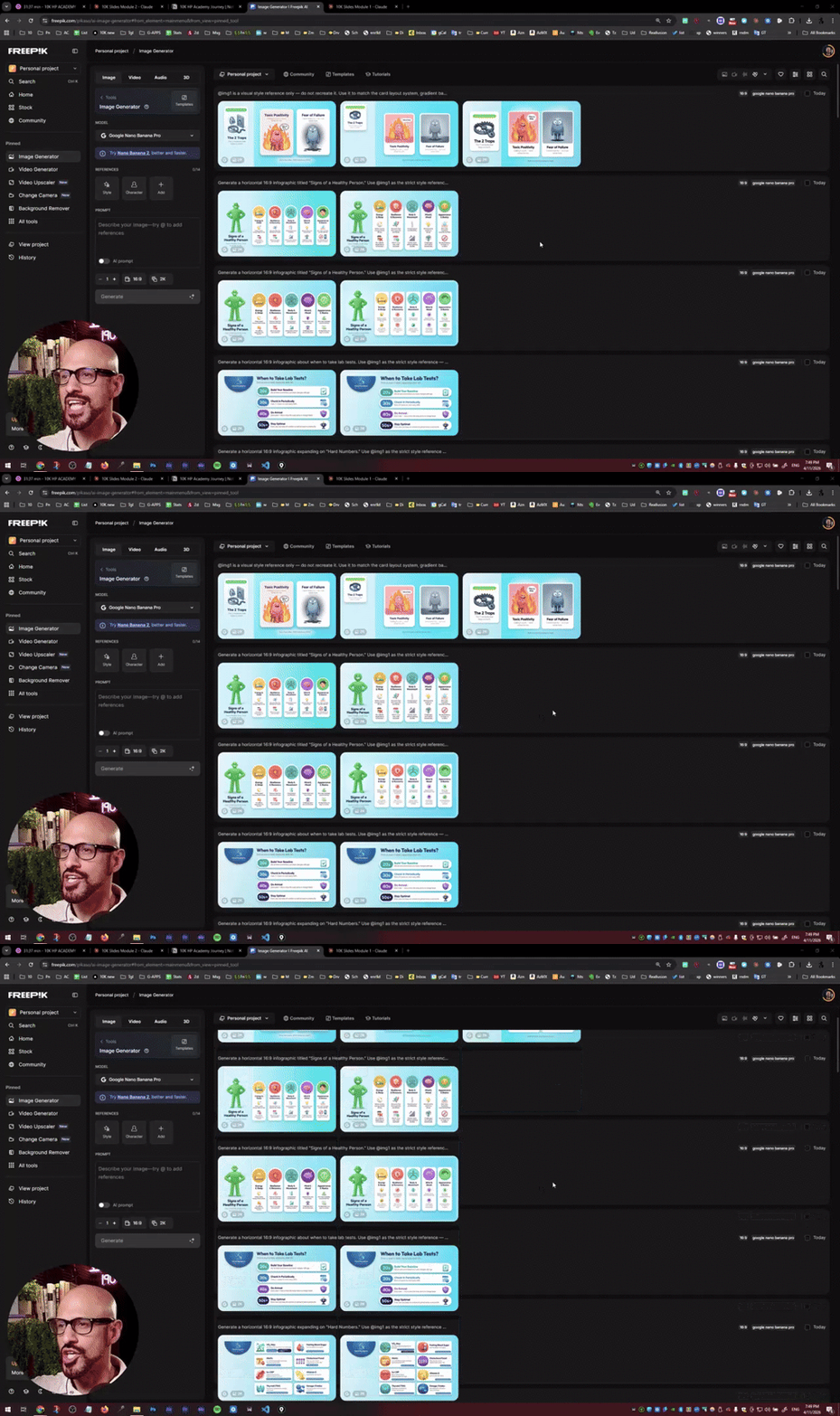
HOLY SMOKES! Anyone using AI for Education?
In the past, creating all these infographics for the slides of a training I'm doing for the 10K HP Academy. Normally, this would take me a whole week, and thanks to Nano Banana and Claude, it took me 2 and a half hours! A total of 19 slides!
2 likes • May 28
Mark, just catching up after been away for awhile. Would you please send me the PDF

Apr 29 •
Learned some useful tips from this class. Here are two of some videos i have made. More on my YouTube channel
https://youtu.be/vCAZ1YosPKk?si=YAYsQNkWwYdmMfvA https://youtu.be/85X0iopxUxM?si=iuQCmlitf2gK4XXo
2 likes • May 28
Well done, Emmy.

May 1 •
Claude can be a video editor
I just found this video and so haven't checked it out, I but wanted to post it before class. This seems to be part of a series and perhaps he is selling an agent or something? But I think he is saying Claude actually can create videos. https://www.youtube.com/watch?v=ZNbgOhxhzXg
2 likes • May 28
It's to use Claude to clean up videos. Tell Claude to analyze and edit out mistakes; trim; remove silences, filler words, retakes and use hyper frames to add motion graphics to video. Some comments were it's like PowerPoint with automation. One comment says gemini offers more with transcribing audio, where Claude cannot. One comment was to use this for motion graphics instead of After Effects. Nate Herk says to install a terminal "thing" for hyperframes. Write HTML. Render Video. Built For Agents.

May 5 •
How I turned a Romanian fairy tale into a 3D-style animated short: the full workflow
A few days ago I posted that team-built 3D animation runs $3,136 per finished minute. That figure still stands. So I tested the other end of the curve. One person. ~16 hours. ~$15 in marginal API credits on top of existing subscriptions. A 5-minute 3D-style animated short of a 145-year-old Romanian fairy tale — Ion Creangă's "Ursul păcălit de vulpe" / "The Bear Who Was Tricked by the Fox" — shipped in English, Romanian, and Hungarian subtitles. The honest comparison isn't "$15 beats $3,136." It's roughly ~$400 per finished minute solo vs. ~$10,000 (included margins, salaries, taxes, per finished minute team-built — about 25× cheaper. With trade-offs: visible artifacts in some shots, ~95% character consistency across 32 shots, ~70% Seedance acceptance rate, occasional Kling fallback for shots Seedance refused. Real, but real. I wrote up the entire pipeline, end to end: - Source material, OCR, and modern children's-English script adaptation - The production bible with @tag identity sheets that lock characters across all 32 shots - The Higgsfield "upload once, reference forever" UUID trick that saves hours per project - ElevenLabs v3 performance tags + bookend-pause discipline for clean TTS - The Seedance lip-sync recipe — the three rules nobody states clearly online (one video reference only, mandatory DIALOGUE block, @Image attribution per line) - Demucs htdemucs_6s for stripping unwanted background music from generated audio - The honest cost accounting: how subscriptions absorb the $15, where 16 hours of human time fits in, why the $10K/minute figure still holds for team-built work Plus real Seedance and ElevenLabs prompts (paste-ready), what I'd do differently next time, and the limitations I haven't solved yet. Full workflow inside and final fairy tale: https://www.youtube.com/watch?v=-kV6a7CpSV4 What folktale would you build with this pipeline? Full article on my LinkedIn: https://www.linkedin.com/feed/update/urn:li:activity:7457503694184497152/
1 like • May 28
Great article. I sent a connect request on Linkedin.
1-10 of 222

@nancy-moon-7995
A writer of children's stories while creating animation shorts from each story to post on YouTube, then splice all together for full episodes.
Active 64d ago
Joined Dec 2, 2025
San Diego
Powered by