
Write something

3d •
Save Location for Cal Sync file on RM
I’d like my calsync folder to save in ‘My Files’ - and not have to save it to a sub-folder.

1d •
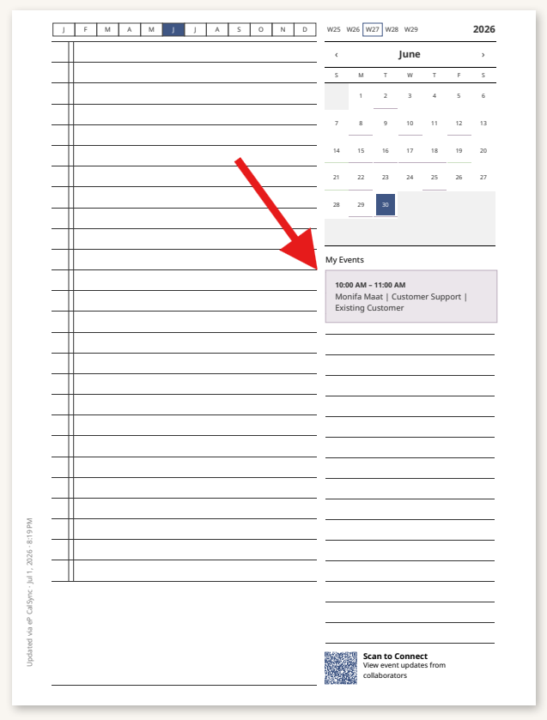
Issue with Color showing for Events
I made sure to turn color on and i also switched it off and back on but the event just show as a grey even (not greyscale) I also made sure the events have color in outlook. All event look like that in the screenshot. What am i doing wrong?

1d •
Daily Event Carousel
the only way I can get my event Carousel updated is through a wired sync. Is it possible to do wirelessly?

16h •
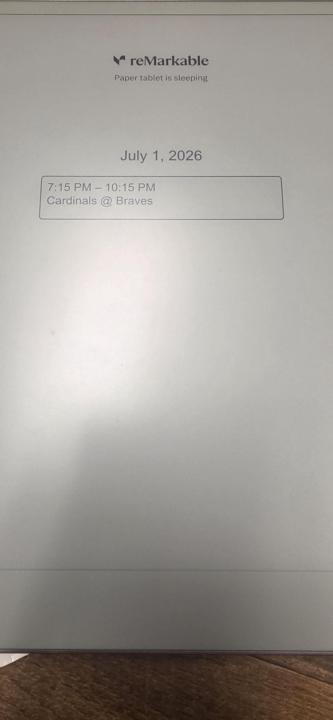
Daily Event Carousel with CalSync - How To?
What is the recommended method for getting your daily event carousel to change to the next day? Mine will stay on the same day forever. Are there steps to take each morning to update this? Example in the picture, that was just taken on July 2nd, the carousel is still showing July 1st.
0
0

4d •
🚀 CalSync 1.4.1 is Available Now
Thank you to everyone who downloaded CalSync 1.4.0 and reported issues so quickly. Your feedback helped us identify and resolve a few important cloud-related problems, especially for Mac users. What’s New Cloud Sync Now Works Correctly on macOS We’ve resolved a packaging issue that could prevent the reMarkable Cloud connection from loading on the Mac version of CalSync. Cloud Sync now works immediately after installation with no additional steps. Your Tablet Always Gets the Latest Planner We’ve improved cloud updates so your reMarkable reliably refreshes to the newest version of your planner after every regeneration. Your handwritten notes continue to be preserved exactly as before. More Reliable Cloud Connections Connecting to reMarkable Cloud is now much more resilient. CalSync now automatically skips unsupported or unreadable items in your cloud account—such as documents created by newer firmware or older folders—instead of stopping the connection process. This means: • More reliable cloud connections • More dependable planner uploads • Smoother folder browsing Clearer Error Messages If something does go wrong, CalSync now displays simple, easy-to-understand messages instead of technical errors, making it much easier to understand what happened. Download CalSync 1.4.1 Apple Silicon (M1 / M2 / M3 / M4) https://www.einkpads.io/api/calsync/darwin/arm64/releases/latest Intel Mac https://www.einkpads.io/api/calsync/darwin/x64/releases/latest Windows https://www.einkpads.io/api/calsync/win32/releases/latest Linux https://www.einkpads.io/api/calsync/linux/x64/releases/latest If you’re already running CalSync, simply open the application, allow it to check for updates, and restart when prompted.
1-30 of 243

skool.com/einkpads
Learn. Share. Create. — Empowering reMarkable, Supernote, and BOOX tablet users worldwide. einkpads.com
Leaderboard (30-day)
1

+14
2

+13
3

+8
4
+8
5

+6
Powered by