Activity
Mon
Wed
Fri
Sun
Aug
Sep
Oct
Nov
Dec
Jan
Feb
Mar
Apr
May
Jun
What is this?
Less
More
Memberships
E-Ink Tablet Users
1k members • Free
3 contributions to E-Ink Tablet Users

3d •
Save Location for Cal Sync file on RM
I’d like my calsync folder to save in ‘My Files’ - and not have to save it to a sub-folder.

0 likes • 1d
I would also like this as well as an option. Since my main files I use daliy are on the My File section would love to have the Planner right on the main screen rather then in a sub folder
0 likes • 16h
@Jason Smith Thank you for all you do!
1d •
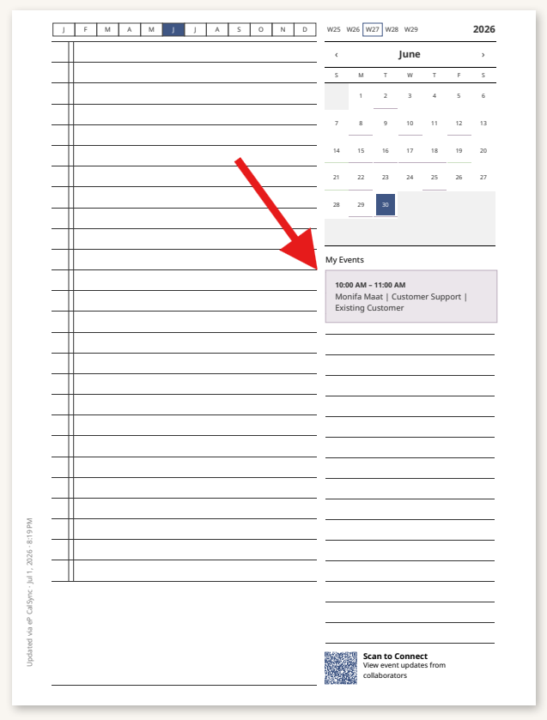
Issue with Color showing for Events
I made sure to turn color on and i also switched it off and back on but the event just show as a grey even (not greyscale) I also made sure the events have color in outlook. All event look like that in the screenshot. What am i doing wrong?
0 likes • 16h
TY for the reply, I know it would not be bright but it looks like that on the PDF too. when I go to the actual folder where the pdf exists it shows just like that in the screenshot as well

4d •
🚀 CalSync 1.4.1 is Available Now
Thank you to everyone who downloaded CalSync 1.4.0 and reported issues so quickly. Your feedback helped us identify and resolve a few important cloud-related problems, especially for Mac users. What’s New Cloud Sync Now Works Correctly on macOS We’ve resolved a packaging issue that could prevent the reMarkable Cloud connection from loading on the Mac version of CalSync. Cloud Sync now works immediately after installation with no additional steps. Your Tablet Always Gets the Latest Planner We’ve improved cloud updates so your reMarkable reliably refreshes to the newest version of your planner after every regeneration. Your handwritten notes continue to be preserved exactly as before. More Reliable Cloud Connections Connecting to reMarkable Cloud is now much more resilient. CalSync now automatically skips unsupported or unreadable items in your cloud account—such as documents created by newer firmware or older folders—instead of stopping the connection process. This means: • More reliable cloud connections • More dependable planner uploads • Smoother folder browsing Clearer Error Messages If something does go wrong, CalSync now displays simple, easy-to-understand messages instead of technical errors, making it much easier to understand what happened. Download CalSync 1.4.1 Apple Silicon (M1 / M2 / M3 / M4) https://www.einkpads.io/api/calsync/darwin/arm64/releases/latest Intel Mac https://www.einkpads.io/api/calsync/darwin/x64/releases/latest Windows https://www.einkpads.io/api/calsync/win32/releases/latest Linux https://www.einkpads.io/api/calsync/linux/x64/releases/latest If you’re already running CalSync, simply open the application, allow it to check for updates, and restart when prompted.
1 like • 1d
So far so good!
1-3 of 3

Active 12h ago
Joined Jul 2, 2026
Powered by