Activity
Mon
Wed
Fri
Sun
Aug
Sep
Oct
Nov
Dec
Jan
Feb
Mar
Apr
May
Jun
What is this?
Less
More
Memberships
E-Ink Tablet Users
1k members • Free
10 contributions to E-Ink Tablet Users

3d •
🚀 CalSync 1.4.0 is Here — Native reMarkable Cloud Sync is Here!
This is our biggest CalSync update yet, and it’s the one many of you have been waiting for. You can now connect natively through the cloud. No Developer Mode. No cables. No complicated setup. Simply sign in, sync your planner, and keep your handwriting every time your planner updates. ☁️ Native Cloud Sync We’ve made cloud syncing the easiest way to use CalSync. For reMarkable • Connect through reMarkable Cloud• No Developer Mode required• No USB cable required• Sync your planner from anywhere with an internet connection For Supernote Supernote is now fully supported and officially out of Beta. • Connect through Supernote Cloud• Keep your handwritten notes across planner updates• Or connect locally over Wi-Fi if you prefer Whether you use reMarkable or Supernote, connecting is now as simple as signing in. 📱 Support for Every Device CalSync now supports all your devices from one place. • reMarkable Cloud • Supernote Cloud• Direct Wi-Fi / USB • Universal Mode for virtually any PDF tablet Switch between devices whenever you like—CalSync remembers the correct connection for each one. 📂 More Reliable Cloud Sync Cloud delivery has been rebuilt to be even more reliable. • Planners consistently arrive in the correct cloud folder • Failed uploads automatically retry • More dependable syncing overall 📊 See Every Sync The Activity screen now tells you exactly what happened. Every sync is tagged with how it was delivered: • reMarkable Cloud• Supernote Cloud• Direct• USB You’ll always know when your planner has been successfully updated. ⭐ Favorites Stay Favorites If you’ve marked a planner as a favorite on your tablet, CalSync now preserves that favorite every time you regenerate your planner. 💾 Smarter Planner Storage Generated planners are now organized by both account and device. That means multiple devices—or multiple accounts on the same computer—no longer overwrite each other’s files. ✨ Lots of Polish We’ve also included dozens of improvements throughout the app.

1 like • 2d
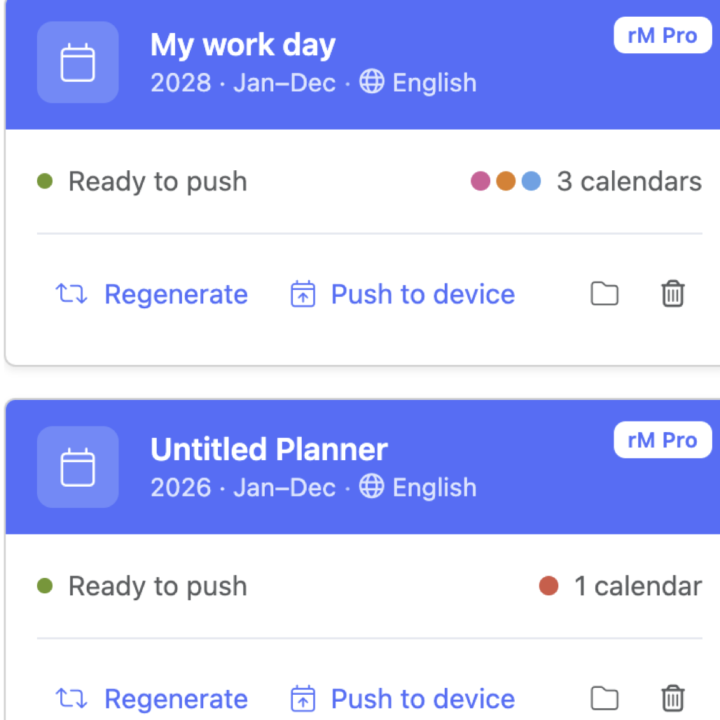
@Jason Smith When connecting via cloud, I'm facing to this issue : couldn't register api or the second screenshot
1 like • 2d
@Jason Smith Confirm that it works. So do we need the app to be lunched or the synchronization can be made in background, when the app is closed.
May 27 •
🤨reThinking of Planner (Ep CalSync)
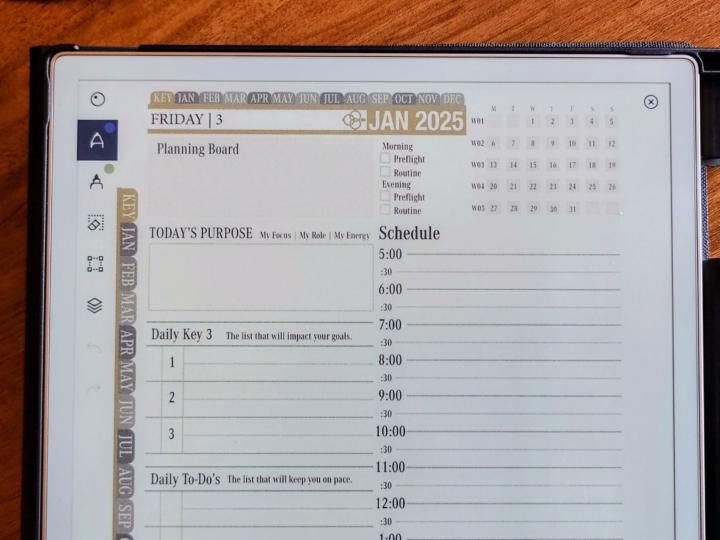
Hi every one My feedbacks and few interface improvements on Ep CalSync : - Allow users to set their preferred active hours during setup (e.g., 6 AM – 9 PM) to eliminate the unused lines currently spanning from 00:00 AM to 11:30 PM. - Add a prominent, centered date at the top of the page for quicker reference. - Make the monthly overview smaller to keep the primary focus and detail on the Daily schedule - Utilize the space saved to increase line spacing, improving overall text readability. Overall, the design should prioritize the daily page with more detailed and user-friendly information. For example, a previous template I used offered excellent flexibility and layout options, although it lacked integration with platforms such as Google or Microsoft, my reaseons to leave it !
0 likes • 4d
@Jason Smith Oh !! Was a good idea, but hidden somewhere in settings 😁... But after several attempts to do this through both USB and WiFi connection, relaunching the app and finally didn't work.
0 likes • 4d
@Jason Smith It works now. Wishing that the next synchronizations will not require this USB interface activation.
5d •
A look at what's coming: reMarkable Cloud sync (in testing)
We want to share something we've been working on — and be upfront that it's still in testing. Early on, we held off on using reMarkable's cloud because we weren't sure it fit within reMarkable's service agreement. We believe we've now found an approach that respects their terms. We have it working internally, but we're still running tests before we decide whether we can release it. If it ships, here's what it would mean for you: - No Developer Mode needed to sync. Today, syncing planners requires putting your tablet into Developer Mode. This approach removes that step. - No need to be on the same network. Your planners can update wherever you are — you and your tablet no longer have to be on the same Wi-Fi. - CalSync runs everywhere, independently. It quietly keeps your planners up to date as your calendar changes. This cloud sync will most likely be a Pro feature. A note on privacy — this matters to us:CalSync still runs on your computer and stays connected. We're deliberately avoiding storing your calendar data in our own cloud. Instead, CalSync acts like a traffic controller: it watches your calendars and pushes the updated planners to your tablet as things change — so your calendar data stays with you, not on our servers. About your standby (sleep) screen:Showing your events on your tablet's standby screen will still require Developer Mode. We'll make this something you can turn on or off based on your preference. We'll keep you posted as testing continues. Thanks for your continued support — it means a lot.
1 like • 4d
@Jason Smith It's certain that this will significantly change the way this app is used. Similarly, the journal has developed considerably over recent months, to become competitive in regards to organisation and user interface.
1 like • 4d
@Jason Smith Ad a option that automatically creates a new linked meeting note from calendar events. This may help users to preprare the meeting according to attendees, topic and others 👍
6d •
🚀 CalSync 1.3.1 is Here — Now with Supernote Support!
This is one of our biggest updates yet, and it includes a feature many of you have been requesting for months. 🎉 Supernote Support Has Arrived You can now connect your Supernote tablet directly through Supernote Cloud. Simply sign in from the Connect screen or Settings, push your planners to your tablet, and keep everything automatically synchronized. Even better, your handwriting is preserved every time your planners sync. ✨ New “Clarity” Planner Style Meet our newest planner layout. Clarity is designed for users who prefer a clean, distraction-free planning experience. ✔ Full date header✔ Month and week navigation✔ Mini calendar✔ Spacious hourly timeline✔ Top Three priorities checklist✔ Notes section✔ Scan-to-Connect QR code ⚡ Jump Between Planner Views Instantly Navigation is now much faster. ✔ Tap the year on a day page to jump to the Year View. ✔ Tap a week’s date range to open that month. ✔ Use the new Week (W##) chips on the month page to jump directly to any week. 📱 Manage Your Devices Anywhere Device management has been completely redesigned. ✔ Add, remove, and switch devices from Settings ✔ Manage devices without opening the Connect screen ✔ Saved devices now sync across all your computers ✔ Only see options that apply to your device (reMarkable or Supernote) No more losing your device configuration after reinstalling CalSync. 📧 Separate Contact Email You can now use a different email for support and notifications. For example: • Sign in with your work email. • Receive replies at your personal email. Your account email never changes. 🎨 Better Readability on Color E-Ink We’ve refined the color theme to improve readability. ✔ Darker event titles ✔ Easier-to-read event times ✔ Better contrast on color e-ink devices like the reMarkable Paper Pro 🔧 Plus Lots More This release also includes: ✔ Redesigned planner cards ✔ Per-calendar color indicators ✔ Improved “Push to Device” button ✔ Clearer Connect screen ✔ Bottom-right notifications
0 likes • 4d
@Jason Smith Have lines on the time slot side disappeared in the latest version, when applying “Clarity” Planner Style ?
21d •
🚀 CalSync v1.2.1 is Available Now!
This is one of our biggest updates yet, bringing powerful new planner customization features, cross-device planner syncing, and major improvements to reliability across the entire app. New Features Calendar Colors Now Show in Your Planner Your calendars now print using the colors you’ve assigned inside CalSync. • Each calendar keeps its own color• Automatic pastel colors are assigned if no color is selected• Color changes automatically apply the next time you generate your planner• No more random color assignments Limit Visible Hours on Time-Block Planners You can now focus your planner on only the hours that matter to you. For example, display only 9:00 AM–12:30 PM and turn the remaining page space into clean note lines. Perfect for focused schedules, students, professionals, and anyone who doesn’t need a full-day timeline. 🔄 Cross-Computer Planner Sync (Pro & Business) Your planner library now follows you. Create or edit a planner on one computer and automatically access it on your other computers. • Keep planners synchronized across devices• No exporting or importing required• Available on Pro and Business plans 🔌 Device & Connection Improvements We’ve made connecting to your tablet faster and more reliable. • Device profiles now always use the correct password• Switching between device profiles is now instant• Improved connection reliability throughout the app ↻ Auto-Sync Improvements • Auto-push settings apply immediately• Frequency changes take effect instantly• Always uses the active connected device• Universal Mode planners never auto-push by design 🗂 Improved reMarkable Compatibility Planner files now better match reMarkable’s current document format. Benefits include: • More reliable cloud synchronization• Accurate page counts• Better document consistency• Handwritten notes and annotations remain preserved when planners are regenerated 🛠 Reliability & Polish • Regenerating a planner now always preserves its layout and structure • Cleaner calendar color picker interface
0 likes • 20d
@Jason Smith If problem comes from my side, Please provide the link and : - Should i uninstall the existing version before installing the update ? - Should i restart the computer ? - What again ?
1 like • 20d
@Jason Smith 🚩Finally is Working 🚩
1-10 of 10