
Write something
Pinned

3d •
📅 Microsoft Copilot Part 5: What Are My Top Priorities
Your calendar tells you where you need to be. But what actually needs your attention? For this example, I am using Plan My Day, an agent set up in my Copilot account. Think of an agent as Copilot configured for a particular job, with its own instructions and information sources. (Microsoft Learn) Microsoft provides a Plan My Day template designed to help identify priorities, prepare for meetings, and surface decisions waiting on you. (Microsoft Learn) The goal is simple: Spend less time figuring out where to start and more time doing the work. 🔁 Practice This - Open Microsoft 365 Copilot. - Select Plan My Day under Agents - Click Top Priorities. - Submit 🔍 What You Are Looking For Focus on three things: - Relevance: Are these genuinely important, or simply the meetings on your calendar? - Preparation: Does it identify something you should review, follow up on, or decide? - Evidence: Can you check the source behind the recommendation? Those are useful starting points. I still decide whether they belong at the top of my list. 📌 Notice What Is Missing There is an important detail in my results screenshot: “No email/chat data returned.” That does not mean there are no emails, unanswered questions, or pending decisions needing attention. It means this particular review did not return that information. A useful briefing should tell you what it found—and what it could not check. 🔑 The Takeaway - The value is not another list of meetings. - It is a short review that helps you decide what deserves attention. - Let Copilot suggest the priorities. You make the final call. - Did it surface something you might have missed—or put something in the wrong order?

Pinned
6d •
✉️ Microsoft Copilot Part 4: Draft Email Reply with Ease
In the last lesson, used Copilot to improve an email we had already written. Now let’s make it even easier. This time, instead of starting with your own draft, you can open an email in Outlook, click Copilot, and ask it to draft a reply for you. That is a great next step because it shows how Copilot can work directly from the message in front of you. 🔁 Practice This Open a real email in Outlook that needs a reply. Then: - Click Copilot in the upper-right area - Open the Copilot side panel - Type a simple instruction like: Draft a reply That is it. You can also give it a little more direction if you want. 💬 Sample Prompt Use this as a starting point: Draft a reply to this email. - Keep it professional, clear, and concise. - Acknowledge the sender’s message, respond to the main point, and make the next step clear. - Do not add facts, promises, or commitments I did not provide. - Show me the draft for review before anything is sent. 🔍 What You Are Looking For Focus on three things: - Did it understand the email correctly? - Is the reply clear and easy to act on? - Does it sound like something you would actually send? If the tone is off, refine it. For example: Make this warmer and more conversational. Or: Shorten this and make it more direct. 📌 Note This is where Copilot starts to feel useful fast. You are not copying and pasting an email into another tool. You are working right inside Outlook, from the actual message thread. That makes it much easier to review, adjust, and move on. Remember - review before sending. Copilot can give you a strong starting point, but you are still responsible for the final message. 🔑 The Takeaway A very practical use of Microsoft Copilot is this: Open the email. Click Copilot. Ask it to draft the reply. Then review and refine. Simple. Fast. Useful.

Pinned
9d •
✉️ Microsoft Copilot Part 3: Improve or Proof Your Email Writing
In Part 2, we used Copilot Chat to help organize the workday. Now let’s move into something most of us do every day: Email. This is one of the easiest places to get immediate value from Copilot. The goal is not to have AI replace your voice, it is to take something you already wrote and make it clearer, tighter, and easier for the reader to act on. 🔁 Practice This (Refer to several screen shots attached) Open Outlook and start an email you actually need to send. Write the first draft yourself. Or you can use this: "I spent some time over the weekend review ChatGPT Astra. And it did not dissappoint. Here are a few things is does well. 1) image editing, 2) video editing, 3) project that require deep thinking." Yes, there is a typo (dissappoint). Ask Copilot to improve it: - Select the text you want to adjust - Click the AI icon 💬 - Select what you would like copilot to do with the text I chose "Auto Rewrite" and this is what it created. Good. Now click, "Replace". "Over the weekend, I spent some time exploring ChatGPT Astra and was impressed by its capabilities. It excels at image editing, video editing, and handling projects that require deep analysis and critical thinking." Done. Send. 🔑 Keep in Mind You do not have to ask Copilot to write the whole email. A very practical starting point is: You write it. Copilot sharpens it. You make the final call. For this practice, take one real email and see whether Copilot can make the message better without making it sound less like you.


Jan 24 •
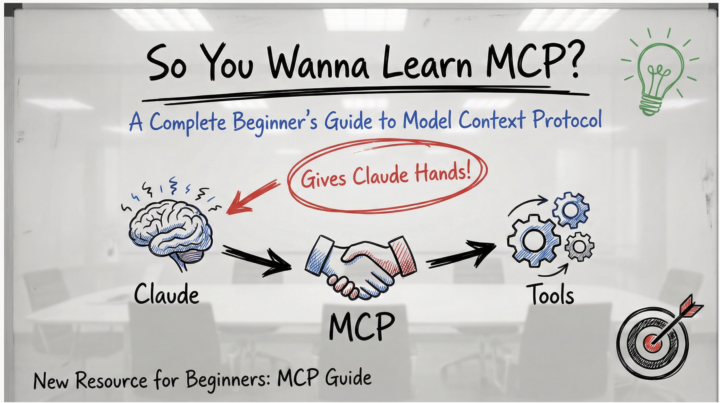
🚀 New Resource: So You Wanna Learn MCP?
Hey everyone! 👋 I just put together a complete beginner's guide to MCP (Model Context Protocol) - the new system that lets Claude actually connect to your tools and do real work. What's MCP? Think of Claude as having a really smart brain but no hands. MCP gives Claude those hands - letting it read your Gmail, work with GitHub, access Notion, search the web, organize your files, and connect to hundreds of other tools. The best part? Someone builds one MCP server and it works with Claude, Cursor, Cline, Windsurf, and any other AI app that supports MCP. No more reinventing the wheel. What's in the Guide? ✅ Visual explanations (diagrams, flow charts, analogies) ✅ Zero technical jargon - plain English throughout ✅ Step-by-step setup walkthrough (takes ~20 minutes) ✅ Hands-on tests to verify it's working ✅ Security tips for evaluating MCP servers ✅ 5 practical exercises to try immediately ✅ Troubleshooting guide Goal: Get you from "What is MCP?" to having your first server running in under 20 minutes. Pro Tips from the Community 🔥 Don't install 100 MCP servers at once! (h/t [Name if you have one]) Start with 2-3 that you'll actually use. Too many servers: - Bloat your context window - Slow down Claude's response time - Make it harder to figure out what's not working - Create unnecessary complexity Start simple. Add more as you need them. What to Try First? The guide walks you through setting up the filesystem MCP server - it's the easiest to configure and immediately useful: - Organize files - Batch rename - Create project structures - Search and analyze your documents Once that's working, expand to tools you actually use daily (GitHub, Slack, Notion, etc.) Let's Learn Together 🤝 This community thrives on sharing knowledge, so: ✨ Try the guide - Follow along and get one MCP server running 💬 Share your results - What worked? What was confusing? 🆘 Ask questions - No question is too basic. We all started here. 🧠 Share your tips - If you've used MCPs, drop your learnings below!
Jan 27 •
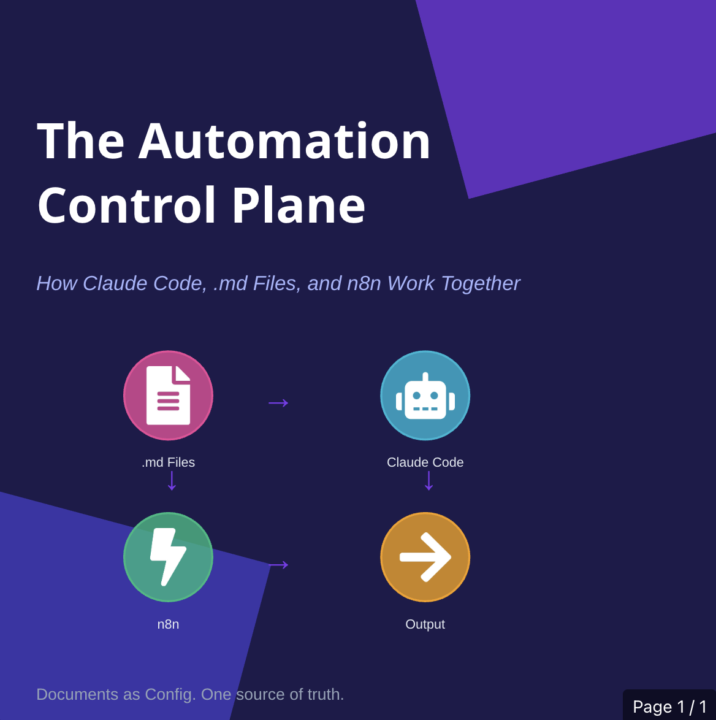
.MD+ ClaudeCode+ n8n = The Automation Control Plane
What if your documentation actually controlled your automations? Not described them. Not explained them after the fact. Controlled them. That's the shift: .md files become the source of truth. Claude Code reads them. n8n runs what Claude builds. Change the markdown, change the system. No more re-explaining context in every prompt. No more documentation that drifts out of sync within weeks. No more tribal knowledge that lives in one person's head. One place to define how it works. Everything else derives from there. TL;DR: - .md files = config, not docs - Claude Code = reads your rules, generates workflows - n8n = executes what gets built - Edit a document → system behavior changes - If you're tired of rebuilding the same patterns by hand, this is worth 10 minutes. Full article: Below⬇️
1-30 of 517

skool.com/ai-bits-and-pieces
AI lessons you can read in under 3 minutes and apply in everyday work and life.
Leaderboard (30-day)
1
+73
2

+43
3

+15
4

+12
5

+11
Powered by