Activity
Mon
Wed
Fri
Sun
Oct
Nov
Dec
Jan
Feb
Mar
Apr
May
Jun
Jul
Aug
Sep
What is this?
Less
More
Owned by Michael
AI lessons you can read in under 3 minutes and apply in everyday work and life.
For those of us that are determined to become the AI resource inside our company, agency, executive room, board room or marketplace.
CapCut Creator Bootcamp
1.4k members • $9/month
AI Video Bootcamp
28.1k members • $9/month
Skoolology: Bring Your Build
73 members • $17/month
AI Automation Society Plus
3.5k members • $129/month
AI for Life
39 members • $497
470 contributions to AI Bits and Pieces

Jan 24 •
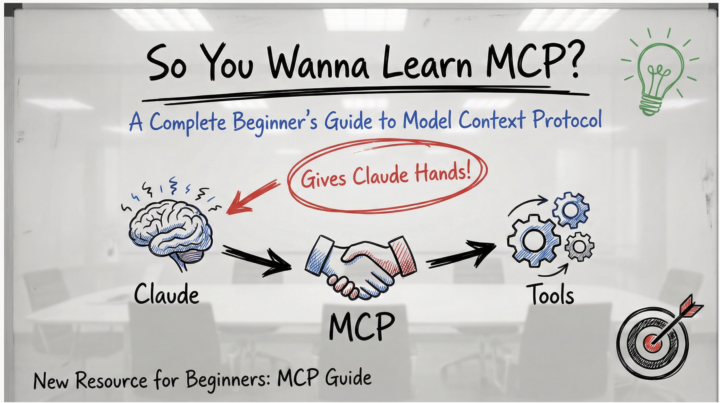
🚀 New Resource: So You Wanna Learn MCP?
Hey everyone! 👋 I just put together a complete beginner's guide to MCP (Model Context Protocol) - the new system that lets Claude actually connect to your tools and do real work. What's MCP? Think of Claude as having a really smart brain but no hands. MCP gives Claude those hands - letting it read your Gmail, work with GitHub, access Notion, search the web, organize your files, and connect to hundreds of other tools. The best part? Someone builds one MCP server and it works with Claude, Cursor, Cline, Windsurf, and any other AI app that supports MCP. No more reinventing the wheel. What's in the Guide? ✅ Visual explanations (diagrams, flow charts, analogies) ✅ Zero technical jargon - plain English throughout ✅ Step-by-step setup walkthrough (takes ~20 minutes) ✅ Hands-on tests to verify it's working ✅ Security tips for evaluating MCP servers ✅ 5 practical exercises to try immediately ✅ Troubleshooting guide Goal: Get you from "What is MCP?" to having your first server running in under 20 minutes. Pro Tips from the Community 🔥 Don't install 100 MCP servers at once! (h/t [Name if you have one]) Start with 2-3 that you'll actually use. Too many servers: - Bloat your context window - Slow down Claude's response time - Make it harder to figure out what's not working - Create unnecessary complexity Start simple. Add more as you need them. What to Try First? The guide walks you through setting up the filesystem MCP server - it's the easiest to configure and immediately useful: - Organize files - Batch rename - Create project structures - Search and analyze your documents Once that's working, expand to tools you actually use daily (GitHub, Slack, Notion, etc.) Let's Learn Together 🤝 This community thrives on sharing knowledge, so: ✨ Try the guide - Follow along and get one MCP server running 💬 Share your results - What worked? What was confusing? 🆘 Ask questions - No question is too basic. We all started here. 🧠 Share your tips - If you've used MCPs, drop your learnings below!

1 like • Jan 25
@Matthew Sutherland Thank you!
2 likes • 1d
@Kerry Doyle Love it!
Mar 10 •
🤯Mishaps and Brain Twists: What ACTUALLY Happens When a No-Code Builder Installs Claude Code on Windows
Let me paint you a picture. 🎨 First, a little context about me. I am a low code/no code builder through and through. Lovable? That's my comfort zone. Claude Code? Open Claw? No, really — These terminal-based tools are about as far from my natural habitat as you can get. However. I've just finished binge-watching four Claude Code videos from Nate Herk in AIS+ and I am 🔥FIRED UP! These videos a great, and I am excited to get started. My interpretation of Claude Code is it's basically like having a senior developer living inside your terminal, building apps for you while you sip coffee. And the skills, the loops, all the good stuff I picked up from those videos — I am READY to put it all to work. I want that life. I deserve that life. So I go to install it. What I thought would happen: Type one command. Done. Sip coffee. What actually happened: A 2-hour odyssey involving Git Bash, hidden folders, PATH variables, and at least three existential crises. 🤷 😂 🛠️ The Setup: Windows Is Not macOS Here's the thing EVERYBODY tells you upfront — Claude Code loves Mac and Linux. Windows? Windows gets the "bless your heart" treatment. The official docs mention something called Git Bash, which is basically a way to trick Windows into pretending it's Linux. Fine. I install Git for Windows. Straightforward enough. Then I try to paste a command into Git Bash. Ctrl+V doesn't work. Right-click. Paste. Nothing. 🫠 Turns out you have to use Shift+Insert to paste in Git Bash. A fun little secret the universe decided not to tell me. The PATH Problem (A Love Story) After installing Claude Code, I type claude into Git Bash and get: bash: claude: command not found🤦 It installed. I can see the file sitting there on my computer. But my terminal doesn't know it exists. This is the computer equivalent of your friend standing right next to you while you call their name and they don't respond.

0 likes • Mar 28
@Kostadin Filev 👊
1 like • 2d
@Kerry Doyle You bet. Good luck and keep the community up to date.
Mar 12 •
😬 I Was Nervous to Try Claude Code. I Was Wrong to Be. First App Done!
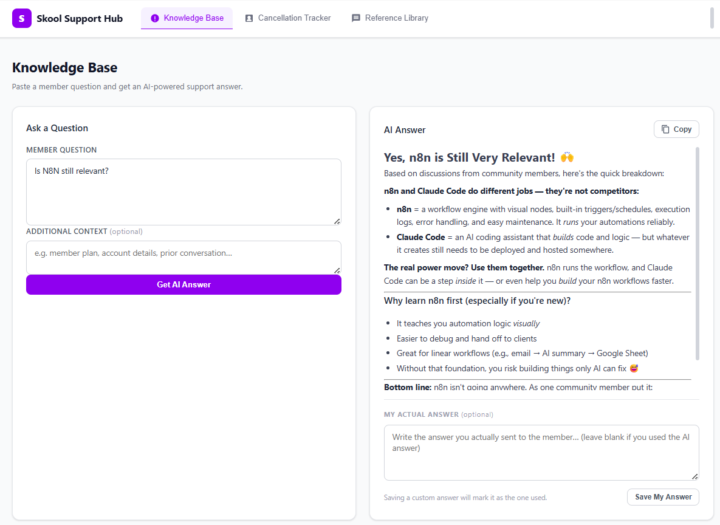
Let me be honest with you. When I first heard people talking about Claude Code — this AI tool that supposedly builds apps for you — my reaction was somewhere between curious and skeptical. Not dismissive. I follow AI closely enough to know that things are moving fast. But nervous. Because I've been burned before by tools that promised to be easy. I'm not a developer. I understand how software works — databases, logic, tables, if-then statements — but I can't write code. I'm a business owner who runs a Skool community, and my day is full enough without adding "learn to code" to the list. So I sat on Claude Code for a while. Watched others talk about it. Told myself I'd try it "when I had time." You know how that story usually ends. 🚀 What Finally Made Me Try It The tipping point was Nate Herk, founder of AIS+. I religiously watch his videos and the new series on Claude Code is fantastic. One video turned into five, five turned into an entire evening of watching a non-developer build real, working tools with nothing but plain English prompts. I couldn't stop watching. And underneath the fascination was a very specific frustration that had been quietly building for weeks. I was copy-pasting the same answers to member DM questions for the tenth time that week. I had no clean system for tracking what questions members were asking. And my templates were scattered across three different Google Docs I could never find quickly enough. Nothing was broken exactly. It was just... exhausting. And watching Nate easily build apps in Claude Code made me realize this was exactly the kind of problem software was supposed to solve. I just hadn't believed I was the kind of person who could build that software. Low code or no code apps using Lovable sure, but a real app - a bridge to far. Nate's videos changed that belief. So I decided to test it. 💡 What I Expected vs. What Actually Happened
1 like • 2d
@Kerry Doyle Me too when I first started. The product has really evolved over the past six months too.
1 like • 2d
@Kerry Doyle 100%
Mar 25 •
🔨 Claude Code Brings 3 Column Spreadsheet to Life!
In our recent survey, over 50% of respondents said they want to see live sessions on Claude Code. That’s clear direction. While we’re preparing for those sessions, here’s a preview of what we’re actually building. 🔨 One example: A client asked me to transform a simple spreadsheet of cancellations into something more useful. The spreadsheet was simple, with three fields: - Name - Date - Reason This app does not just organize the data — it helps my client understand customer behavior in a real, tangible way. - AI suggests categories instead of guessing - Highlights trends over 14 / 30 / 60 days - Sentiment analysis (positive / neutral / negative) Most importantly: it helped them understand the intent behind why people leave and provides suggestions on how to address it. Watch this short video that highlights how powerful Claude Code can be when applied to a simple spreadsheet.
1 like • 2d
@Kerry Doyle With AI Coding the first step is Planning. Simply start a session and say to Claude Code, “I want to plan an app, and brain storm before building anything.”
1 like • 2d
@Kerry Doyle Also check out this classroom. https://www.skool.com/ai-bits-and-pieces/classroom/5bebee2e
3d •
📅 Microsoft Copilot Part 5: What Are My Top Priorities
Your calendar tells you where you need to be. But what actually needs your attention? For this example, I am using Plan My Day, an agent set up in my Copilot account. Think of an agent as Copilot configured for a particular job, with its own instructions and information sources. (Microsoft Learn) Microsoft provides a Plan My Day template designed to help identify priorities, prepare for meetings, and surface decisions waiting on you. (Microsoft Learn) The goal is simple: Spend less time figuring out where to start and more time doing the work. 🔁 Practice This - Open Microsoft 365 Copilot. - Select Plan My Day under Agents - Click Top Priorities. - Submit 🔍 What You Are Looking For Focus on three things: - Relevance: Are these genuinely important, or simply the meetings on your calendar? - Preparation: Does it identify something you should review, follow up on, or decide? - Evidence: Can you check the source behind the recommendation? Those are useful starting points. I still decide whether they belong at the top of my list. 📌 Notice What Is Missing There is an important detail in my results screenshot: “No email/chat data returned.” That does not mean there are no emails, unanswered questions, or pending decisions needing attention. It means this particular review did not return that information. A useful briefing should tell you what it found—and what it could not check. 🔑 The Takeaway - The value is not another list of meetings. - It is a short review that helps you decide what deserves attention. - Let Copilot suggest the priorities. You make the final call. - Did it surface something you might have missed—or put something in the wrong order?

2 likes • 2d
@Matthew Sutherland Appreciate the feedback.
1-10 of 470

@michael-wacht-9754
AI Bits and Pieces | Become an AI Standout
Active 1m ago
Joined Aug 23, 2025
Mid-West United States
Powered by