
Write something

🔥
1d •
The 1% effort rule
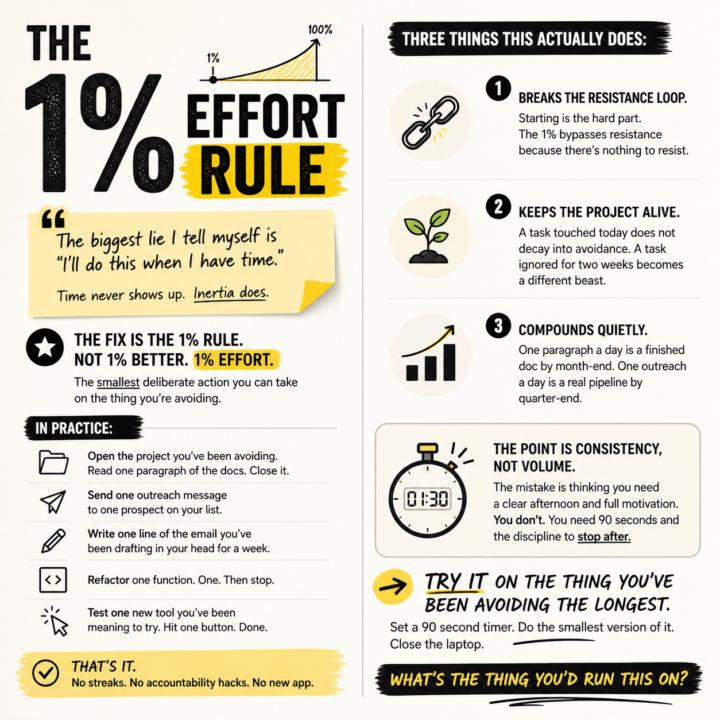
The biggest lie I tell myself is "I'll do this when I have time." Time never shows up. Inertia does. The fix is the 1% rule. Not 1% better. 1% effort. The smallest deliberate action you can take on the thing you're avoiding. In practice: - Open the project you've been avoiding. Read one paragraph of the docs. Close it. - Send one outreach message to one prospect on your list. - Write one line of the email you've been drafting in your head for a week. - Refactor one function. One. Then stop. - Test one new tool you've been meaning to try. Hit one button. Done. That's it. No streaks. No accountability hacks. No new app. Three things this actually does: 1. Breaks the resistance loop. Starting is the hard part. The 1% bypasses resistance because there's nothing to resist. 2. Keeps the project alive. A task touched today does not decay into avoidance. A task ignored for two weeks becomes a different beast. 3. Compounds quietly. One paragraph a day is a finished doc by month-end. One outreach a day is a real pipeline by quarter-end. The point is consistency, not volume. The mistake is thinking you need a clear afternoon and full motivation. You don't. You need 90 seconds and the discipline to stop after. Try it on the thing you've been avoiding the longest. Set a 90 second timer. Do the smallest version of it. Close the laptop. What's the thing you'd run this on?

🔥
9d •
APIs, explained the way I explain them to clients.
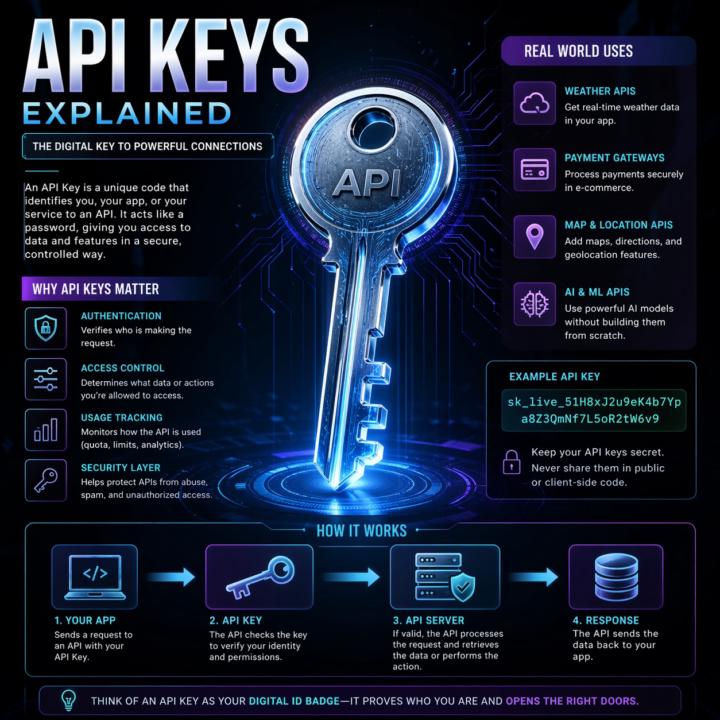
Most automation problems I see trace back to a fuzzy mental model of what an API actually is. So here's the frame I use with clients. An API is a remote control for software. Your app presses a button (sends a request). Another app does something and sends back a result (a response). You don't see how the other app works inside. You just follow the rules printed on the buttons (the docs). That's it. That's the whole concept. Two analogies that work in client calls: Restaurant menu. The menu lists what you can order and how to ask for it. Kitchen is hidden. Meal is the response. Light switch. Flip the switch (request). Wiring, grid, power plant are hidden. Light turns on (response). Same idea either way: clear inputs, clear outputs, hidden complexity. The actual call pattern: 1. Client asks (your app, browser, script) 2. Request goes out with a URL, a method (GET, POST, etc.), and any data the server needs 3. Server does the thing 4. Response comes back, usually JSON Break any of those rules and you get an error, not data. Why this matters for builders: - Reuse beats rebuild. Use Stripe's API instead of building payments from scratch. - Complexity stays hidden. You don't need to know how Twitter stores tweets to pull the last 20. - Access is controlled. APIs decide what's exposed, who can call it, and how often. Security still depends on the implementation, but the boundary exists by design. - Apps mix APIs like ingredients. Maps, payments, email, auth, all stitched together. When two pieces of software talk in a structured, agreed way, they're using an API. Every n8n node, every Claude Code tool call, every trigger. All APIs under the hood. What analogy do you use when a non-technical client asks what an API is? Curious what lands for other builders. Highly recommended related information: Check out @Michael Wacht's Daily Dose: https://www.skool.com/ai-automation-society-plus/ai-terms-daily-dose-api-use?p=5c08d0bf
🔥
8d •
When's the last time your in-person meeting actually needed to be in-person?
A 60-minute in-person meeting rarely costs 60 minutes. Five of them a week costs you a full working day of hidden overhead. Every week. Nobody audits that number, so nobody fixes it. Default to video for execution work. Use in-person strategically. Most organizations still treat in-person meetings as the standard and video as a fallback. Flip the default for execution-layer work and speed goes up the same week. The operator case for video as baseline: 1. Meetings cost more than the meeting A 60-minute in-person meeting is rarely 60 minutes. Add 30 to 90 minutes of travel, buffer time on either side, and the cognitive hit of leaving your workspace. Run the math across a week. Five meetings, two hours of hidden overhead each, ten hours back. A full working day reclaimed every week. 2. Scheduling becomes elastic (with discipline) Video calls collapse to fit the work. Ten-minute syncs become viable. Reschedules stop cascading into lost half-days. The trap: video defaults can expand meeting volume instead of shrinking duration. Pair the elasticity with a protocol. Default length 15 minutes, agenda required, no agenda no meeting. 3. The cost structure runs deeper than fuel Surface costs: gas, parking, vehicle wear. Real costs: opportunity cost of lost working hours, meeting room infrastructure, coordination overhead, travel reimbursements. Most of it is invisible on the books. Video removes nearly all of it with no drop in output on execution-layer work. 4. Decision velocity compounds Pulling stakeholders together takes a calendar invite instead of a commute. Decisions happen in hours instead of days. Fewer blockers. Tighter feedback loops. Competitors still scheduling in-person reviews fall behind on iteration speed alone. 5. Meetings become assets, not ephemera This is where the operator edge lives. A typical pipeline: Fathom or Fireflies records the call. Transcript drops into n8n. Claude or GPT extracts action items, owners, and deadlines. Output writes to Airtable, Notion, or the CRM. A Slack DM fires to each owner with their tasks.

🔥
8d •
Your Claude API call is eating 1.2 seconds. Here is when that stops being acceptable.
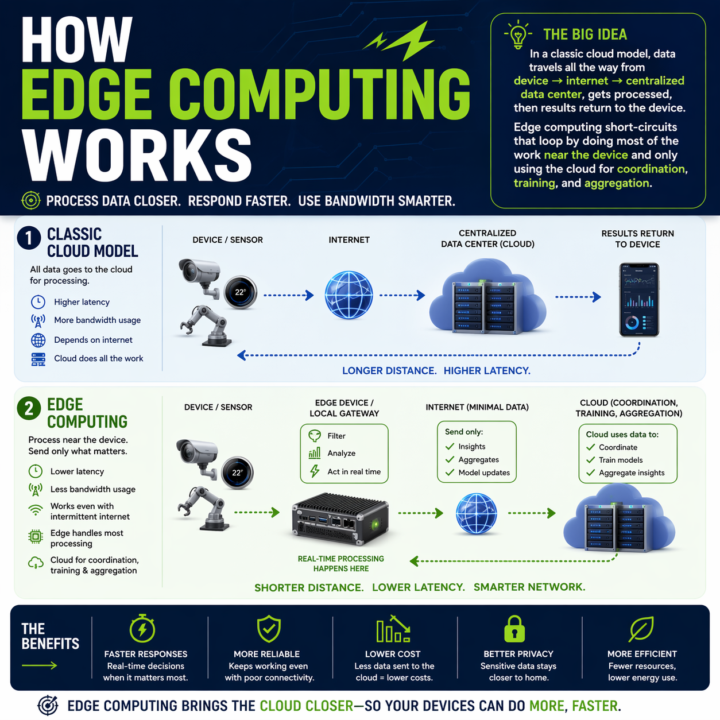
Every automation you build has a round trip baked in. Claude API, OpenAI call, n8n webhook, vector DB lookup. Data leaves the device, travels to a data center, gets processed, comes back. On a good day a cached Claude call runs 600ms to 1.2s. On a bad day you are watching a spinner. Where that round trip breaks: - Real-time perception in vehicles or robotics - Industrial control loops that cannot wait on a network - Anywhere connectivity is spotty or intermittent - High-volume sensor data where shipping everything to the cloud burns bandwidth and budget Edge changes the math. Compute runs where the data is generated. Local work stays local. Cloud only sees what needs cross-site context. The split that is emerging: - Edge: real-time inference, event detection, filtering, local control - Cloud: model training, cross-site analytics, long-term storage, heavy compute On-device SLMs are usable now. Llama 3.1 8B on an M-series Mac via Ollama hits sub-100ms first token. Haiku-class reasoning is running on phones with NPUs. If your automation touches physical systems, live audio, live video, or anything latency-sensitive, you have a real placement decision to make: edge, cloud, or hybrid. The pattern I keep reaching for: route by cost of latency. If a one-second delay breaks the experience, run it local. If the step needs cross-context memory or a frontier model, send it up. Cheap decisions at the edge, expensive ones in the cloud, with the edge doing the filter so the cloud only sees signal. The architecture question has changed. Not "which cloud model do I call," but "where does each step of this pipeline need to run." What is running in your stack right now that should not be making a cloud round trip? What is stopping you from moving it?
1-30 of 224

skool.com/ai-bits-and-pieces
Build real-world AI fluency to confidently learn & apply Artificial Intelligence while navigating the common quirks and growing pains of people + AI.
Leaderboard (30-day)
1
🔥
+124
2

+23
3

+16
4

+14
5

+14
Powered by