Activity
Mon
Wed
Fri
Sun
Jun
Jul
Aug
Sep
Oct
Nov
Dec
Jan
Feb
Mar
Apr
May
What is this?
Less
More
Memberships
Notion Wizards
5.9k members • Free
AI Automation First Client
1.6k members • Free
AI Accelerator
18.5k members • Free
AndyNoCode
33.2k members • Free
Automation Masters
3.8k members • Free
AI Automation Society
355.9k members • Free
AI Automation (A-Z)
153.8k members • Free
AI Automation Agency Hub
315.1k members • Free
28 contributions to AI Automation Society

Dec '25 •
Guardrails in N8N
Wondering if anyone has used the guardrails in n8n for large document processing, also once it has sanitised the PII is there any way to replace the sensitive data back to the original post AI agent node?
2 likes • Dec '25
@Hicham Char Thanks appreciate it

Nov '25 •
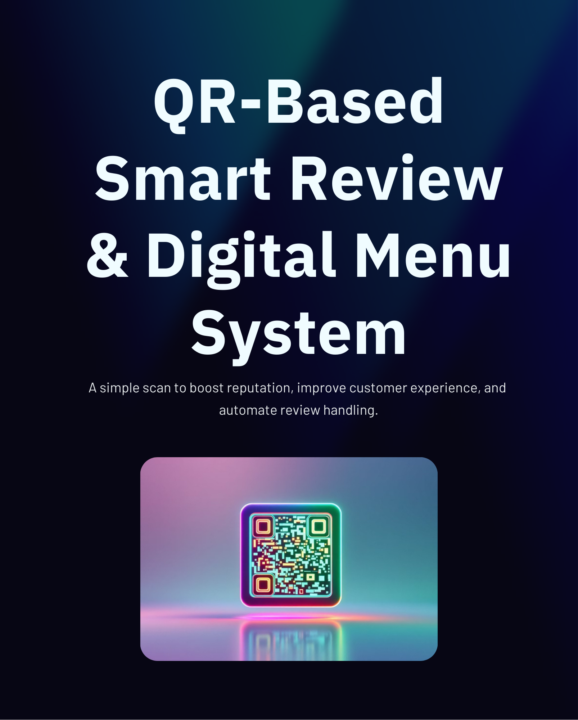
QR-Based Smart Review & Digital Menu System
Just built something powerful for businesses who want to improve customer experience + automate the entire review process! I created a QR-Based Smart Review & Digital Menu System that lets any business collect reviews, filter bad feedback, and send manager alerts — all automatically. Here’s what it does: — Customers scan a QR — They see the digital menu + rating page — Good reviews go public — Bad reviews go privately to the manager — n8n automation kicks in instantly This helps businesses: ✔ Catch issues before they hit Google ✔ Improve reputation ✔ Modernize the customer experience ✔ Run fully automated workflows I’ve shared a full presentation with visuals + a live QR demo. Would love your thoughts on it — and happy to help anyone implement this in their own business or for clients!
2 likes • Nov '25
Looks great, what did you use to create the front end?

Nov '25 •
🧠 n8n experts: Anyone has a workflow/JSON for emails → key date → Sheets → Calendar → notification?
I think this automation is fairly simple, but if anyone has a similar workflow/JSON, I’d be super happy to check it out! I also think this flow could be packaged and reused across many businesses, so having a solid reference would be super valuable. I’m trying to build this flow in n8n: → Read incoming emails (Gmail or Outlook) → Extract one key date and other important info from the email body → Save the extracted data into Google Sheets → Create a Google Calendar event using that key date → Send a notification (email or WhatsApp) with the extracted information Ideally, I’m looking for an example that already includes: ✔ Email text parsing ✔ Date extraction (regex or any reliable method) ✔ Date normalization (YYYY-MM-DD) ✔ Writing results into Sheets ✔ Creating the Calendar event ✔ Sending the final notification I f anyone has an n8n workflow JSON or something similar I can use as a reference, I’d really appreciate it! 🚀
2 likes • Nov '25
@Nateherk has made an automation like this in one of his recent youtube posts. You should check it out, pretty much made what you mentioned I think.

Nov '25 •
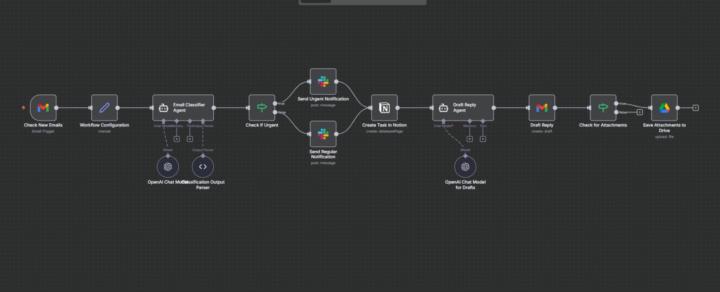
Build 34 # AI Email management
Just shipped an AI Email Management Agent inside n8n — and it's creating an issue of nodes while importing JSON Here’s exactly how it works: 1. Gmail Listener (Intake Layer) Checks your Gmail every 5 minutes. Pulls: – sender – subject – full body – attachments – direct email link This is your “always awake” inbox watches 2. System Configuration Layer Stores your: – Notion Tasks DB – Slack alert channel – Google Drive folder for attachments Once set, you never touch these again. 3. AI Email Classifier (The Brain) This is where the magic happens. AI reads the email and sorts it into: Urgent Money Clients Tasks Other Plus it extracts: summary, priority, action items, people, dates, amounts — everything. It even flags isUrgent = true when needed. 4. Smart Alert Router If it’s urgent → Sends a red-alert message in Slack. If not → Sends a regular update. Never miss what’s actually important again. 5. Notion Task Creator Every email becomes a fresh, clean task with: title category priority sender summary link to email Your task list updates itself while you do… absolutely nothing. 6. AI Reply Generator Reads the whole context and writes the perfect reply: urgent → acknowledgment + timeline money → confirmation + clarity clients → warm + helpful tasks → clear next steps other → short + professional You basically stop writing emails. 7. Attachment Manager If the email has files → Automatically uploads them to Google Drive. No more “Where did I save that PDF?” This turns Gmail into a fully automated operations system — without hiring a VA and without touching your inbox. What should I add to improve this?
3 likes • Nov '25
Serious stuff 👏

Nov '25 •
Are we overbuilding under selling.
I see incredible builders here: n8n automations, SaaS tools, Gemini workflows… I’m curious: – How many of you feel confident in your technical skill, but uncertain about how to price or sell your work? – If I handed you a client tomorrow and said: “Make them an offer,” would you know what to charge and how to present it? I’m asking because I’ve spent decades in business and watched brilliant technical people burn out not from lack of skill, but from lack of business understanding. No judgment, just a genuine question: What’s harder for you right now – building the thing or selling the thing? Drop just one word below: “Building” or “Selling.”
1 like • Nov '25
Making an offer without understanding their business processes, how much value they associate with their time and the depth of pain points they have would cause under selling in my opinion. Once you essentially audit their business, and provide them with a solution on their easiest pain point for free (Quick MVP) you can calculate an offer from there and would put you in a better position. This is just my opinion.
1-10 of 28

@zamir-mir-4621
I’m a driven and motivated individual with a passion for excellence and a desire to make a meaningful impact in my field.
Active 35d ago
Joined May 20, 2025
Powered by