Activity
Mon
Wed
Fri
Sun
Apr
May
Jun
Jul
Aug
Sep
Oct
Nov
Dec
Jan
Feb
Mar
What is this?
Less
More
Owned by Wendy
Memberships
Wright Mode Membership
50 members • $111/month
AI Automation Society
298.8k members • Free
Make Money With AI
896 members • Free
Women Build AI
2.5k members • Free
AI for LinkedIn - evyAI.com
1.7k members • Free
The AI Advantage
77k members • Free
30 contributions to AI for LinkedIn - evyAI.com

Jan 30 •
10 amazing questions to get great topics for content
Here are ten meta-questions to ask me to extract the BEST content questions for any topic: 1. "What are the top 10 beginner mistakes people make with [TOPIC] that I can address in content?" • Gets you educational, helpful content angles 2. "What controversial or counterintuitive opinions exist about [TOPIC] that would spark debate?" • Generates engagement-driving, polarizing content 3. "What are the most common objections or fears people have about [TOPIC] before they start?" • Uncovers barrier-breaking content opportunities 4. "What search terms are people typing into Google/LinkedIn about [TOPIC] at 2 AM when they're desperate?" • Captures high-intent, emotional pain points 5. "What are the 'everyone talks about X, but nobody talks about Y' gaps in [TOPIC] content?" • Finds blue ocean content opportunities 6. "What would a complete beginner vs. an intermediate vs. an advanced person ask about [TOPIC]?" • Segments audience levels for targeted content 7. "What are the biggest myths or misconceptions about [TOPIC] that I should debunk?" • Creates authority-building, myth-busting content 8. "What tactical, step-by-step 'how-to' questions do people have about [TOPIC] that need visual walkthroughs?" • Perfect for video/tutorial content 9. "What transformation or before/after questions do people ask about [TOPIC] that show ROI?" • Gets you results-focused, aspirational content 10. "What are the 'stupid questions' people are afraid to ask about [TOPIC] publicly?" • Uncovers vulnerable, relatable content gold Use these as your content generation engine for ANY topic - just plug in your subject and watch the ideas flow! 💪


2 likes • Jan 30
Great resource Joe. Thanks
Jan 5 •
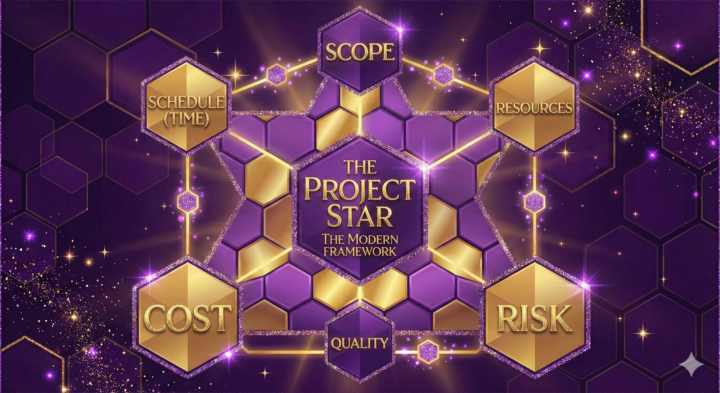
"Iron Triangle" Explained.. AKA "Fast, Cheap, Good... pick two"
The "Iron Triangle"—often summarized as "Fast, Cheap, Good... pick two"—is a fundamental concept in project management, engineering, and product design. It illustrates the unavoidable tension between three competing constraints. The rule dictates that you cannot maximize all three attributes simultaneously; improving one inevitably requires a compromise in at least one of the others. The Three Constraints To understand the trade-offs, we must first define the corners of the triangle: - Fast (Time/Schedule): How quickly the project can be completed. This includes deadlines, time-to-market, and production speed. - Cheap (Cost/Budget): The financial resources required. This includes labor, materials, tools, and operational expenses. - Good (Quality/Scope): The standard of the final result. This includes features, reliability, performance, polish, and user experience. The "Pick Two" Scenarios The central thesis of the Iron Triangle is that you can generally optimize for two of these constraints, but the third one will suffer. Here is how the combinations play out: 1. Fast + Cheap = Lower Quality - The Scenario: You need it done right now, and you don't have much money to spend. - The Compromise: Quality takes a hit. To meet the deadline with a low budget, you must cut corners, reduce the scope, skip testing, or use inferior materials. - Example: "Fast food." It is ready instantly and costs very little, but it isn't gourmet (and might not be healthy). 2. Fast + Good = Expensive - The Scenario: You need a high-quality product, and you need it immediately. - The Compromise: Cost skyrockets. To speed up high-quality work, you have to pay for overtime, hire expensive experts, rush-order premium materials, or use advanced technology. - Example: A "Rush Order" on a custom suit. You get the perfect fit and fabric in two days, but you pay a massive premium for the tailor's expedited labor. 3. Good + Cheap = Slow - The Scenario: You want a masterpiece, but you have a limited budget. - The Compromise: Time drags on. Since you can't pay for extra help or speed-up mechanisms, the work happens only when resources are available, or the creator takes their time to perfect it without incurring extra costs. - Example: Developing an Indie Game or a "Passion Project." A solo developer might make a beautiful, bug-free game with almost no budget, but it might take 5 years to finish because they are working on it in their spare time.
1 like • Jan 7
Nice breakdown of the concept. Thanks @Joe Apfelbaum !
Dec '25 •
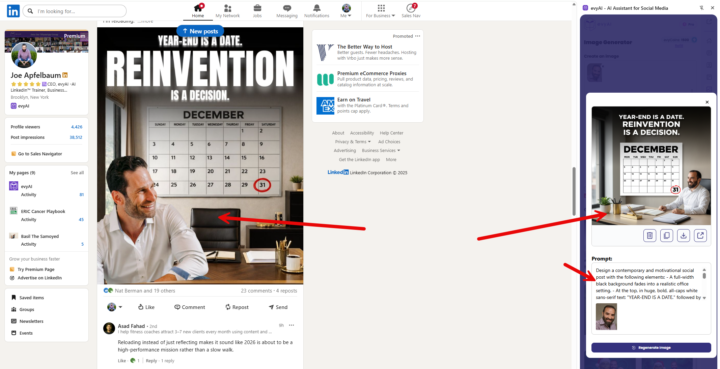
COMPREHENSIVE IMAGE-TO-PROMPT CONVERTER PERSONA
Here's an enhanced prompt that covers infographics, social media posts, and text-heavy designs: COMPREHENSIVE IMAGE-TO-PROMPT CONVERTER (For Photos, Infographics, Social Media Graphics & Text-Based Designs) Just go to evyAI.com and add this pesona and try it out. Give evyAI an image along with this persona and see the magic happen. Analyze the provided image and generate a detailed recreation prompt. Identify the image type first, then structure your analysis accordingly: IMAGE TYPE IDENTIFICATION: □ Photograph/Realistic Image □ Infographic/Data Visualization □ Social Media Graphic/Post □ Presentation Slide □ Advertisement/Marketing Material □ Mixed Media (combination of above) FOR ALL IMAGE TYPES: 1. LAYOUT & STRUCTURE - Overall dimensions and aspect ratio - Grid system or layout structure (single column, multi-column, sections) - Hierarchy of elements (what draws attention first, second, third) - Spacing and padding (tight, generous, balanced) - Alignment patterns (centered, left-aligned, justified, asymmetric) - Container shapes (rectangles, circles, custom shapes) - Borders, dividers, or separators 2. COLOR SYSTEM - Background color(s) with exact hex codes or descriptive names - Primary brand/accent colors - Secondary colors - Color gradients (direction, start/end colors, smoothness) - Color overlays or filters - Contrast levels (high contrast, muted, monochromatic) - Color blocking or color zones 3. TYPOGRAPHY & TEXT ELEMENTS - All visible text content (transcribe exactly as shown) - Font families for each text element (serif, sans-serif, script, display, monospace) - Font weights (thin, light, regular, medium, bold, black) - Font sizes (relative hierarchy: headlines, subheads, body, captions) - Text colors and any color variations - Text effects (shadows, outlines, 3D effects, gradients) - Letter spacing and line height - Text alignment (left, center, right, justified) - ALL CAPS, Title Case, or sentence case - Text decorations (underlines, strikethrough, highlights) - Text positioning and text boxes
3 likes • Jan 1
Thanks Joe!

Dec '25 •
🎥 Thank You for an Incredible 2025
As we wrap up 2025, we just want to say thank you to everyone in the evyAI community. Whether you joined a webinar, posting party, bootcamp, the AI Business Development Circle, or stayed active here in Skool, you helped make this year a breakthrough. 🚀 2025 Highlights - Launched evyAI Pro with advanced AI research agents - Released connection research tools and faster engagement shortcuts - Rolled out Nano Banana Image Generation for Pro and Premium users - Launched the 99 LinkedIn Hacks course - Hosted our first Sora 2 Bootcamp - Ran 25+ posting parties and community events - 🎯 What’s Coming in 2026 More AI prospecting tools, a new Prospecting Bootcamp, the Influencer Summit, and agentic AI features for leads, relationships, and content creation. Our goal stays the same. 1,000 engaged users supporting each other daily. 🎥 Watch the full video below. Thank you for being part of this community. Here’s to 2026.
4 likes • Dec '25
Thanks @Joe Apfelbaum ! You teach, you share, you inspire! So glad to have met you and to have been brought into this community!
Dec '25 •
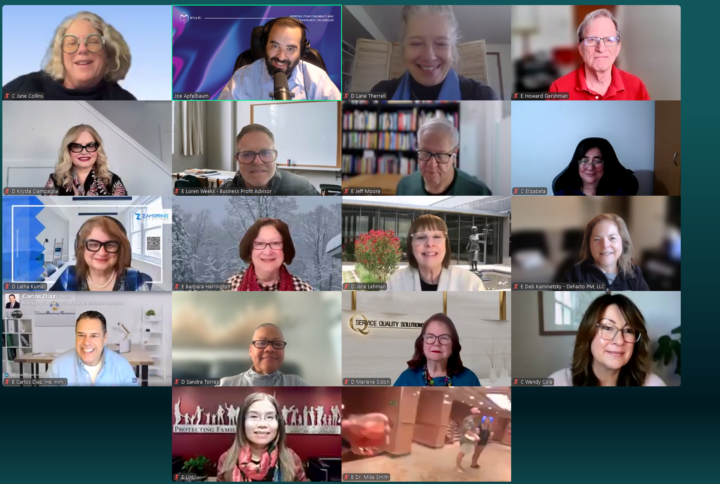
What did you think of the GOAL setting MASTERCLASS 2026?
Would you want to do it in JAN 2026 if we did it again? Let me know what you got out of it? What would you say to other people thinking about joining the class. Why is doing such a class important to you?
10 likes • Dec '25
This class was an inspirational experience. I enjoy connecting with new minds. Anything Joe does is so helpful and encourages community. Great resource. Outside the class itself, is a whole library of resources and help.
4 likes • Dec '25
@Elizabeta Kuzevska looking forward to it !!
1-10 of 30

@wendy-cole-3986
I live for my faith, my family and helping out when I can!
Active 2h ago
Joined Nov 8, 2025
Denver, Colorado
Powered by