Activity
Mon
Wed
Fri
Sun
Jun
Jul
Aug
Sep
Oct
Nov
Dec
Jan
Feb
Mar
Apr
May
What is this?
Less
More
Owned by Erik
Memberships
The AI Advantage
121.6k members • Free
GoHighLevel + Selling AI
1.7k members • Free
Startup Empire
687 members • $2,999/y
AI Builders Circle
537 members • Free
Enovair Circle
131 members • Free
The Ai Agency - Free Resources
1.4k members • Free
SystemKit
279 members • $125/m
Listing Agent Toolkit
9.2k members • Free
Samin's Resource Hub
11.9k members • Free
4 contributions to Lead Gen Secrets 🤫

Nov '25 •
The $1.50/mailbox cold email infrastructure I use to send 100K+ emails monthly
Hey everyone 👋 I've been meaning to share this with the community for a while now, and I figured it's time to stop gatekeeping this resource. Quick context: When I scaled our PR agency to $800K/month, one of the biggest operational costs was email infrastructure. At $8/mailbox on Google Workspace, running 300+ mailboxes was costing us $2,400/month just in mailbox fees. The alternative I found: There's a category of SMTP services with unmanaged IP addresses that cost $1-1.50 per mailbox/month. I'm currently running 375 active mailboxes across 75 domains through one of these services. What you get: • Unlimited scaling potential • 3-click setup process • Direct export into Instantly • Professional SMTP infrastructure • Full domain ownership and control The important caveat (please read): This is NOT for beginners. Here's why: With Google/Microsoft, they manage IP reputation for you. With these SMTP services, YOU are responsible for maintaining sender reputation. If you get spam complaints or hit spam traps, the entire IP range gets flagged and all your mailboxes go to spam. Who this is for: ✅ You already have a profitable cold email system with Google/Microsoft ✅ You consistently get low spam complaint rates ✅ You understand deliverability fundamentals ✅ You're ready to scale and reduce operational costs My current setup: I use this service alongside Google and Microsoft mailboxes to diversify infrastructure. When Google had those recent policy changes, my campaigns kept running because I wasn't 100% dependent on them. To get instant access to this: Comment "INBOX" below and I'll DM you the link 📦

0 likes • 19d
Inbox
19d •
60% of your lead list is garbage.
Stop scaling cold email volume. Scale your list quality. Had a client booking 5 meetings a day from 3,500 emails. Not bad. But they were scraping leads manually with almost zero qualification. Out of every 1,000 on the list, 600 shouldn't even be there. Same mailboxes. Same copy. Better leads. They went from 5 meetings a day to 50. Pre-qualify before you send. Run AI enrichment. Check against your ICP before they hit the sequencer. Adding mailboxes won't fix a targeting problem.
5 likes • 19d
Agreed 100 percent. We were burning through domains trying to outpace bad data. Now we run every raw CSV through Claude Opus before it ever touches Instantly. We just have the model read the websites and score the leads against our ICP to verify they are actual decision makers. Scraping is cheap now, the filtering is where the actual bottleneck is.

23d •
Campaign Overview — AI Receptionist Cold Email Sequence Offer:
Free after-hours AI receptionist for small restoration companies (water, fire, mold). Answers all calls 24/7, captures job details, notifies the owner instantly. No contract, no setup cost. Paid plan starts after the trial converts. ICP: Owner-operated restoration companies, 1–5 employees, no dedicated receptionist, $200K–$1.5M revenue. Core pain: missing emergency calls after hours = losing jobs to competitors who answered. Sequence structure (4 emails total): — Day 1: Main email. Pain angle = missed calls lose jobs. CTA = reply "yes" to get the system set up. — Day 3: Follow-up #1. Angle = it's not about being the best company, it's about who answered first. — Day 7: Follow-up #2. Angle = direct financial cost of one missed call ($1K–$5K). Restate the free offer. — Day 12: Breakup email. Low-pressure close. Leave the door open. After a "yes" reply: prospect receives a short Loom video showing exactly how the system works and what happens on their first call. Formatting rules applied: plain text only, no links in email #1, subject lines under 5 words, body under 6 lines, single low-friction CTA per email. What I'd like feedback on: 1. Is the pain angle strong enough for this ICP, or should it be sharper? 2. Does the free offer lower trust instead of raising it? 3. Is the follow-up spacing (3 / 7 / 12) correct, or should it be tighter? 4. Any line in the sequence that feels like it would trigger spam or read as mass email? Email copy: https://docs.google.com/document/d/1bhdxBfbf5Pmc9Y3boGthWW43V3EJ9uXu8iEOleotkuw/edit?usp=sharing
1 like • 19d
Hey Mouh, coming at this from the ops side. The core logic is decent but you have a few leaks in this sequence. I actually ran this exact sequence structure through Google AI Ultra to check the semantic pacing and it flagged a couple things that match exactly what we see in production. Here is what you need to fix right now: 1. The follow up spacing is way too slow. Days 3, 7, and 12 give them too much time to forget you exist. Compress the timeline to Days 1, 3, 6, and 9 to keep momentum. 2. Be careful leading so heavy with the word free. It attracts tire kickers and lowers the perceived value for business owners who are used to paying for quality. Instead of free, pitch a performance guarantee. Tell them you cover all the setup costs upfront to prove it works. 3. The Day 1 call to action is too heavy. Do not ask them to reply yes to a setup right away. Ask a low friction question just to get the reply and boost your sender reputation. Ask if they are currently handling all after hours emergencies in house or routing them out. Once they reply, then pitch the Loom.

19d •
Important spam email content question
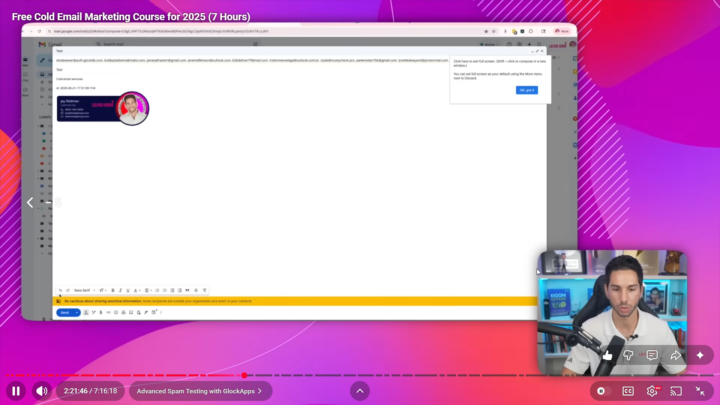
Recently discovered that tools like Mailmeteor and Folderly still miss a lot of keywords that put you on the spam folder. I'm really looking to hear if anyone found a better way. Here's what I tested. In the @Jay Feldman 7h video (Free Cold Email Marketing Course for 2025 (7 Hours), he goes through GlockApps with a simple email test with the content "cold email services." Obviously glockapps tells you that this content triggered spam filters on google. If you paste "cold email services" on any other "spam checker" you don't get ANY errors flagged in your copy. Even glockapps doesn't tell you exactly which part of the copy is wrong if you're sending a longer email. Has anyone found better QA methods? @Jordan Wiseman
1 like • 19d
Hey Max, I ran into the exact same issue. Most of those older tools just scan for static words, but Google spam filters are basically reading the overall context of the email now. Instead of relying only on GlockApps or Folderly, I have been dropping my copy into Google AI Ultra and asking it to grade the semantic intent. If the AI thinks it sounds like a hard pitch, Google probably will too. Like Jordan mentioned, Consulti is a solid move. But honestly, if your domains are properly warmed up on Microsoft 365, the exact keywords seem to matter a bit less than your overall sender reputation and reply rates anyway.
1-4 of 4

@erik-hill-8209
Lover of media and marketing. Ready for the next chapter in the world of remote closing.
Active 10d ago
Joined Feb 4, 2025
Powered by