Activity
Mon
Wed
Fri
Sun
Jun
Jul
Aug
Sep
Oct
Nov
Dec
Jan
Feb
Mar
Apr
What is this?
Less
More
Owned by Andrew
Memberships
NoeAI Premium
739 members • $97/month
Cortex
522 members • $97/month
Chase AI Community
60k members • Free
AI Staffroom
861 members • $67/month
LeadIndicator.ai
561 members • Free
Agency Masters Elite™
983 members • $150/m
AI Sales Agency Launchpad
14.7k members • Free
Unlimited Leads™
1.8k members • Free
Freedom Fastlaner
6.5k members • Free
34 contributions to Assistable.ai

Dec '25 •
🚀 Assistable Community — Free Snapshot Drop
Quick context: Last week I ran a free workshop inside the LeadIndicator group. During that session, I walked through the exact Assistable workflows and automations we use internally — the real ones that run our business, support, fulfillment, and scaling. There was a lot of interest in getting those workflows, and since the workshop was positioned as pure value with nothing to sell, I decided to give the entire snapshot away for free to that group. Rather than keep that value isolated, I want to make it available here as well. ✅ What I’m giving you - The full Assistable snapshot - The exact workflows we use internally - No stripped-down templates - No pitch, upsell, or funnel This is not something we normally give out publicly. The only thing I’m asking in return If you’ve found value in Assistable, I’m asking for one small favor: 👉 Go to Google, search for Assistable's TrustPilot page. Leave an honest review on our Truspilot page. That’s it. Reviews matter a lot — especially as we continue to grow and as we deal with the occasional bad-faith review that comes with scale. Your feedback genuinely helps. 📬 How to get the snapshot - leave a review on our TrustPilot page - Comment that you've left the review and I'll DM you.


1 like • Dec '25
Review Done, thanks Bernie.

Apr '25 •
How to Build a Support System Using Custom Objects
If you want a reason to be even more impressed with GHL capabilities, look at custom objects. Maybe i'm late to these but i've recently been messing with them and it was the missing piece for me.
0 likes • Nov '25
@Alexis Martin sent you a DM
1 like • Nov '25
@Tommy Loch Sorry for delay, I meant to send this sooner but got distracted. In the 'Task' section of the prompt, i use 'custom.one' and in the 'Make AI Call' WF i use a custom field that houses the greeting. I'm able to dynamically change the greeting based off of the contact's scenario (New lead, Appointment Reminder, No Show etc).
1 like • Nov '25
@Tommy Loch My pleasure. Lmk how it works out for you.

⭐
🔥
Oct '25 •
Chat Follow Up doesn't work
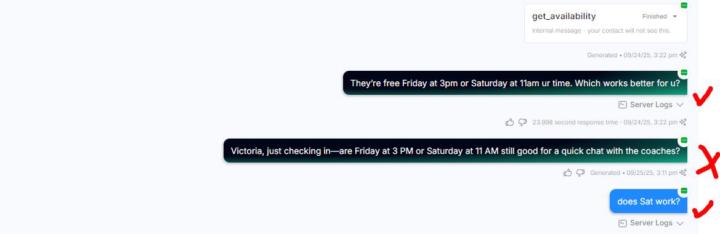
Hey everyone, @Luis Garibay built out his forever follow up version for me which uses the Chat Follow Up function in GHL (used to be called Context Injection). When it fires to follow up via SMS, I get billed 1 cent and Assistable does come up with a message to send (there's no server logs however), but the message doesn't get pushed out into GHL and isn't sent to the prospect. It's weird because everything else works (AI conversations thru SMS, manual SMS). Can anybody help me with this or has some pointers of what I need to do? I've already talked to GHL support and they said it's gotta be Assistable related. THANKS SO MUCH!!!
1 like • Nov '25
@Jorden Williams Food for thought, this is how zappychat functioned.... When the AI Reply was generate, the AI reply would be input into a custom field (ie 'Response') and a tag would be applied (ie 'Response' tag). This would trigger a response workflow, the last reply channel from the contact would then determine the channel that GHL would send the AI Reply with an if/else condition....whether it was FB Messenger, IG DM, SMS etc by placing {{contact.response}} in the message body of the outbound action. This would also help with logging message history between contact and AI. I noticed when AI Reply is generated, the contact gets the tag 'ai_replying' added and then removed, but the message body of the chat generation isnt input anywhere. Is it possible to have the chat run inserted into a custom field and after each ai reply it replaces (overwrites) whatever was previously in the field?

Sep '25 •
What is the best way for training?
Hey, I’m training a voice agent and getting mixed results. I’ve given it a knowledge base, but sometimes it doesn’t seem to pull from it. I also tried using the knowledge lab, but I haven’t noticed much difference. Do you think I should include part of the knowledge base directly in the prompt? What would you recommend for better results? I’ve already gone through the best practices.
1 like • Sep '25
@Mikel Pascacio For the KB to function for your voice agent, you must enable the voice KB (which is extra), regular KB functions for chat. From my understanding, voice can read plain text and URL data. Chat can read all 4 data sources.
1-10 of 34

@andrew-cruz-1274
Retired Marine. Gym & SaaS Founder. Family man. I build things that grow—muscles, businesses, and systems that scale.
Online now
Joined Mar 23, 2026
Chino Hills Ca
Powered by