
Write something

🔥
24d •
Quick tip for your IG carousels this week 👇
Living photo carousels are getting serious traction right now. The concept is simple: mix short video clips with your still images instead of posting all photos. But here's what makes them work: the video needs to be lazy. Camera still. Just a little movement in the frame. Think a candle flickering, steam rising, leaves moving. Enough to feel alive, not enough to steal focus from what you're actually saying. Too much motion = your audience watches the clip and skips the copy. The sweet spot: one or two low-movement clips mixed with stills. Motion as a hook, not the main event. Worth testing on your next carousel. Are you already using video in your carousels, or is this new territory? ⚡

🔥
Jun 2 •
On a scale of 1 to whatever....
I want to get something straight before I keep sharing resources in here. Where are you actually showing up online? List your platforms 1 to however many. Starting with the one you're most active on, ending with the one you check once a month and feel vaguely guilty about. 😄 I'm pulling this together so what I bring into this community lands where it's actually relevant for you. No point in me going deep on Instagram strategies if most of you are building on LinkedIn or vice versa. List yours below!

🔥
May 31 •
Instagram just made video easier
Can we talk about this Instagram update for a second? They just added a teleprompter inside the main Reels camera. You type your script, it scrolls while you record. Which means if your like me you can finally stop doing 20 takes just to sound coherent. You're not a professional broadcaster. You're a business owner with a message to share. Tools that make it easier to show up? Those matter. This one's worth knowing about. Who's going to try it out?👋
🔥
May 15 •
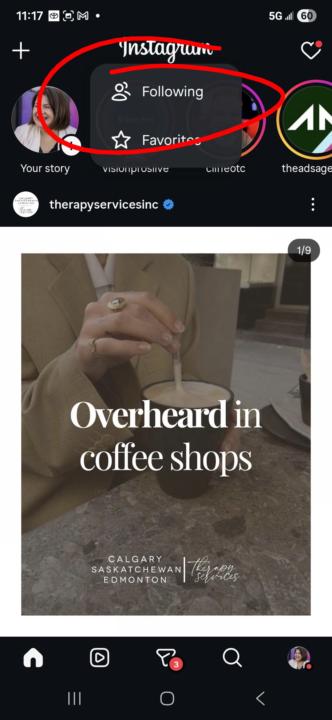
Fast Fix Friday: Chronological Feeds
Meta defaults you to algorithmic feeds, but here's the thing: both Facebook and Instagram have chronological feed options that show fewer ads and zero suggested content. On Instagram, tap the word "Instagram" at the top of your screen. You'll see a dropdown menu: hit "Following." You're now seeing posts from people you actually follow, ordered by when they were posted. Minutes ago, not weeks. On Facebook, tap your profile picture in the bottom right corner. Same deal: you'll get options for which feed to view. Pick the chronological one and you're back to real-time content. This is where I do my actual engagement. 10 minutes a day on each platform, then I'm done. Everything else is noise. The chronological feed keeps it simple and honest. **click on each photo for where to find the Chronological feeds.
🔥
Apr 23 •
Let's connect on LinkedIn
As today seems to be a LinkedIn heavy day, let's cap it off by sharing your LinkedIn profile below. Connect if you'd like, no pressure to do so. Here's my personal profile. I don't have a business page as I already manage 6 for my clients 😄

1-30 of 31
Leaderboard (30-day)
1
+54
2
+38
3

🔥
+19
4

🔥
+18
5

🔥
+16
Powered by