
Write something
Pinned

Mar 15 •
Welcome to Clief Notes. Here's where to start.
1. Watch the intro video and introduce yourself in the intro post here 2. Start with The Foundation (free course). Concepts, folder architecture, prompting framework. Everything else builds on this. 3. Check in at the bottom of each lesson. Polls, discussion posts, other members working through the same stuff. Use them. 4. When you're ready to build real things, move to Implementation Playbooks (Level 2). When you're ready to build your own tools, Building Your Stack (Level 3). 5. Post your work. Ask questions. Help others when you can. What are you here to build?
Poll
4269 members have voted
Pinned
1d •
🌶️ CINCO DE MAYO FIRESALE — STARTS NOW 🌶️
Locked in for the next 5 days only. Ends May 5th at 10:00 AM EST. No exceptions. 🎉 Premium: $27 → $14/mo 🎉 VIP: $97 → $67/mo The closest you'll get to our original launch pricing. We're doing this because the community has shown up for us, and we want to show up back. 🤝 🔥 Already a member? Read this carefully. To lock in the new rate, you need to: 1. Cancel your current plan 2. Resign under the new price That's the only way the system can apply the new rate. We have way too many members for manual refunds, so we can't refund anyone who just signed up at current pricing. But the savings stack month over month, so if you plan to stick around (and you should 😁), the math works out fast. 🚫 A few ground rules: Please do not DM myself or Jake about pricing, exceptions, or extensions. We love you, but we're a small team and we need to stay focused on building. Everyone gets the same window. Everyone gets the same deal. If you miss it, you miss it. We'll do more things for the community down the road. ⏰ The clock: 🟢 LIVE NOW 🔴 Locks May 5th, 10:00 AM EST - Premium gets you The Vault and Afternoon Tea calls. - VIP gets you The Drawing Room, High Tea, and bespoke folder builds from Jake himself. If you've been on the fence, this is the moment. 🚀 Tag a friend who needs to be in here. Let's make Cinco a movement. 🎊 🌶️🌶️🌶️

just now •
I just showed what I was building and it opened a door
At work we have strict rules around AI and for a long time I thought it would never be possible to get access to tools like Claude. In my personal life I've been using AI for a while now mainly to help me build Power Automate flows. I'm not technical but I know what I want and I've built a lot in SharePoint that helps me do my job. A few months ago I hit a wall. I kept having to explain to AI who I was and what I wanted every single time. I was done with it. Online there was so much going on that it felt like I was missing everything. Then a video from Jake showed up on Instagram. I scrolled past it twice. The third time I watched it. It was about the folder structure he used. I could see what he was building but I had no idea if it would actually work for me. After one week the results were way better than I expected. And it keeps getting better. Back to work. I wanted to find out what AI options were actually available within our company. So I showed my work to a few people. Turns out the company has a dedicated AI team already working with Claude. I didn't even know that. They told me I was further ahead than most people and that they loved seeing that I had picked up the folder structure the way I did. That is what convinced them. Only a few people in our entire organization have access to that environment. And now I'm one of them. Really happy about this 🚀🏆
0
0

10h •
Now I Know How a CEO Feels!
I am working on 4 different projects using mainly Claude Code and CoWork. Two projects are personal and two are for clients. I understood that I need to be in the loop to make important decisions (strategic, operational, aesthetical). So, I tell my agents to show me their work stept by step, present pros, cons, unkowns, and ask for my decision. So, I spent my day answering questions from my agents as the present me their work, just like a CEO would spend their day answering questions from its direct reports. Sometimes they are high level questions, sometimes they are detailed quesitons. I might be able to automate some of those decisions in the future, but now I understand where do I need to spend my time and how important is our capacity to make decisions about complex issues.


1d •
What does your workspace look like?
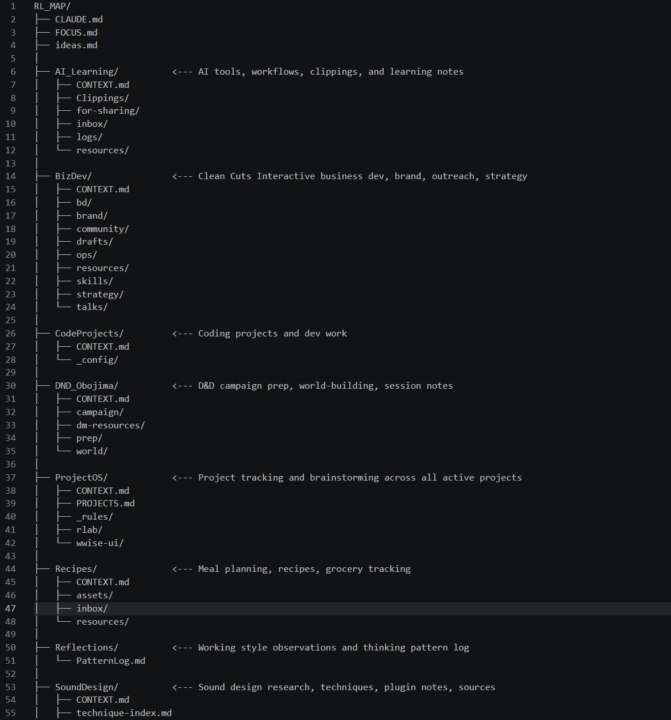
Just got around to watching the high tea session 2 and the discussion about workspace organization / management got me curious about what people are doing. For me I have a Top Level folder that is a Github repo, RL_MAP. I needed to work between 2 computers so I wanted built in sync and backup. Then within that only 1 CLAUDE.md at the root, and each workspace gets its own CONTEXT.md, root level just routes to each folder based on what I'm doing. All memory and context stored inside the repo, don't write to system memory and don't write system skills. This last part is evolving slightly as my needs are changing. The main global hook I have is I have claude auto-commit after each write, so I always have a backup and always can undo independent of Claude. Also makes looking at what changed very easy with Github's tools. This has worked for awhile but as you can see now its starting to get a bit crowded. The way Jake threw everything on the Desktop was kinda revelatory/mind blowing. But also as more and more of these small contexts appear in my work I'm seeing the benefit of not constraining everything to a single space. What have people found works for them?
1-30 of 921

skool.com/quantum-quill-lyceum-1116
Jake Van Clief, giving you the Cliff notes on the new AI age.
Leaderboard (30-day)
1

+766
2

+704
3

+453
4

+396
5

+386
Powered by