

20h •
Why Simple Pipelines Outperform “Smart” AI Systems
Every few months, a new AI orchestration framework drops. More dashboards. More abstractions. More complexity. You wire up a simple workflow… and spend hours debugging it. Here’s the truth: most AI workflows don’t need “smart” orchestration. They need structure. A simpler approach already exists: Jake's folder architecture. Inspired by Doug McIlroy and Unix pipelines: Do one thing well Use plain text Make steps work together The idea: Folder = Pipeline Each step is a folder: instructions.md → what to do output.md → result Flow: AI runs → human reviews → move to next step That’s it. No frameworks. No hidden state. Example: /01-research → /02-draft → /03-review → /04-publish Why it works: Clear input/output at every step Human becomes the control layer Easy to debug, edit, and stop Works with any AI tool Upgrade it with one small addition: Add status.md RESULT: SUCCESS | WARN | FAIL Now every step is measurable, not guesswork. Rules that make it powerful: • One folder, one task • Plain text only • Always include a stop instruction • Review before moving forward • Version your pipeline like code When to use it: When accuracy matters more than speed When human review adds value When you want clarity, not abstraction The Unix pipeline is 50+ years old and still runs the internet. Your AI workflow doesn’t need more tools. It needs better structure. Thanks to @Jake Van Clief for this workflow.

8d •
What's one "obvious" thing you've changed your mind on since joining?
I'll go first. I used to think building systems meant more templates. More prompt libraries. More "frameworks" saved in a folder. But after going through the Foundations and sitting with the idea that "the file system is the skill", I've flipped. Now I think the best system is the one you don't notice. Clean architecture, thoughtful naming, and a way of working that Claude can see without you explaining it every time. The templates were a crutch. The thinking underneath was the real thing. What about you? What's something you believed coming in that you've quietly changed your mind on?

6d •
The debugger can't debug itself
Three days ago I started building a dispatch system. The thing that lets an AI orchestrator hand work to cheaper AI workers. Project manager to specialists. Day three. Four bugs left to fix. I did what you're supposed to do. I delegated. Dispatched a worker to fix one of the bugs. The bug I asked it to fix was "worker runs out of max-turns without telling anyone it ran out." The worker I dispatched to fix that bug ran out of max-turns while trying to fix it. That's the signature of a recursion trap. The system you need to debug IS the system you're using to debug. What I did wrong I kept trying to use the broken system to fix itself. Each dispatch was slower, stranger, less trustworthy than the last. What I should have done day one Stopped dispatching. Fixed the primitives manually, in the main session. Verified with tests. Merged. Then resumed normal dispatch. Why this matters outside AI You cannot debug the plane while flying it. When the tool is the subject, stop using the tool. Fix it. Restart it. Same pattern everywhere: Auditing a content process using the content process. Optimising a workflow with a checklist built inside the broken workflow. Refining a brief template on the project where the brief is failing. The fix isn't faster iteration. The fix is stepping outside. What I did instead Stopped delegating. Fixed it by hand. Shipped. Then I added one line to my own memory bank so I don't repeat it: when the work targets the orchestration primitives, never orchestrate the fix. Do it inline. One line of discipline. Saves three days next time.

8d •
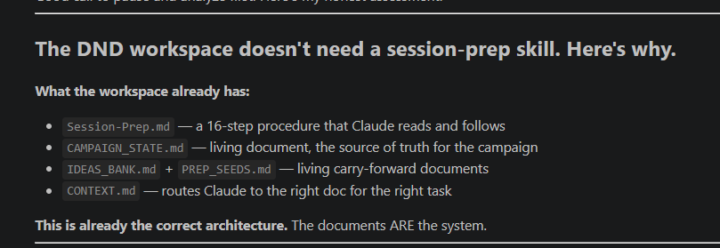
Claude just told me the file system is the skill
Was exploring skills after finishing foundations course and was working with skill creator and had it analyze my workspace before starting and it said this: This is already the correct architecture. The documents ARE the system. Was gonna try to spend more time learning about skills but oddly I guess this means just working with Claude is a better use of time
6d •
Harness Engineering: The Missing Layer in AI Systems
Prompt Engineering peaked between 2022 and 2024 as the foundational skill for working with large language models. It focused on crafting precise instructions such as roles, few-shot examples, and structured phrasing to get the best possible output in a single interaction. The model was treated as a black box, and success depended on how well you asked. Context Engineering emerged in 2025 and expanded the scope beyond the prompt. It focused on curating everything the model sees inside the context window. This includes retrieval systems, memory, tool outputs, summaries, and smart context management. Prompt engineering became just one part of a larger system designed to ensure the model always has the right information at the right time. Now in 2026, the frontier is Harness Engineering. The shift is simple but profound: Agent = Model + Harness Harness Engineering is about designing the system around the model. It turns a powerful but unpredictable LLM into a reliable, production-grade agent. Instead of relying on better prompts or more context, it builds structure, constraints, and feedback loops that guide the model’s behavior. Think of it like managing a junior engineer. You do not just give instructions. You define boundaries, provide tools, enforce standards, and create systems that prevent repeated mistakes. This shift happened because capability is no longer the bottleneck. Reliability is. Even the most advanced models still drift, hallucinate, and repeat errors. Context alone cannot solve long-running or multi-session workflows. The real leverage comes from engineering the environment in which the model operates. A strong harness typically includes six layers: 1. Tool and Permission Layer Clearly defined actions, APIs, and boundaries the agent can access. 2. State and Memory Management Persistent logs, checkpoints, and artifacts that survive across sessions. 3. Context and Prompt Orchestration Dynamic and structured context strategies supported by versioned documentation.
1-30 of 358

skool.com/quantum-quill-lyceum-1116
Jake Van Clief, giving you the Cliff notes on the new AI age.
Leaderboard (30-day)
1

+697
2

+657
3

+430
4

+417
5
+299
Powered by