
Write something

30m •
Every AI agent hallucinates timelines
I spent years in ceramics before I wrote a line of code. Glaze chemistry is all math — silica, alumina, fluxes — and the difference between a celadon and a catastrophe is a fraction of a molar ratio. The kiln doesn't care about your intention. That taught me something I never forgot: "you can't quantify that" is a starting point, not a conclusion. So when AI agents started confidently saying "that'll take six hours" — six hours of what? — it hit the same nerve. There's no ground truth. No calibration. The agent's sense of time has nothing to do with how humans move through work. It's a number pulled from nothing, delivered with total confidence. I built Epoch for the same reason I used to calculate thermal expansion coefficients for fun. Because "it's just a gut feel" is almost always someone admitting they don't want to look at the math. MCP server, CLI, REST API. 24 tools across 5 layers: PERT, Monte Carlo, COCOMO II, critical path analysis, reference class forecasting. It tracks estimate vs. actual over time and self-corrects. The loop is simple: 1. Agent asks Epoch for an estimate 2. Epoch returns a calibrated range — a distribution, not a single number 3. Agent does the work 4. You feed the actual time back in 5. Epoch adjusts. Every project that reports back makes every other project better. What the commit history looks like 207 commits. 3 days. Here's how it broke down: Day one — 50 commits. Foundation. Service architecture, tool layer, estimation engine. The bones. Day two — 76 commits. Heavy construction. PERT network builder, Monte Carlo simulation engine, COCOMO II calibration. The math got real. Day three — 81 commits. Polish and ship. v0.2.0. 870+ tests passing. Service score: 97/100. 73 features. 50 fixes. 20 docs. 17 test files. Fix-to-feature ratio of 0.68:1 — meaning for every feature, there was roughly seven-tenths of a fix. That's a healthy loop. Build, break, fix, ship. I'm neurodivergent. I don't naturally estimate time the way most people do. Most neurodivergent people don't. So I externalize it. Epoch is one more system that does the estimation for me — built for agents this time, but the impulse is the same one that made me calculate thermal expansion coefficients for fun.
1
0

2d •
The Vault will make your Claude efficient
It’s not: “we cleaned files” It’s: “we built a system that keeps itself clean.” The first month I was just trying to get my head around the Foundation, Implementation and understand what is happening. Foundation already gave me a Content Provider style architecture, along with the animation and website builder, i intuitively and with both ChatGPT and Claude I started by implementing Jake's structure. I watched YouTube videos as well that gave me other insights (and validated that Jake's course is the only place that i see that talks about ICM and Architecture and such). Either way, I signed up for premium yesterday, and found that there was much more to complement the Foundation. As Jake suggested, I slowly took each on of the Vault items, and explored with Claude - how is our architecture compared to GitHub repos (which I tapped into some of the members GitHub repos and made Claude check itself against those insights - super thank you Community!!). It pointed out a few times that our architecture is more mature, though it always found 1 or 2 items that could improve its flow. We had a glitch this morning when I prompted the execution of today's schedule with all the items to post, create and monitor, which the Orchestrator and Operator (me) had to dissect what it did and ensure it won't follow that course again, and whether such a flow is efficient both Token costs and Workflow. It found ways to optimize - extracted what it found useful from the Vault, informed that skills that mention in Vault are skills we already captured (among others). My very first project with Jake - text to video animation has been improving on its own outside my Brand Sandbox. And as I closed my Claude after uploading the content it had structured neatly for me in an HTML file with EVERYTHING that i needed for the content posting, I had it summarize its work - which I hope this help if you read this far (thank you for reading my stuff:)) - Three-day architecture delta (Apr 30 → May 3)


2d •
The Folder System Became My Agency
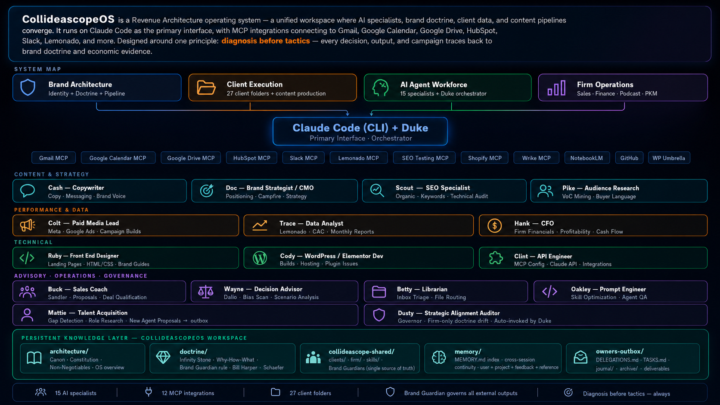
Twenty-four days ago I posted about Jake's folder system video. This is what happened next. Same foundation — markdown files, orchestration prompts, clear roles. I just kept building. Fifteen named specialists. Each one with a soul file, guardrails, and a playbook. Duke orchestrates. Cash writes. Trace pulls the data. Hank runs the financials. Clint handles the MCP integrations. Behind each one is either a human counterpart doing the real work alongside them — or a role I can't afford to hire yet. Katie who's been with me for 18 years, now has her own orchestrator running the same system. Twenty-seven client folders. Twelve live MCP integrations. One shared repo. The folder system isn't replacing my agency. It becoming my agency. Jake gave me the unlock. This is how it's going.

5h •
Watch Claude Control a WebApp (For Nerds Only) 🤓
Video Summary: I open Claude in Chrome, tell it to read the console, and it discovers a menu of commands for controlling my app (this is a super easy API I built that lets AI run the app). Then I say "make this sign 8 in by 8 in, red, and make it say hello" and it does it. Here's the part I think is REALLY interesting. The save files are just simple, readable JSON. You can just read understand what it says. Which means the AI doesn't even need the application to create something. You give it an example save file and tell it what you want. It writes the file directly without the UI. So it could create thousands if you wanted it to. So.... The application becomes just a review tool. You use it to look at what the AI made and tweak it if you want. The AI does the production. The human review does the quality control (for now). That flips our working model. We think about AI controlling the app, but if your data format is simple enough, the AI skips the app entirely and just writes the output. WAAAAAY more efficient.
1
0

24h •
How I Turned SKOOL Docs Into a Working AI System
Bottom line: Two hours. Jake's frameworks went from a folder to live tools running in my workspace. Most community content has a 48-hour half-life. You read it, save it, and it ends up somewhere it influences nothing. The content is fine. The structure is the problem. Here's what I did: --Organized the vault: Cleaned up 30+ scattered files, classified by type, split into five sections. A file you can't find in 15 seconds doesn't exist. --Built an auto-ingestion pipeline: Scheduled task runs nightly. Drop anything new into _Inbox, it classifies and routes itself. New content stays in its lane. --Converted three frameworks into live skills: - Council of 5 — runs on command. Five advisor perspectives on any decision, simultaneously. - 60/30/10 Triage Rule — installed into workspace operating rules. Applies to every task without prompting. - Discovery Call SOP — no longer a document you read mid-call. Phases through pre-call, live support, and debrief automatically. --Audited workspace documentation: Cut 30-40% from routing and context files. Tighter files, faster responses. Before: Jake's frameworks lived in a folder. After: three of them are running. The best part is that it compared it against what my current business needs are and filtered out resources that weren't relevant to me (yet). For example @Curtis Hays full agency or @Roc Lee and his awesome conference talk engine. If you want to replicate it, I've attached a step-by-step guide with the exact prompts I used across all five sessions. Thank you ALL for your inspiration and to @Jake Van Clief for building this incredible community.
1-30 of 158

skool.com/quantum-quill-lyceum-1116
Jake Van Clief, giving you the Cliff notes on the new AI age.
Leaderboard (30-day)
1

+819
2

+769
3

+472
4

+452
5

+451
Powered by