Activity
Mon
Wed
Fri
Sun
May
Jun
Jul
Aug
Sep
Oct
Nov
Dec
Jan
Feb
Mar
Apr
What is this?
Less
More
Memberships
Clief Notes
23.5k members • Free
31 contributions to Clief Notes

6d •
Using Claude to help structure your file system
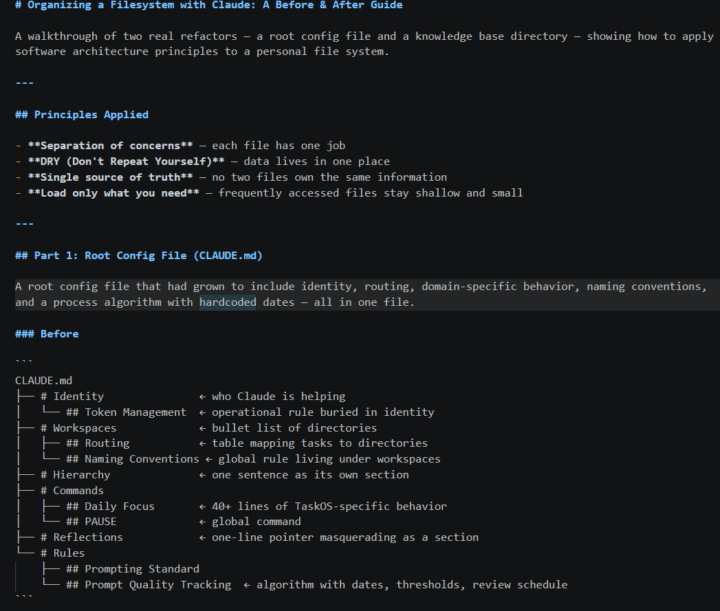
for people just starting, here's what I did to start organizing my file system after a few days of use. I have a little bit of coding background so I asked claude to treat my file system like computer architecture and follow SOLID principles. They are roughly summarized as follows: - Separation of concerns — each file has one job - DRY (Don't Repeat Yourself) — data lives in one place - Single source of truth — no two files own the same information - Load only what you need — frequently accessed files stay shallow and small As example my claude.md file shrunk about 50%, it had grown from 30-40 lines to 100 or so. And the context file in another workspace went from 157 lines to 15. The goal isn't necessarily file reduction, it's efficiency and clarity. I went step by step through each directory with Claude to clean up stuff. At the end I had Claude summarize the process for me to share. attached are pictures of the .md file for easy viewing and I included the actual .md file of the process. But I'll also list it below: The Process Every refactor follows the same pattern: 1. Audit — list every job the file or directory is currently doing 2. Identify what's wrong — duplication, mixed concerns, wrong location 3. Propose before acting — show the before/after and confirm scope 4. Execute in order — move files first, update references second 5. Verify — make sure all links and paths still resolve The key question at each step: does this file have one job, and does it live where you'd naturally look for it? Prompts Used The actual prompts from this session, mapped to each process step. Audit "look at Claude.md architecture. analyse for separation of concerns and good computer architecture" "let's look at sound design context file first" Identify violations "looking at Claude.md Identity, workspaces and routing section. Is there overlap of function there?" "as a computer system architect taking into account separation of concerns, DRY, and clarity, what is the most efficient format?"
0 likes • 2h
@Jordan Shaw dude thats sick im gonna have to try that!
0 likes • 2h
@Rutger Clemens I mean it just takes time. Like if you want a system where the files point to each other you ahve to add them manually somehow. The clipping helps me somewhat because I can add the tags at the intake. But your note taking and tagging or linking are all manual in Obsidian. So it depends on your own discipline and workflow. I've found it easier to have the structure and have claude to the maintenance so that I can just use the output. I still love obsidian and it's my main note taker, but my notes are all super messy in my main vault. Mostly just daily notes and things important for that day. or random ideas with no clear place to go.
1d •
How to learn quickly with YouTube and Claude
Hey All wanted to share something I was able to use today that helped me get something done in 20min rather than the usually 2-3 hours. I like to use Youtube a lot to learn new techniques and ideas to use in my work, but that takes a lot of time. I wanted to learn a specific granular synthesis patch to recreate a sound. Under normal conditions: watch the video, rewatch the confusing parts, look up GRM's modulation system separately, rebuild the patch by trial and error. Realistically 2–3 hours before I'm actually working. With this workflow: clipped the video, had Claude reconstruct the signal flow and give me step-by-step instructions, followed them, asked for timestamps twice when I needed to see something visual. I was building the patch within seconds. Here's the breakdown of the workflow pasted from my session summary from claude: --- ## The Problem YouTube tutorials are great but they also take a lot of time to watch and digest. A 45-minute walkthrough covers maybe 20 minutes of usable information, buried in real-time narration, visual demos, and the host's live troubleshooting. To actually *do* what you watched, you still have to reverse-engineer the steps or follow along. But if I'm hunting YouTube for a tutorial for something I need to do right now that's a time sink. --- ## The Workflow Works for any tutorial, any domain. **Step 1: Clip it.** - Use Obsidian Web Clipper to save the YouTube video as a markdown file. The clipper pulls the transcript and metadata into a structured note directly to an Obsidian vault you can work with directly in a chat. - If you store the Obsidian Vault inside your Claude workspace in a directory you can access it with Claude. **Step 2: Have Claude teach it to you.** - Ask Claude to read the transcript, summarize the technique and walk you through it step by step. - you can immediately start working or learning. **Step 3: Execute with Claude on standby.** - If you need calrifcation ask Claude for the timestamp to a specific step. It can point you back to the exact moment in the source video without you having to scrub through the whole thing. It will even give you a direct link to that point in the video.
1 like • 1d
@David Vogel good callout, I do also use notebooklm for research and its great for that, for topics with breadth that I need to learn its great. This is a subset of that, I have 1 specific youtube video I'm learning from which is a unique technique in my field to create a sound, I think the benefit here for me is I can clip instantly to a local file I can edit and categorize using Obsidian's tools. It follows my usage pattern a bit better where I"ll be browsing on youtube and find a great video and then I can clip it right there. With notebook lm I'll need to manually enter the youtube url. I haven't done a token audit, so not sure how much it takes, but I haven't hit my limits yet. The other benefit of having the extracted technique as my own markdown file is I can decide how granular I want the extraction and I can edit or view it as a normal Obsidian vault as well, so I can use the Obsidian database plugin too.
2 likes • 14h
@Francisco Mateos not sure about this because I haven't tried connecting NotebookLM via MCP yet. @David Vogel might be better able to answer this. Obsidian web clipper is just a browser extension, can get it in chrome or firefox extension marketplace. can use the toolbar button or a hotkey and it will go directly to .md in your vault, which is why I like it. and yeah sometimes the videos talk a little bit too much when I just want to know what to do next

Mar 15 •
🏁 Playbooks 1.4 Check-In
The challenge: build a 30-second explainer on any concept. This is where you post it. Where are you at?
Poll
18 members have voted
2 likes • 3d
it's so fun to make these, I really wanted to try remotion so I had a script made using research in NotebookLM, had it create a short audio clip of it, had Gemini transcribe it with time stamps (mostly to avoid using claude tokens). Then followed the animation workflow and got this result. The audio was also added in remotion, just noticed that it could handle audio files so gave it a shot
0 likes • 2d
@Anish Jajodia here's a breakdown i asked clause to help me generate, I usually do try to log it but forgot and had to recreate it. I'm developing a process-log workflow to make it easier in the future. But... basically all follows Jakes workflow. Main divergence before starting on the video portion: 1. I used Notebook LM to research a topic and create a short audio clip of the summary to quickly get a script> 2. I gave Gemini the clip to transcribe and timestamp 3. I gave Claude the transcribed text to use to make a script. this is all the #1 below. 4. the UI/UX spec review is using the UI UX Pro Max Skill from claude 5. I went to a color palette generator to generate a color palette so I had my own 6. went to a font generator to find some free fonts to use instead of the default Here's the video workflow as a step-by-step guide: 1. Write a timestamped script before touching any code or tooling. 2. Generate a beat map from the script, resolving all open questions (colors, fonts, motion rules, icons vs text) before building. 3. Run a UI/UX spec review on the beat map to catch animation and layout issues pre-code. 4. Ask Claude anything I don't understand in the spec 5. Revise the spec if needed 6. Ask Claude to build 7. review what I don't like, give claude screenshots with circles of what is wrong using snipping tool 8. describe what I would like to see: ie. "Create a Matrix Style Background in scene 1" 9. Ask claude to append the audio to remotion 10. Render

🚀
3d •
Claude Design Update is Folder Architecture
Claude design is fully released. It burns up tokens but it works very well, and allows you to automate the folder design process that I've been showing you all. My video will go on to how not to use it as I think there's still some limits to what it can be done, but it's the step in the right direction. Again, I've been telling you about building systems that will be amplified by updates, not replaced. This is a perfect example. I'm going to go ahead and make a nice long form video out about this. What do you want out of the YouTube video? Comment below what use cases you want me to explore in the long-form (and eventually course addition of course !) For those of you that have been studying this the past few months, how does it feel to be ahead for once!?
1 like • 3d
@Alain Grignon how are you finding the results of this approach?
0 likes • 2d
@Alain Grignon that's super cool! What prompt did you give it to kickstart the process? Did you just ask it to read the knowledge base or did you give it specific instruction with the data as context?
14d •
🏁 Playbooks 3.3 Check-In
This is the lesson that pays for itself. Five steps before Claude Code creates a single file. Spend your thinking before you spend your tokens. 💬 Drop Your Answer in the Comments 1. What's a project you're planning to build? Doesn't have to be a website. Internal tool, content system, client work, anything. 2. Write your Step 3 prompt and post it here. Don't run it yet. Let the community give feedback before you burn tokens. 3. If you've already tried this method: how many total prompts from start to finished build? The benchmark is under 10. What would you front-load differently next time? ✅ Action Step Run Steps 1 and 2 right now in Claude chat. Pick any project. Analyze what exists, then ask Claude to write a markdown briefing document for Claude Code to read. Save that file. Drop it in your project folder. You just did the thing that saves the most tokens long term. Quick Gut Check Why do you create a markdown briefing document in Claude chat before opening Claude Code?
Poll
12 members have voted
1 like • 2d
@Nick Prescott exploring myself, I’m trying to let Claude manage it. What I do is I have an obsidian vault, but I don’t use any of the obsidian functions, it’s just so I can use Obsidian web, clipper and clip websites easily. Then I point Claude to it and ask it to make a database that it can use. you can talk to Claude about how you want to use it and it will suggest a good organizing system and you can decide if that’s what you want. Goal is something that you can use manually like a look up table and something that makes sense to Claude and is lightweight.
0 likes • 2d
Obsidian is also searchable
1-10 of 31

Online now
Joined Apr 6, 2026
Powered by