Activity
Mon
Wed
Fri
Sun
Jun
Jul
Aug
Sep
Oct
Nov
Dec
Jan
Feb
Mar
Apr
What is this?
Less
More
Memberships
Clief Notes
26.3k members • Free
7 contributions to Clief Notes

55m •
I just showed what I was building and it opened a door
At work we have strict rules around AI and for a long time I thought it would never be possible to get access to tools like Claude. In my personal life I've been using AI for a while now mainly to help me build Power Automate flows. I'm not technical but I know what I want and I've built a lot in SharePoint that helps me do my job. A few months ago I hit a wall. I kept having to explain to AI who I was and what I wanted every single time. I was done with it. Online there was so much going on that it felt like I was missing everything. Then a video from Jake showed up on Instagram. I scrolled past it twice. The third time I watched it. It was about the folder structure he used. I could see what he was building but I had no idea if it would actually work for me. After one week the results were way better than I expected. And it keeps getting better. Back to work. I wanted to find out what AI options were actually available within our company. So I showed my work to a few people. Turns out the company has a dedicated AI team already working with Claude. I didn't even know that. They told me I was further ahead than most people and that they loved seeing that I had picked up the folder structure the way I did. That is what convinced them. Only a few people in our entire organization have access to that environment. And now I'm one of them. Really happy about this 🚀🏆
1
0

1d •
What does your workspace look like?
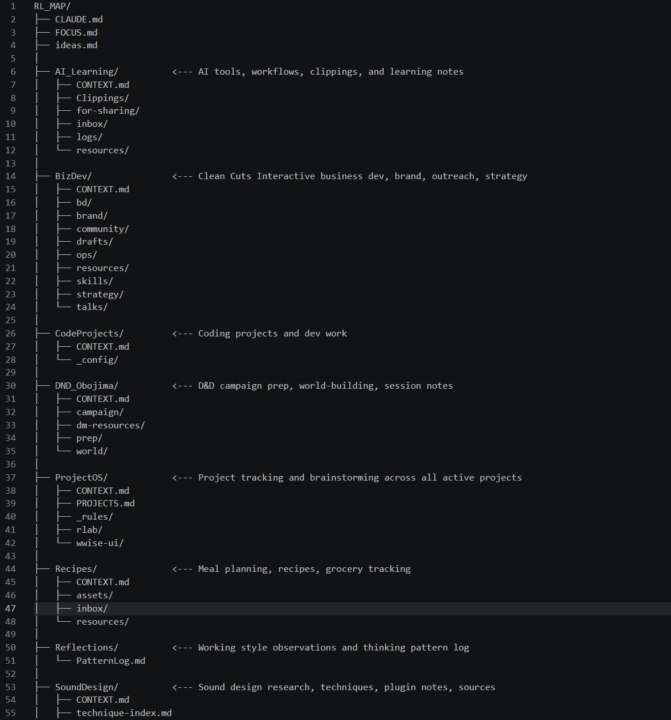
Just got around to watching the high tea session 2 and the discussion about workspace organization / management got me curious about what people are doing. For me I have a Top Level folder that is a Github repo, RL_MAP. I needed to work between 2 computers so I wanted built in sync and backup. Then within that only 1 CLAUDE.md at the root, and each workspace gets its own CONTEXT.md, root level just routes to each folder based on what I'm doing. All memory and context stored inside the repo, don't write to system memory and don't write system skills. This last part is evolving slightly as my needs are changing. The main global hook I have is I have claude auto-commit after each write, so I always have a backup and always can undo independent of Claude. Also makes looking at what changed very easy with Github's tools. This has worked for awhile but as you can see now its starting to get a bit crowded. The way Jake threw everything on the Desktop was kinda revelatory/mind blowing. But also as more and more of these small contexts appear in my work I'm seeing the benefit of not constraining everything to a single space. What have people found works for them?
2 likes • 1d
This is my workspace, but I’m still figuring out if I’m on the right path 😅 Document controller working with SharePoint
1 like • 1h
@Roc Lee Using Context.md and Index.md in every folder for navigation. Index.md contains a table with keywords that describe the contents of each folder.
1d •
Figma community showcase, great for visual design inspo
Researching ideas for a personal website and came across this, https://www.figma.com/community Some of them you can actually open in figma, great place for assets
0 likes • 1d
Thanks you're going like a 🚀 Nice to see

3d •
Exposed by a tool, Not failed by it!
I think we all can agree — we're all looking for results. We're here to up our game by providing ourselves a finely honed knife that cuts through the clutter and delivers the best AI has to offer. Below is a response to one of our members who built a solid workflow around Jake’s Method / ICM, only to keep running into error after error. -------------------------------------------------------------------------- " Exactly — “exposed by a tool, not failed by it.” If you're running into error after error with Jake’s Method or ICM, it’s almost never the method itself. It’s almost always incomplete context. Think of it like this: You’re the best chef in your circle. You’re hosting a backyard barbecue. You spared no expense on ingredients and prepped everything perfectly… but you forgot the one secret ingredient that actually makes the dish hit. What hits the table ends up tasting like generic diner food. Same thing with AI. AI doesn’t fail. It simply delivers exactly what the context allows. No more, no less. When using Jake’s Method or ICM, the difference between clean one-shot builds and constant errors usually comes down to: - Crystal-clear definition of the final desired outcome - Tight, focused context files (I keep mine under 150 lines each) - One task, one outcome — chained together properly Most people fail because they either expect the AI to magically fill in the gaps, or they dump multiple sub-tasks into a single prompt and wonder why it falls apart. Give it the full map up front — role, constraints, success criteria, architecture decisions, everything. Do that consistently and the errors drop dramatically. How’s your Context MD file structured right now? That’s usually where the real leverage is. -------------------------------------------------------------------------- The real skill isn’t finding the perfect prompting framework. It’s learning to brief the AI with the same precision and clarity you’d demand from a top-tier teammate or system architect. Master that, and everything else starts falling into place.
Poll
12 members have voted
2 likes • 3d
Whenever I feel discouraged and consider giving up, this community consistently guides me in the right direction. Yeah, I often wonder if I'm doing the right thing using the right markdowns, setup, and all the rest of it 😬

🚀
⭐
13d •
Claude Design Update is Folder Architecture
Claude design is fully released. It burns up tokens but it works very well, and allows you to automate the folder design process that I've been showing you all. My video will go on to how not to use it as I think there's still some limits to what it can be done, but it's the step in the right direction. Again, I've been telling you about building systems that will be amplified by updates, not replaced. This is a perfect example. I'm going to go ahead and make a nice long form video out about this. What do you want out of the YouTube video? Comment below what use cases you want me to explore in the long-form (and eventually course addition of course !) For those of you that have been studying this the past few months, how does it feel to be ahead for once!?
0 likes • 13d
🙌
1-7 of 7