

12d •
Opportunity for a Claude Code Developer: Build & Grow Together
Hey everyone, I'm looking for a Claude Code developer who might be interested in partnering on a project. I have an idea for a system targeting a specific industry and I'm looking for someone technical who enjoys building AI products and wants to collaborate long-term. If you have experience with Claude Code and think you'd be interested in hearing more, feel free to DM me. Looking forward to connecting with like-minded builders.
0
0

24d •
AI Research Assistant
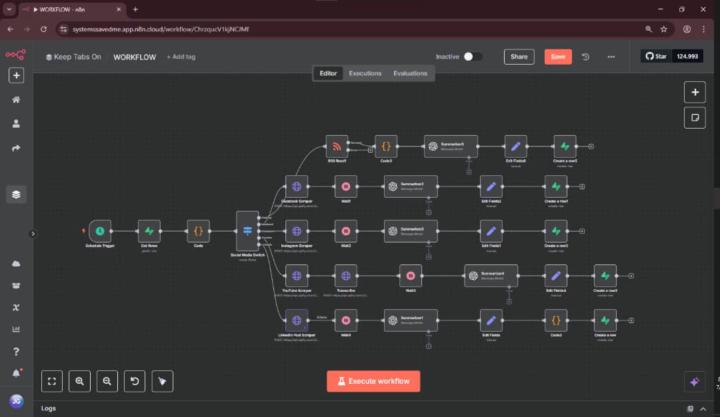
Do you know your updates could show up in one place, already summarized and organized? That's exactly what this workflow does. This workflow collects content from multiple sources, creates quick AI summaries, and stores everything in a structured format for easy access. This workflow is useful for anyone who needs to stay informed across multiple channels without spending hours gathering and sorting information manually. If you want to automate this process, send a message and let's automate
0
0

May 28 •
What is the best way to handle "Service unavailable" for N8N's AI nodes
I’m building an n8n workflow that uses AI nodes, specifically Google Gemini and Claude, as part of a long SEO research and content brief generation process. The issue I’m trying to handle more effectively is temporary AI model failures like this: ``` Service unavailable - try again later or consider setting this node to retry automatically. This model is currently experiencing high demand. Spikes in demand are usually temporary. Please try again later. ``` The problem is that this error is usually temporary, but when it happens, it can break the whole workflow execution. Since the workflow has already completed several expensive/research-heavy steps before reaching the AI node, I lose a lot of progress and often have to re-run the entire workflow manually. The retry option is on but the max is 5 attemps every 5 seconds and some time this is not anough time for the service to restore... I’m currently using n8n self-hosted version 2.22.4. What I’m considering is this approach: 1. Enable **Continue On Error** on the AI node. 2. Send the error branch to a **Code node**. 3. In the Code node, detect whether the error is a temporary/retryable error, such as: * service unavailable * high demand * try again later * timeout * 429 / 503 errors 4. If the error is retryable and the retry count is below a maximum number of attempts, send the item to a **Wait node** and then back to the AI node. 5. If the error is not retryable, or the max number of attempts has been reached, either stop the workflow or mark the item as failed. 6. I’m also thinking about moving this logic into a reusable **sub-workflow**, so I can use the same “safe AI call” pattern across multiple AI nodes. My main question is: * How do experienced n8n users usually prevent losing progress when an AI node fails after several previous research steps have already completed? My goal is to make the workflow resilient, avoid repeating expensive research steps, and only retry the AI generation part when the error is temporary.
May 29 •
Claude Code vs OpenCode: what are you using right now?
I’ve been seeing more people talk about OpenCode as an alternative to Claude Code, especially because it lets you connect different models instead of staying locked into one provider. For those using both, what has been your real experience? Do you prefer Claude Code because it feels more polished, or OpenCode because it gives you more flexibility with models and providers? I’m especially curious about real workflows, not just benchmarks.
0
0

May 17 •
Noob question about Make scenario
Hi all. I'm trying to build a morning briefing type thing. I'm just watching the make.com course in the Classroom. I'm stuck at the first hurdle (jeez). Should I add the 'watch emails' action in Gmail or 'search emails'? I've no idea what comes next, so back to the course I go. Thanks in advance
1-30 of 155

skool.com/automate-what-academy
Get paid to build AI solutions, no tech background required.
Leaderboard (30-day)
1

+10
2

+7
3

+7
4

+7
5

🔥
+5
Powered by