Activity
Mon
Wed
Fri
Sun
Aug
Sep
Oct
Nov
Dec
Jan
Feb
Mar
Apr
May
Jun
Jul
What is this?
Less
More
Memberships
Wholesaling Real Estate
78.3k members • Free
Free Email Marketing Community
2k members • Free
Cold Email Accelerator
966 members • Free
GreatCopy
32 members • Free
AI Automation Mastery
30k members • Free
NO BS Content Club
1.5k members • Free
AI Income Lab
2.9k members • $29/month
LeaX
1.7k members • Free
Tinocode
2k members • Free
16 contributions to Automate What Academy

28d •
Spent the last month deep in the AI voice agent rabbit hole.
What started as a simple experiment has turned into 7 different AI call assistants, with another one currently in development. Some of the capabilities I've implemented so far: • Inbound call handling• Outbound calling workflows • Lead qualification• Appointment scheduling • Rescheduling and cancellations • SMS confirmations and follow-ups • Reminder calls before meetings • CRM updates and record management • Call transfers when needed • Multi-step business workflows The most interesting challenge wasn't getting the AI to talk. It was getting it to remember. One of the assistants can remember previous conversations across multiple calls, retrieve historical context, and continue the conversation naturally instead of treating every call like it's the first interaction. Building these systems taught me that the hard part isn't the voice model itself—it's the orchestration behind the scenes. Memory, workflows, CRM integration, scheduling logic, error handling, and all the small edge cases end up being where most of the work happens. Still a lot to improve, but it's been fascinating seeing how far AI voice technology has come in such a short time. Curious what everyone else is building in the voice AI space right now.
0
0
Apr 20 •
Built a session-limited AI system to control usage (and it worked better than expected)
Recently worked on an AI system for a music industry website redesign. There were two parts to it: 1. A public-facing AI chat widget for general queries + lead capture 2. A private, full-screen AI assistant inside the client portal. The second one was more interesting. The client didn’t just want “AI support” — they were concerned about users overusing it and burning unnecessary tokens. So instead of a typical chatbot, I designed a session-based interaction system: - Each user gets a 5-minute active window - At minute 4 → a warning is triggered (“1 minute left”) - At minute 5 → session ends + redirects to an external GPT - Then a 5-minute cooldown kicks in - After cooldown → user can start again It basically runs in a loop. What’s interesting is how this changes behavior: Users become more intentional with their questions instead of treating it like an endless chat. Also ended up optimizing one of their internal workflows in the process: A task that used to take ~6 hours manually is now done in under 10 minutes. No fancy theory here—just structuring AI usage in a way that actually makes sense operationally. Still experimenting with how far this “controlled AI interaction” approach can go.
1
0
Mar 1 •
From zero experience in AI to deliver projects globally
One year ago, I had no experience in AI or automation. Today, I’ve delivered multiple projects globally. I’m still learning. Still figuring out consistency. But the way I think and operate has completely changed. Here are 13 simple but important lessons that made the biggest difference: 1. Mindset is the foundation. Skills grow only when your thinking is stable. 2. Focus on one thing at a time. Scattered effort creates scattered results. 3. Stick with an idea for at least 30–45 days. Nothing compounds in a week. 4. Write your plan on paper. It prevents chaos in action. 5. Never start things randomly. Random decisions = random outcomes. 6. Stop overthinking the process. Clarity comes through execution. 7. Too much knowledge at once delays action. Learn → Apply → Repeat. 8. Break tasks into chunks. It’s easier to handle small parts than one huge mess. 9. Always track your progress. What gets measured gets improved. 10. Be around like-minded people. 11. Never rely on others for your core capabilities. 12. Don’t just consume. Real growth comes from doing real work. 13. Always trust yourself, even when results are slow. One turning point for me: In the early stage, I landed multiple projects that I couldn’t fully execute myself. So I found someone to help. It worked… until one day he disappeared mid-project. NO BACKUP NO SYSTEM JUST RESPONSIBILITY I tried to find another shortcut. But I didn’t have time. So I rebuilt everything from the ground up. I went back to past projects, broke down the logic, and forced myself to understand what I had been avoiding. I delivered that project on my own. That shift — from depending on someone else to taking full control — changed everything. The biggest realization? Hope is not a strategy. Posting randomly is not a strategy. Sending outreach randomly is not a strategy. Trying offers randomly is not a strategy. Maybe it works sometimes. But in the long-term game, it won’t. STRUCTURE WINS SYSTEMS WIN CONSISTENT EXECUTION WINS
1
0
Feb 4 •
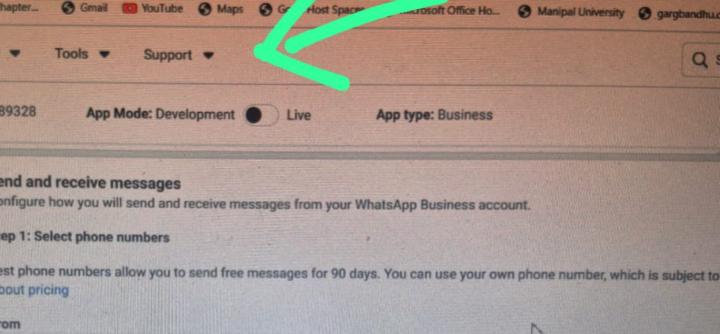
Need help with n8n and WhatsApp
Hi everyone, I am using WhatsApp Cloud API directly from Meta. Right now: - My app is in Development mode - I am using the Meta provided test phone number - Messaging works fine with the test number on n8n I have a few simple questions: 1. For real production usage (real WhatsApp number and real users), do I need to switch the app to Live mode? 2. Is the access token shown in the Quickstart / API Setup page only a temporary token and not recommended for production? 3. To get a permanent (non-expiring) access token, do I only need to switch app to Live mode or there is something else to do? 4. For automation, is it recommended to use a fresh/new WhatsApp number instead of an existing WhatsApp number? I want to be sure I am following the correct and safe process before going live. Thanks for your help.
Jan 29 •
Here is the full demo video of TalkPilot
Hey everyone 👋 A few days ago, I shared a quick walkthrough of a system I built called TalkPilot. After that post, I started getting a lot of messages asking for a proper demo — how it actually behaves in real time and how it handles different scenarios. So I recorded a full working demo showing the complete flow. You can watch it here: https://www.linkedin.com/posts/yash-maheshwari5_youre-losing-leads-even-though-people-activity-7422560191121944576-JUGF In this demo, I walk through how the system handles conversations from start to end. Some of the key things it covers: • identifies new vs existing leads using email • avoids duplicate entries in the CRM • remembers previous conversations and shows them with dates • allows notes to be added at any point and maintains a history of past notes • supports human approval for sensitive cases like discounts • allows users to update incorrect details (like email) • answers only business-related questions and ignores irrelevant ones • handles meeting booking, rescheduling, and cancellation • manages time zones correctly for both user and admin • sends automated reminders before meetings (24h and 30min) • tracks show and no-show scenarios • sends feedback or reschedule follow-ups automatically • maintains structured chat history and summarized conversation records This post is mainly to share the working demo and the overall thinking behind the system. In the upcoming videos, I’ll be breaking down how this system is developed — the logic, automation flow, and structure behind it. Would love to hear thoughts or suggestions from people building similar systems.
1
0

1-10 of 16

@seyreon
Lead Generation & Qualifier, Customer Support, Appointment Setting, Voice Assistance, and business automation solutions.|[email protected]|
Active 4h ago
Joined Jan 28, 2025
India
Powered by