
Write something

6d •
ChatGPT Race Plan!
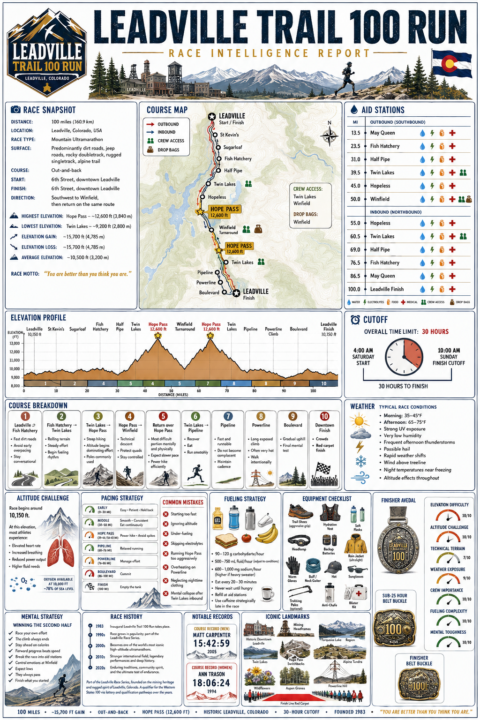
ChatGPT's Image 2.0 model is the absolute gold standard for complex image generation and with OpenAI's recent updates to their reasoning models, now you can build a fully customized race plan for whatever race you want! Using the prompt below, it will scour the internet, search reddit, and curate a deep race plan for you, complete with: 1) Detail course maps with elevation profiles 2) Aid station overviews 3) Race logistics 4) Required gear 5) Weather intelligence 6) Pacing and fueling strategies 7) Pro tips based on actual finishers Check it out here: https://www.skool.com/athlete-ai-community/classroom/c89bd042?md=c3e0f569008d431aa6ce05322510c5f6 Below are some races I just used it for! If you use it send some of the images it generates in the comments, I'd love to see them!

2d •
I had my AI red-team the Garmin setup — here's a hardened version (Win + Mac)
(works with any AI you use) Like many of you I wanted my Garmin recovery data (sleep, HRV, resting HR, body battery) going into my AI coach — it's the data Strava can't give you, and for me it changed the conversation from "how far did you run" to "why was your Wednesday night 4.5 hours of sleep." Before running the setup from the classroom guide, I did what the guide itself kind of teaches us: I asked my AI to review it first — and then to red-team the result. A proper adversarial security review. It found real things worth fixing before I'd type my Garmin password anywhere. So we rebuilt it, audited it, and I'm sharing the result so you don't have to choose between your data and your peace of mind. Same idea, same open-source library (python-garminconnect), one script — but hardened: - Read-only, and provably local. The only network connection is to Garmin. No upload endpoints, no analytics. The script is ~350 lines — you (or your AI) can read every one. - Your password is typed once, hidden, never stored — not in files, not in environment variables, not in your shell history. The script even refuses to run in terminals that can't hide your password. - Your login token never gets printed and is saved with locked-down permissions. (A printed token = a year of account access sitting in your terminal scrollback.) - Dependencies pinned to exact versions, so a compromised future release of some library can't silently install itself on your machine. - Smarter failure behavior: if the network is down, it tells you it's the network — so you never get trained into re-typing your password "just in case." That habit is exactly what phishing lives on. What you get: a garmin/ folder of clean markdown notes — one wellness note per day, one per workout, plus a data.json. Point your AI coach at it and every morning it knows how you slept before it tells you what to do. Setup: unzip, follow the README. Five minutes, Windows and Mac covered, including how to schedule it to run automatically every morning (with catch-up for days your machine was off). The only thing you ever type is your Garmin login, once.
3d •
Supplement & Nutrition Research Prompt
I'm sure most people are like me and they look at a supplement wall and have absolutely no clue what to get or who to believe. I got tired of guessing, so I built a prompt that makes Claude read the actual sports-science research on everything you take and tell you what to keep, what to cut, and what to switch to (with links). Check out yours, takes 2 minutes: 1. Open Claude, new chat, turn on Research. 2. Snap a photo of your supplement shelf (or just type the list). 3. Paste the prompt below and fill in your sport + goal. 4. You get a color-coded report: keep / cut / test / what to switch to. Grab the prompt below: https://www.skool.com/athlete-ai-community/classroom/c89bd042?md=35301a3e3f5c4ecd9e9a17bd890532ca Then drop your "cut list" in the comments. Research, not medical advice, but it beats guessing.
2
0
5d •
Claude Nutrition & Macros Tracker
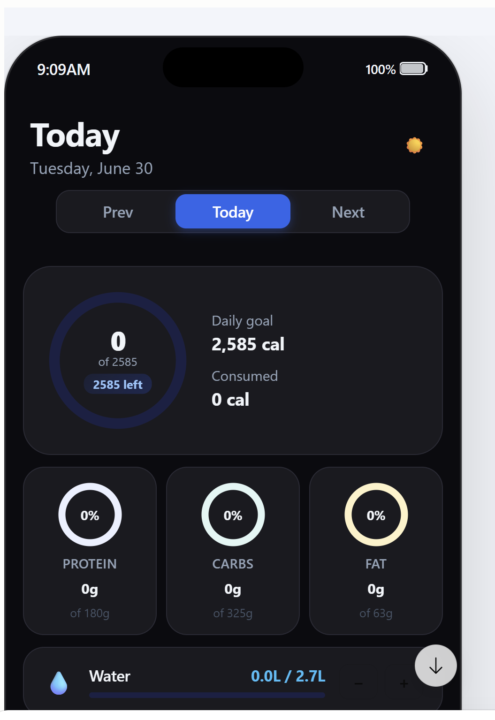
I've tried using half a dozen nutrition tracking apps and they all seem to work the same way, nothing special. Yesterday I was playing around with a creating one for free directly in the Claude mobile app and came up with a process flow that I think is fairly nifty and can eliminate the need for those paid subscriptions! Take a look below and let me know your guys thoughts: https://www.skool.com/athlete-ai-community/classroom/c89bd042?md=8cc987d499114dfc84c8c9f5b4bbcc72 It works the exact same way as other calories trackers, but can be completely customized to your needs: 1) Create a new Claude project specific to calorie tracking 2) Paste in the master prompt in the above and set-up your environment 3) Once you're configured all you need to do is take a picture of your food or tell Claude what you ate and it will log it 4) The cool part is the artifact lives in the same context window permanently Let me know your guys thoughts! Kevin
4d •
NFC Tag iPhone Safety Automation
I saw a video on Insta of a woman who was terrified running - and it made me angry. Everyone should feel safe to run wherever and whenever. So I built an iPhone automation using NFC tags to trigger a panic button. Quick one that might matter on a bad day. Full step-by-step guide (iPhone) is in the Library, including exactly what to buy and how to make it fire hands-free. https://www.skool.com/athlete-ai-community/classroom/c89bd042?md=1a5158c789104ae886290b00d00852b8 You stick a tiny NFC sticker on your watch band. Set up a shortcut on your phone once. After that, any time you feel unsafe, on a solo run, walking to your car at night, in a rideshare, you tap your watch to the top of your phone and it instantly: - Texts your live location to up to 5 people - Calls your emergency contact No app to open. No unlocking and thumbing through contacts while your hands are shaking. One tap, help is already on the way. It is free, runs on hardware you already wear, and takes about 5 minutes to set up. The stickers are a few bucks for a 30-pack on Amazon. Set yours up, then drop a comment on what else you might build with NFC tags!
2
0
1-10 of 10
skool.com/athlete-ai-community
For athletes & coaches curious about AI, who want to learn & build their own tools. No code. Come learn, build & connect. Start FREE 7 Day Challenge!
Leaderboard (30-day)
1
+21
2
+7
3
+6
4

+6
5
+4
Powered by