
Write something

7d •
Take the advance payment
Freelancers & agency owners, Take the advance payment. Seriously. I know this sounds obvious, but I ignored this rule once and I'm paying the price for it right now. A few weeks ago, I completed an entire workflow for a contractor based in California. The scope was discussed. The work was delivered. Everything was completed from my side. Then came the scope creep. Suddenly there were new requirements that were never part of the original agreement. Since those requests were outside the approved scope, the project got stuck in back-and-forth discussions. The result? The client hasn't paid the contractor yet. The contractor hasn't paid me yet. And everyone's stuck in endless conversations. The reason I didn't take an advance? "Let's build trust first." Big mistake. Trust is great. Contracts are better. Advance payments are even better. A lesson I'll never ignore again: Get the scope in writing. Take an advance. Deliver the work. Get paid. Leave on good terms. PS: Get that advance fix that windshield 😂
1
0

11d •
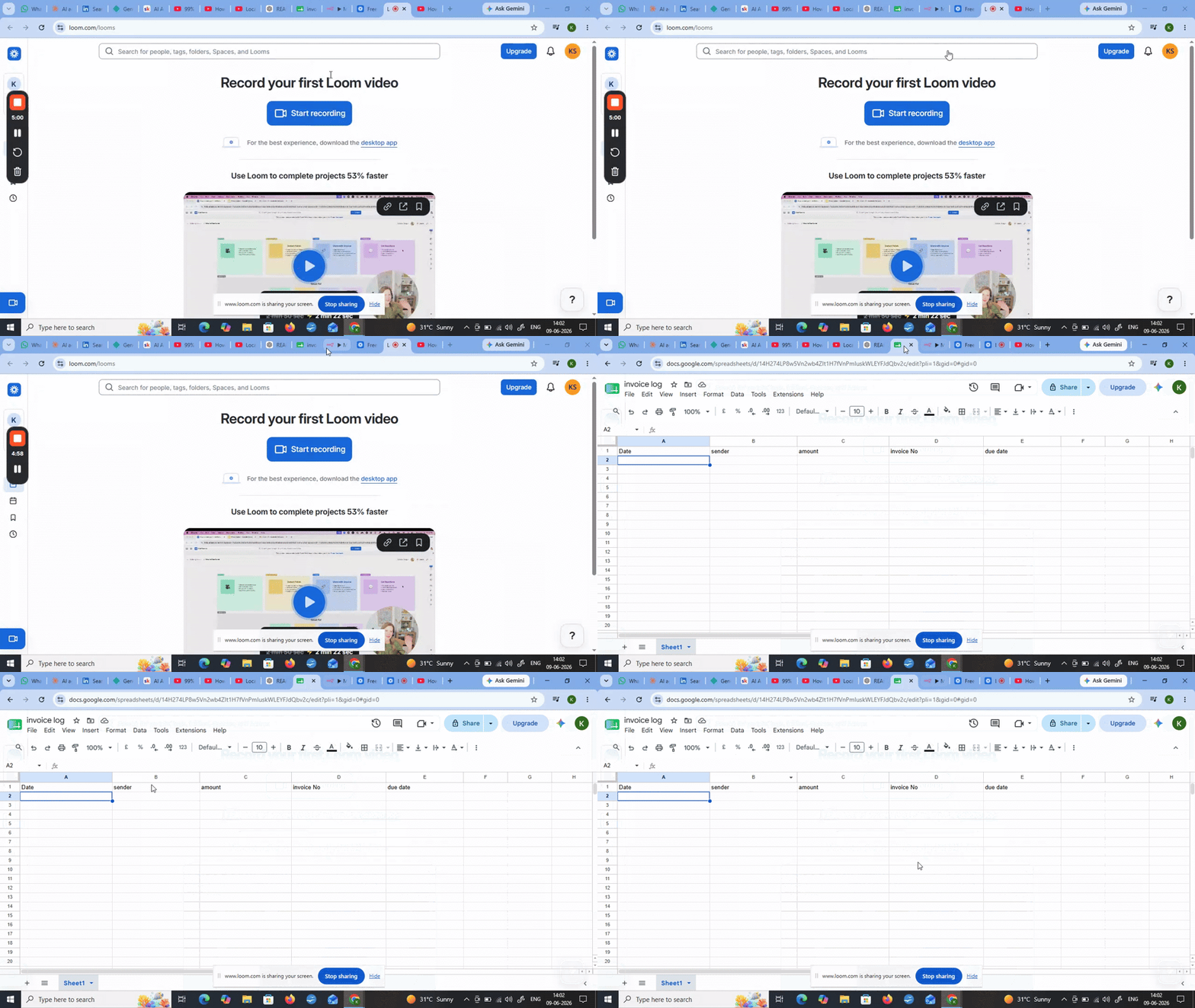
AI automation Invoice extractor (Gmail → Spreadsheet)
🎉 Built my first working n8n automation! What it does: → Gmail receives invoice email → Groq AI extracts: sender, amount, invoice number, due date → All fields auto-fill in Google Sheet → Zero manual work Stack: n8n + Groq (llama-3.3-70b) + Google Sheets API 🎥 Demo: https://www.loom.com/share/d12f508fe7834e8c9a5061f7dbfd477c Took 3 days, tons of errors, kept going. Now looking for my first paying client. Any advice on pricing and outreach for local Indian businesses? Feedback welcome! 🙏

13d •
Meta Ad Agency in a Box.
Nobody got into marketing to spend their Thursdays formatting spreadsheets. But that is where a lot of teams end up. Not because they are disorganized or under-resourced. Just because the way Meta advertising works right now, a huge portion of the actual time spent is not on thinking or strategy. It is on doing things that, honestly, should not require a human at all. Creating ad variations for a product launch. Checking what competitors are running this week. Writing up a performance summary for a client who wants it by Monday. These are not high-skill tasks. They are repetitive, time-consuming, and they sit right in the middle of every marketing team's week, every single week. And the cost is not just time. Every hour your strategist spends building a report is an hour they are not spending on the next campaign. Every day your creative process takes longer than it should is a testing cycle you did not get to run. Every week your team is manually monitoring competitor ads is a week where the market is moving and you are reacting instead of leading. That gap, between where teams are spending their time and where they should be spending it, is exactly what this system closes. Three AI agents. One generates product ad creatives and copy automatically. One monitors competitor ads from the Facebook Ad Library and surfaces the insights that matter. One pulls your Meta data and builds branded client reports without anyone having to touch a template. The outcome is not just that work gets done faster. It is that your team's actual capacity changes. You can handle more clients without adding headcount. You can run more creative tests without increasing your production timeline. You can give leadership and clients better visibility into performance without that visibility costing you hours to produce. For a CEO or a COO, this is an operational efficiency question. The same output with significantly less overhead. For a CFO, this is a margin question. Marketing is expensive. When a portion of that expense is going toward manual tasks that a system can handle, that is worth looking at.

Sep '25 •
Your Complete 30-Day Roadmap to Landing Your First $1,000+ Client
Welcome founding member! You're literally one of the first people here, and that's exactly where you want to be. The Promise: Follow this exact roadmap for 30 days. Land your first automation client. Or I'll personally help you until you do. WEEK 1: Build Your Authority (Even Starting from Zero) Day 1-2: The Foundation Setup Download these templates: Github Awesome Templates Day 3-4: Your Tech Stack Here's exactly what I use (most are free): - Automation: n8n, Zapier, or Make (pick ONE) - PDF Processing: Any tool you want (my suggestion: PDF Vector - go-to for reliability - free tier handles 100 pages) - Communication: Loom for demos, Calendly for bookings - Contracts: HelloSign or PandaDoc free tier Day 5-7: Your First "Proof" Create ONE simple automation that shows value: - Invoice extractor (Gmail → Spreadsheet) - Document organizer (Dropbox → Organized folders) - Research compiler (Web → Summary report) Assignment: Post your automation in comments. Get feedback from everyone. WEEK 2: Book Your First 5 Discovery Calls The 3-Message Method That Actually Works: Message 1: The Observation "Hey [Name], noticed you mentioned struggling with [specific problem]. Mind if I share something that might help?" Message 2: The Value "I built a simple automation that handles exactly this. Takes about 10 minutes to set up. Want me to show you how it works?" Message 3: The Close "I can jump on a quick call Tuesday or Thursday to walk through it. Which works better?" Where to Send These: - Your existing LinkedIn connections - Facebook groups you're already in - Local business owners you know - Previous colleagues or clients Goal: 5 calls booked by end of week 2 WEEK 3: Demo and Close Your First Deal The Problem Calculator Framework: Step 1: "How many hours per week does your team spend on [manual task]?" Step 2: "What's the average hourly rate?" Step 3: "So that's costing you $[amount] per month..."

24d •
Built an AI System for Real Estate Agents
Most real estate agents lose deals for one reason: Leads come from everywhere…WhatsApp, Instagram, calls, referrals, websites… …and eventually: - follow-ups get missed - hot leads go cold - tenant issues become messy - site visits are not tracked properly - everything stays scattered So I built an AI-powered Real Estate Management System called EstateFlow AI to solve this entire workflow in one place. 🔗 Live Demo: https://estateflowapp.vercel.app/ What the system does: ✅ Captures leads automatically from forms, website enquiries, AI chat, and WhatsApp ✅ AI instantly analyzes every enquiry and extracts: - budget - preferred location - urgency - buyer intent - property preferences ✅ AI automatically recommends matching properties for each lead ✅ Smart follow-up system helps agents avoid losing interested buyers ✅ AI chatbot answers customer questions 24/7 using live property data ✅ Voice AI assistant allows customers to speak directly with AI for enquiries and bookings ✅ Complete lead pipeline:New → Contacted → Qualified → Site Visit → Negotiation → Closed ✅ Tenant portal for maintenance requests and lease management ✅ Automated reminders for: - rent due - follow-ups - scheduled visits - customer confirmations ✅ Real-time analytics dashboard showing: - lead sources - conversions - pipeline health - business insights The goal was simple:Help real estate businesses reduce manual work, respond faster, and close more deals using AI + automation. Still improving the platform and adding more advanced workflows, but the core system is already running live. Would love honest feedback from agency owners here 👇 What is the biggest operational problem you face in your business today? Also — if any real estate agency, broker, or business owner wants a custom AI system like this for their own business, feel free to DM me. I’m open to building tailored solutions.
3
0
1-30 of 369
powered by
skool.com/ai-first-client-formula-8589
From zero to first $1k/month with AI automation in 30 days. Get the exact formula + templates that landed 100+ their first client.
Suggested communities
Powered by