
Write something
Pinned

🔥
19m •
AI in Real Life: Down 32lbs & Counting with ChatGPT
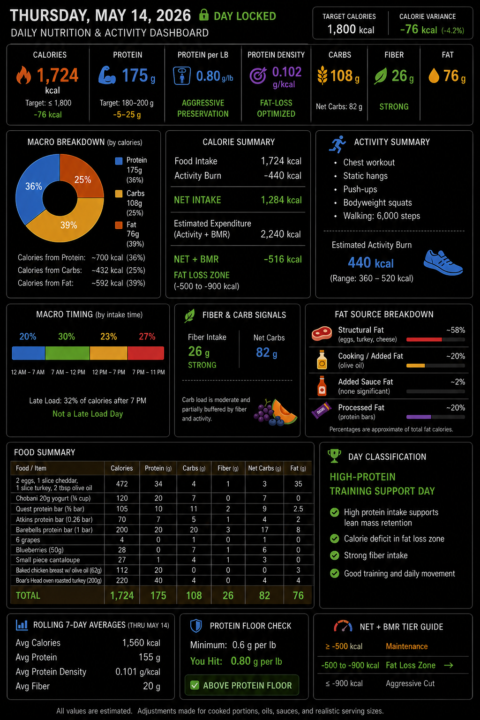
Back on my birthday, I stepped on the scale at 249.5 lbs alongside some pretty funky blood pressure and blood sugar readings. Today, I weighed in at 217.5 lbs Down 32 pounds! And more importantly… starting to feel like myself again. Since turning 60 on December 16th, I made a commitment to live my next best decade — physically, mentally, spiritually, professionally, and personally. God willing. People have asked me what changed this time. Honestly… two things. First, I hired a highly recommended nutrition and fitness coach, @Felix Urbanek who helped bring structure, accountability, and consistency to the process. Second, I tracked everything using ChatGPT. Every step. Every calorie. Every workout. Every small adjustment. Nothing extreme. Nothing glamorous. Just awareness and consistency stacked day after day. What surprised me most was how easy AI made the process feel. No spreadsheets. No complicated apps. No mental gymnastics trying to remember what I ate three days ago. Just simple conversations between ChatHPT and me that helped me stay engaged and accountable. And that matters. Because most people do not fail from lack of information.They fail from losing consistency. The interesting thing about AI is that it can quietly reduce friction in everyday life in ways people are only beginning to understand. Not by replacing effort. But by helping us sustain it. And that is a segue into the next series. I am going to show you how to do two things at the same time: Leverage ChatGPT as a nutrition and activity tracker… while also learning how LLMs actually work behind the scenes. Memory. Context. Projects. Drift. and more… Real-world AI learning… wrapped inside a real-world health journey. Now that’s AI in Real Life. Make it a ❤️ healthy day.
Pinned
🔥
11h •
NotebookLM in 10 Bites: Better Outputs (8/10)
Bite 8 — Create Better Outputs So far, you have: ✅ Signed up ✅ Created a notebook ✅ Added a source ✅ Asked your first question ✅ Created your first output ✅ Saved useful notes ✅ Turned a note into a source ✅ Used multiple sources and Web Fast Research Now it is time to create better outputs by combining everything that we learned and leveraging ChatGPT. Today, we are going to use everything you have built so far to get more useful results from NotebookLM. You can refer to the screenshots for the major steps. This matters because better outputs usually come from better inputs. If you start with stronger sources, ask better questions, save useful notes, refine what matters, and bring in more context, NotebookLM has much more to work with. That usually leads to better summaries, stronger guides, clearer checklists, and more useful visuals. This is an important shift. You are no longer just testing features. You are starting to shape quality. 🧪 Better outputs come from better inputs The quality of the output usually reflects the quality of the source material and the clarity of the request. Now let’s use it. 👉 Create a better output For today, we are going to ask NotebookLM to produce something practical and structured. Steps: ☐ Open your notebook ☐ Go to the Chat panel ☐ Paste this prompt: "Curate a list of the top 5 best practices for conducting meetings" ☐ Press Enter 👉 Now save it to a note Once you have a response you like, save it so you can build on it later. Steps: ☐ Click Save to note 👉 Now convert the Top 5 into a source Steps: ☐ Go to the Note ☐ Click the three-dot menu ☐ Select Convert to source 👉 Now use ChatGPT to create the infographic prompt At this point, you can ask ChatGPT to help you create stronger instructions for NotebookLM’s infographic field. Ask ChatGPT this: Create instructions to enter into the "describe the infographic you want to create" field to generate a professional illustration that has white space to show teams during orientation meeting. Include visual style.
Pinned
🔥
2d •
NotebookLM in 10 Bites: Fast Research (7/10)
Bite 7 — Work Across Multiple Sources If you have been following along, so far, you have: ✅ Signed up ✅ Created a notebook ✅ Added a source ✅ Asked your first question ✅ Created your first output ✅ Saved useful notes ✅ Turned a note into a source Now it is time to level up. Today, we are going to work with multiple sources and use Web Fast Research. This is where NotebookLM starts to feel much more powerful. Up to this point, you have mostly been working from one source at a time. That is useful, but in real life, good information is often spread across more than one place. A transcript, a meeting note, a process document, and a saved note you refined yourself can all hold part of the answer. When you bring multiple sources together, NotebookLM can help you find patterns, themes, gaps, and connections across them. And when you use Web Fast Research, you give NotebookLM even more relevant information to work with. 👉 Today, we will use Web Fast Research to gather more information related to your topic. 📚 Multiple Sources: More context The more relevant source material you add, the more context NotebookLM has to work with. 🌐 Web Fast Research: Add outside information quickly This helps NotebookLM bring in additional context and useful information related to your topic. Now let’s use it. Steps: ☐ Go to Web Fast Research ☐ Type this question: "Best practices for team meetings" ☐ Run the search ☐ Review the results that come back ☐ Click View and select one or more sources, or simply click Import to accept all sources ☐ Click Import to bring those sources into your notebook That’s it. You just took an important advanced step forward in how to use NotebookLM. This is where the tool starts to feel much more practical for real work, because the best insights usually do not come from one isolated document. They come from connecting ideas across multiple pieces of material and giving NotebookLM more context to work with. Today, you learned how to do exactly that by using multiple sources and Web Fast Research together.
🔥
2d •
Been Away - Daughter Graduated from College
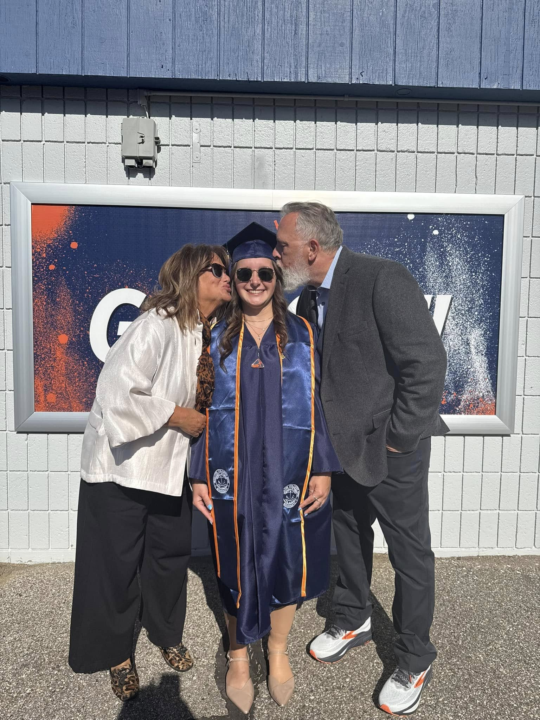
I’ve been a little quiet here the past few days for a very good reason. I was away watching my daughter graduate from college as a nurse and helping her pack up for the next stage of life. Proud girl dad moment, for sure. The good news is she already has a job lined up and is excited for what comes next. It is one of those moments where you realize how fast time moves, how much work goes into raising kids, and how rewarding it is to see them step into their own future. Back in the mix now and catching up. Grateful for this community, and also grateful for a few days focused on family.
🔥
2d •
Amazon launches Claude Platform integration across AWS
AWS on Monday launched Claude Platform on AWS, the first cloud service offering Anthropic's native platform experience through existing AWS accounts. Full article: https://www.perplexity.ai/page/amazon-launches-claude-platfor-a9q7VY9BREeEn9HhW298jQ
5
0
1-30 of 403
skool.com/ai-bits-and-pieces
To-the-point posts and single-thought AI lessons you can read in under 3 minutes and apply in everyday work and life.
Leaderboard (30-day)
1

+106
2

+27
3

+19
4

+18
5

+15
Powered by