Activity
Mon
Wed
Fri
Sun
Jun
Jul
Aug
Sep
Oct
Nov
Dec
Jan
Feb
Mar
Apr
May
What is this?
Less
More
Memberships
Agency Scaling Secrets (ASS)
2.6k members • Free
Agency Owners
19.9k members • Free
AI Automation Society
361.2k members • Free
DIGITAL EMPIRE
113 members • $399
AI Automation First Client
1.6k members • Free
AI Automation Station
2.6k members • Free
AI Bits and Pieces
720 members • Free
122 contributions to AI Bits and Pieces

🔥
3d •
NotebookLM in 10 Bites: Source Panel (2/10)
Bite 2 — Understand the Interface: Sources Panel Yesterday, you got set up in NotebookLM. Today, we’re going to actually use it. No deep dive. Just enough to understand how it works. Before we jump in, here’s what you’re working with: NotebookLM has three main panels: 📂 Sources: What you give it. This is where your documents live: PDFs, notes, transcripts, pasted text, and more.Everything starts here. 💬 Chat: How you interact. Ask questions, request summaries, and explore ideas.This is where you “talk” to your content. 🧪 Studio: What it creates. This is where outputs live: summaries, notes, guides, and things like infographics. Now let’s use the Sources panel. The fastest way to understand NotebookLM is to actually use it. 👉 First Create a New Notebook: Create New Notebook Steps: 1. Open NotebookLM 2. Click "Create new notenook" 👉 Source Panel: Add Source Information Steps: 1. Click Add source 2. Choose Copied text 3. Paste the sample document text 4. Click Insert If you don't have content to cut and paste use this: Source Content: Planning and Running an Effective Team Meeting You don’t need to master this yet. Just understand the flow: Add Source → Ask Question → Create Output 👉 Sample Screen Shot: Click the screen shot image below to see what it will look like when a source document is added to the notebook. You now understand the three basic functions of each panel, and how to add Source information. From here, we’ll build on this. If you want to keep going, go ahead and experiment—you won’t break anything. Share what you create with the community. Related Posts: NotebookLM Basics in 10 Bites: Set Up (1/10) https://www.skool.com/ai-bits-and-pieces/notebooklm-in-10-bites-sign-up-110?p=f506e49d

2 likes • 2d
@Michael Wacht keep working
🔥
3d •
NotebookLM in 10 Bites: Set Up (1/10)
Are you open to try something new together? 🗓️ For this series, I’ll walk through NotebookLM one small step at a time—each one you can digest in under 3 minutes. Not a masterclass. Not a firehose. Just one bite-sized step each day that builds on the next. NotebookLM is one of those tools that once you understand how to use it, it can turn documents, notes, transcripts, and messy information into something useful. That’s the goal here. By the end of the 10 days, you should understand the basics well enough to start using NotebookLM for your own work, learning, or projects. 🗓️ Day 1 — Get Set Up For today, just get signed in. If you already have an account, great — you’re one step ahead. ✅ Step 1: Go to NotebookLM and create your account - Go to: https://notebooklm.google.com - Click “Try NotebookLM” - Sign in with your Google account If you already use Gmail, this takes about 10 seconds. That’s it for today. Most people don’t get stuck because something is hard. They get stuck because they haven’t started. This step removes friction. Today is just about getting started. 🚀 Tomorrow, we’ll create your first notebook and add source information. What is NotebookLM? 📒 NotebookLM is an AI tool from Google that works with your documents. Instead of pulling from the internet, it helps you organize, summarize, and generate insights from the information you provide — notes, PDFs, transcripts, and more.
1 like • 3d
@Michael Wacht it's really an effective tool
1 like • 2d
@Michael Wacht
🔥
5d •
⚠️ AI Slop: Uncanny Valley of Writing
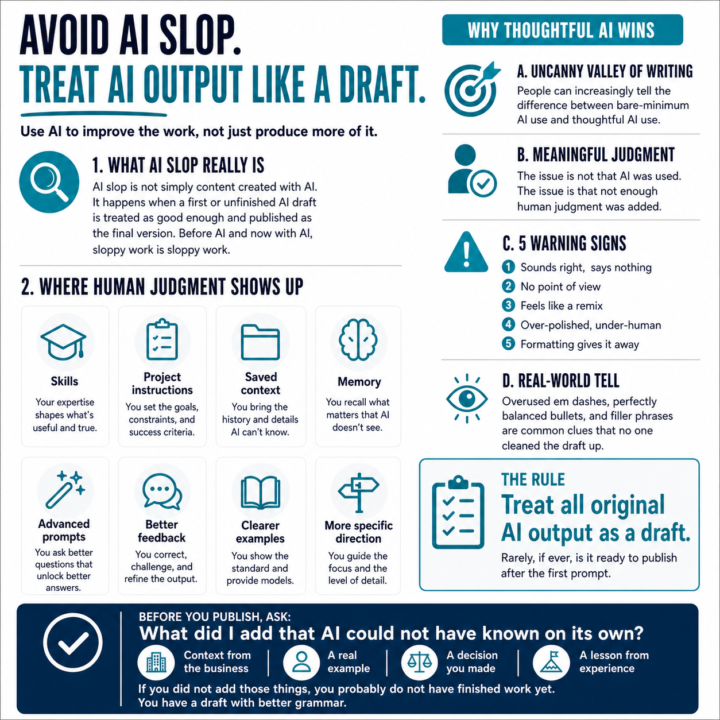
The latest buzzword is “AI slop.” And honestly, I think it is a useful one. But AI slop is not simply “content created with AI.” That misses the point. AI slop is what happens when someone treats the first or unfinished AI drafts as “good enough” and publishes it as the final version. Decent but unfinished content is not the antidote to procrastination. Before AI, and now with AI, sloppy work is sloppy work. We are quickly approaching a time where, in a professional environment, people can tell the difference between bare-minimum AI use and thoughtful AI use. You have probably heard of the uncanny valley problem with AI images, where something looks almost right, but still feels off. I believe something similar is starting to happen with AI writing. That same intuitive sense that tells people an image was generated by AI also starts to work against the person who presents unedited AI output as their own thinking. Not because they used AI. Because they did not add enough meaningful human judgment. And that judgment can show up in a lot of ways: - Skills. - Project instructions. - Saved context. - Memory. - Advanced prompts. - Better feedback to the LLM. - Clearer examples. - More specific direction. Thoughtful AI use creates better content, deeper meaning, and a sharper perspective. My rule is pretty simple: 👉 Treat all original AI output as a draft, and accept that it will rarely, if ever, be ready to publish after the first prompt. Always a draft. Here are five warning signs I look for: 1. It sounds right, but says nothing If you can delete the sentence and the meaning does not change, cut it. 2. There is no point of view If anyone could have written it, no one will remember it. 3. It feels like a remix AI is very good at summarizing what already exists. Your job is to add the experience, the example, or the opinion. 4. It is over-polished, but under-human Perfect grammar does not equal trust. Sometimes the post needs a shorter sentence.A rougher line.A little more of you.
1 like • 5d
@Michael Wacht
🔥
15d •
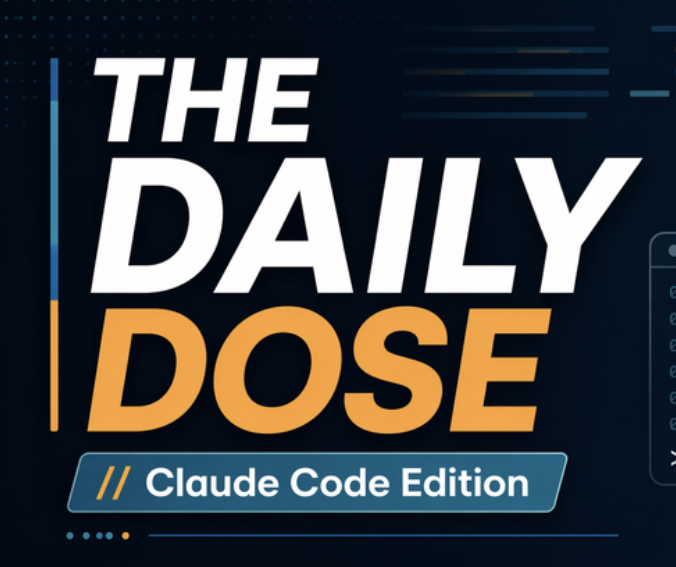
🖼️ ChatGPT Images 2.0 - Created LinkedIn Brand Thumbnail
I spent a little time testing the new ChatGPT Images 2.0 for a branding use case. I wanted a new visual for my LinkedIn “The Daily Dose” series that felt clean, modern, professional, and aligned with my AI Bits & Pieces branding. My prompt was simple and straight forward: "I need to create a LinkedIn thumbnail for a post I'm doing called "The Daily Dose". I'm doing the Claude Code edition, and I need my logo in there for AI Bits and Pieces." In one shot, I had the base image: I uploaded my logo, it came back with a great design, it matched my colors, and was not overly produced. From there, I took the image into Canva to add my headshot, and I was done. It saved me hours today. ChatGPT gave me the creative acceleration. Canva gave me the final polish. That is becoming a very practical workflow for content creation: generate fast with ChatGPT → refine visually with Canva → publish confidently ChatGPT Images 2.0 helped me create the foundation. Canva helped me finish the job. Results below: 1) Tile shot 2) Original image from ChatGPT Image 2.0 3) Final image - After applying Magic Layers, offsetting the word "Daily" and adding my headshot in a frame it was done
3 likes • 15d
@Michael Wacht
🔥
20d •
AI in Real Life: So Many AI Tools, So Little Time — Here Is What They All Have in Common
I was commenting on a great question posed by @Girish Mohan, and I found myself thinking about it long after I responded.🤔 That reflection led to this post about the future of AI in a practical, real-world sense. The essence of the question: Is there a risk in becoming too dependent on one AI company, product, or tool set? I thought that was a smart question, because there is some real tension there. At this early stage of AI adoption, there is always a risk in overcommitting too soon. We have seen this before. During the eCommerce boom, a lot of companies looked like they were going to dominate, and many of them did not last. Early markets move fast. Leaders change. Sometimes you pick the wrong horse. 🐎 At the same time, over-diversifying creates its own problem. If you keep jumping from one tool to the next, you can lose the benefit of synergy. Some tools work better together. 🔗 Gemini and NotebookLM are a good example. When tools are designed to complement each other, the combined value can be better than chasing ten separate platforms that do similar things. There is also a practical reality that matters. One person cannot learn every AI tool coming to market. There are too many. At some point, each of us has to decide where we want depth, where we want breadth, and what kind of workflows actually fit the way we work. 🎯 That means some specialization is going to matter. People will need to find their niche instead of trying to master everything. But for me, the bigger point sits above all of that. We are moving into a very different communication model. 1) AI is shifting toward natural language. 2) More of the work will be handled through machine-to-machine interaction at machine speed, 3) All this be done without the user interface we think of today. 🛍️ My shopping AI may eventually interact with a retailer’s concierge AI. 🤖 Your scheduling assistant may work directly with mine. 🔄 Business systems will increasingly pass tasks, context, and decisions across platforms without the same kind of manual navigation we deal with today.

1 like • 20d
@Michael Wacht yeah so many tool and so much work to do
1 like • 20d
@Michael Wacht
1-10 of 122

@muskan-ahlawat-4812
AI Automation for PI Law Firms | Building & teaching real AI workflows that actually work | No-code • LLMs • Real systems
Active 7h ago
Joined Sep 16, 2025
Powered by