
Pinned

💎
⭐
14h •
🚀New Video: I Can Actually Watch My AI Agents Work Now
In this video, I show you exactly how I created a system where my AI agents in Claude Code have their own virtual office and I can watch them work in real time. We were able to do this using Pixel Agents, a VS Code extension that turns your terminal agents into animated pixel art characters. I walk through a full demo spinning up multiple agents in parallel, show you step by step how to set it up yourself, and share my honest thoughts on whether this is actually useful or just a fun gimmick.
Pinned
💎
⭐
2d •
🚀New Video: From Zero to Your First Agentic AI Workflow in 26 Minutes (Claude Code)
This full guide shows exactly how to go from zero to your first agentic AI workflow in 26 minutes with Claude Code, step by step. This is the most valuable video I've ever made on Agentic AI Workflows, so make sure you watch this full tutorial. Hope you enjoy!
Pinned

🔥
5d •
🏆 Weekly Wins Recap | Feb 14 – Feb 20
This week inside AIS+ was all about ROI, real client work, and turning skills into assets. A lot of “firsts.” A lot of momentum. And a lot of proof that execution compounds. Here are a few standout wins inside AIS+ 👇 👉 @Rishi Raj closed a $1,000 client on his birthday - full ROI on his community investment… and he’s only 17. 👉 Dave-Amy Simpson signed and delivered their first paid vibe-coded automation gig, breaking down pricing and value-based selling. 👉 Sven Loeffler got his first fully implemented client workflow live, removing manual data entry completely. 👉 @Emmanuel Gonzalez shipped his first landing page + AI assessment flow, complete with email automation and spam protection. 👉 @Sai Santosh Kumar D rebuilt his website using Framer MCP + Claude Code, leveling up speed and execution. 🎥 Super Win Spotlight: @Abdurrahman Ibrahim | $8,000 from Showing Up Abdurrahman calculated it. $8,000 earned directly from AIS+. No cold DMs. No aggressive outreach. Just posting valuable work consistently. A simple tutorial about OpenAI Web Search API brought in a high-end client. Other posts brought more inbound opportunities. His biggest surprise? How easy it became once he started showing authority publicly. When you share real work in a high-signal room, the right people notice. Abdurrahman’s story is proof that visibility + value = opportunity. 🎥 Watch Abdurrahman’s story 👇 ✨ Want to see wins like this every single week? Join AI Automation Society Plus and turn learning into clients, systems, and real ROI 🚀


1h •
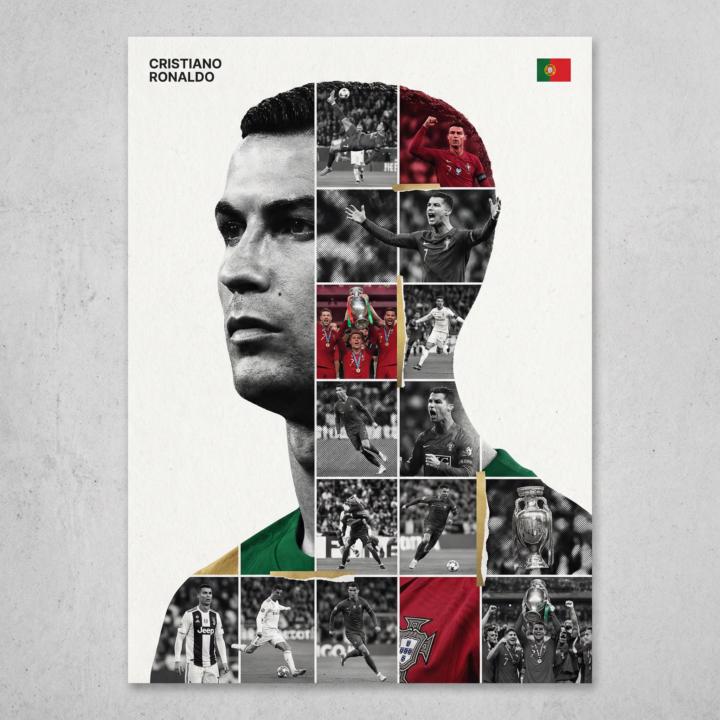
Legacy Poster Template 🫡
Poster system template that turns any celebrity into a high-end tribute piece All built using the same framework 👇 This style works because: • The main black & white silhouette becomes the “container” • Career moments are rebuilt as a textured photo grid • Selective color adds rhythm instead of chaos • Typography stays small, controlled, premium It feels like something you’d see in a design annual or gallery, not just a random collage 💡 How to Use This 1. Replace [PERSON NAME] 2. Use high-quality career images 3. Apply textures (halftone, fabric, film grain) 4. Keep color accents minimal and intentional 5. Respect the micro-scaling typography rules Don’t oversize the name Don’t over-color the grid Restraint is what makes it premium Prompt 👇 [PERSON NAME]. Act as a high-end sports graphic designer creating a conceptual tribute poster. The style is a complex "dual exposure photo-grid composite" with mixed-media textures. **CENTRAL STRUCTURE (THE VESSEL):** The central focus is a large-scale, high-contrast black and white portrait silhouette of [PERSON NAME]. This main portrait acts as the container. **THE GRID FILL & TEXTURES (MIXED MEDIA):** The interior of the silhouette is populated by a dense "photo mosaic grid" of action shots from the person's career. **CRITICAL TEXTURE INSTRUCTION:** Do not just paste flat photos. Apply artistic textures to various grid cells to create a tactile, collage feel. Use effects like: - **Halftone Dots:** Comic-book style raster patterns on some cells. - **Fabric/Embroidery:** Subtle thread or canvas textures suggesting a jersey or patch. - **Film Grain:** Heavy noise on specific high-contrast action shots. **COLOR STRATEGY:** The base is Monochrome B&W. Use selective color overlays (relevant to the team/flag) ONLY on specific grid cells to create a rhythm. **TYPOGRAPHY & BRANDING (STRICT MICRO-SCALING):** 1. **Top Left (The Name):** Write "[PERSON NAME]" strictly using the font **Inter Semibold**.

5m •
Choosing the Right Tool for AI Automation
Hey everyone! 👋 I’ve been diving deep into AI automation recently and have been exploring different tools to build workflows efficiently. One topic I keep seeing pop up in discussions is the choice between Make.com and n8n. As someone who primarily uses Make.com, I’ve been loving the visual workflow builder, the wide range of integrations, and how quickly I can get things running. That said, I’m curious to understand other perspectives: many people in the community mention n8n as a more advanced or flexible option, and I’d love to hear what specifically makes it stand out to you. I know every builder has their own workflow style and priorities, so there’s probably no “one size fits all.” But I think it’s helpful to share experiences and trade-offs, especially for those of us still learning the ropes and trying to decide where to focus our time. So here’s my question to the community: - If you’ve used both, what’s the biggest difference you’ve noticed between Make.com and n8n? - If you had to recommend one to someone starting out or trying to grow quickly, which would it be and why? - Are there specific use cases where you think one clearly wins over the other? I’d love to learn from your experiences and start a discussion here — I’m sure there’s a lot we can all take away from each other’s insights.
0
0
1-30 of 13,661

skool.com/ai-automation-society
A community built to master no-code AI automations. Join to learn, discuss, and build the systems that will shape the future of work.
Leaderboard (30-day)
1

🔥
+3640
2

+1401
3

🔥
+1309
4

+789
5
🔥
+612
Powered by