Activity
Mon
Wed
Fri
Sun
Jul
Aug
Sep
Oct
Nov
Dec
Jan
Feb
Mar
Apr
May
Jun
What is this?
Less
More
Memberships
SBA Model (FREE)
47 members • Free
AI Automation (A-Z)
159.4k members • Free
AI Automation First Client
1.8k members • Free
AI Automation Agency Hub
325.6k members • Free
AI Automation Growth Hub
3.7k members • Free
AI Automation Society
407.1k members • Free
222 contributions to AI Automation Society

💎
⭐
11d •
"This model isn't good enough yet. I'll wait for the next one."
I hear some version of this constantly and it's almost always wrong. Not because the models are perfect because I know they're not. But because "is the model good enough" blames the tech rather than yourself. AI adoption isn't binary. It's not "can the agent do this entire job for me? Yes or no?" It's "how much can it do, how much do I need to guide it, and where does it still make me faster than I was?" Right now there's a massive gap in how people use this stuff. On one end, someone is running a business by themselves that used to take a team of 15. On the other end, someone opens the AI tool their company gave them, asks for some research, watches it hallucinate everything, closes it, and decides AI just isn't there yet. If everyone has access to the same models, then why are we seeing people get drastically different outcomes? Because if someone is getting great results from a setup you could copy today, the bottleneck isn't the model. It's the driver. The way I think about it, there are three layers: → The model is the engine. Opus, GPT, Gemini, whatever you're running. Everyone can buy the same one. → The harness is the car built around that engine. Claude Code, Codex, OpenClaw. The tools it can reach, the way it spins up sub-agents to split up the work, the whole system that turns a raw model into something that can actually do a job. → You're still the driver. Your prompts. The context you feed it. The memory and skills you set up so it knows how you work. And the steering, for when it starts to drift. You can put the car on cruise control. But if you don't steer, you're still going to crash. (Yeah, I know some cars have lane assist now. You get the point.) A while back, Andrew Ng ran a version of this. GPT-3.5, an older and "worse" model, wrapped in a simple agentic workflow, hit around 95% on a coding test. GPT-4 on its own, no workflow, hit 67%. That workflow is the harness. A better harness around an older engine beat a newer engine running on its own.

10 likes • 11d
@Frank van Bokhorst yeah
💎
⭐
May 8 •
🚀New Video: Overwhelmed By AI? Just Copy My Tech Stack
If you've been feeling overwhelmed by the constant stream of new AI tools, this video is my full breakdown of the stack I actually use day to day, ranked into a tier list. I cover what's earned a spot as a daily driver, what I've graduated from, and why a lean stack always wins. I also share the mindset shifts and decision framework I use to stay focused so new releases stop pulling me off my path.
5 likes • May 8
Perfect👌💯
10 likes • May 8
@Ahmad AI Dude
💎
⭐
May 3 •
🚀New Video: I Tried 100+ Claude Code Skills. These 6 Are The Best.
After 400 hours in Claude Code, I noticed that businesses keep paying for the same six types of skills. In this video, I break down each one, what it does, and why these simple, boring skills are the ones that actually sell. Whether you're brand new to AI automations or already building for clients, these are the skills worth learning first.
1 like • May 4
🔥🔥🔥🔥

May 1 •
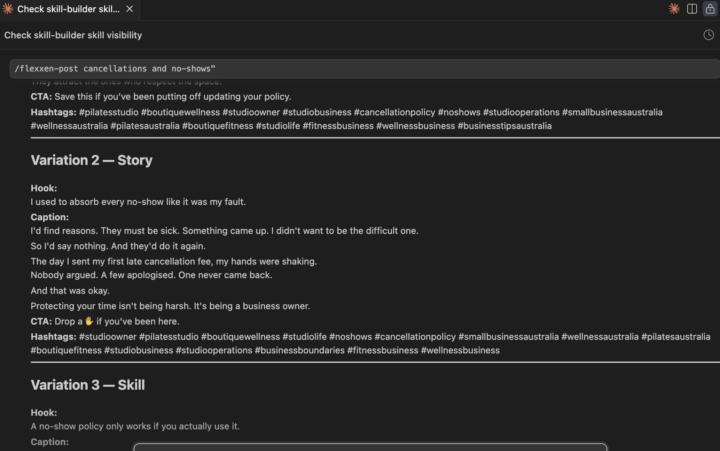
DAY 3 ✅ Built my first custom Claude Code skill
Skill name: flexxen-post What it does: Takes any topic and writes 3 branded Instagram post variations — hook, caption, CTA and hashtags — in my exact brand voice, for my exact audience (Pilates and boutique wellness studio owners in Australia). How I trigger it: /flexxen-post [topic] Example: /flexxen-post cancellations and no-shows → 3 ready-to-post captions. Instantly. Saved to a file automatically. One optimisation I made: I added guardrails — no sales pitching, no generic wellness clichés, no American spelling. Because I know my audience and I know what I DON'T want it to write. The output that blew my mind 👇 "I used to absorb every no-show like it was my fault. I'd find reasons. They must be sick. Something came up. I didn't want to be the difficult one. So I'd say nothing. And they'd do it again." I didn't write that. The skill did. In my voice. First try. Next I'm building /flexxen-reel and /flexxen-story so every content format has its own skill. Day 4 tomorrow 🌿 #claudecode #aiautomation #studioowner
0 likes • May 1
Wow, good work keep going
💎
⭐
May 1 •
🚀New Video: Build & Sell Claude Code Operating Systems (2+ Hour Course)
This is the full walkthrough of how I build my AI Operating System inside Claude Code, from the frameworks I use to think about it (the Three Ms and the Four Cs) to the actual setup, connections, skills, and routines that run while I sleep. By the end you'll know exactly how to set up your own AIOS, even if you've never opened Claude Code before. The full template, docs, and resources are free in my school community linked below. GITHUB REPO
8 likes • May 1
@Mike McDonald
0 likes • May 1
Wow
1-10 of 222

Active 11d ago
Joined Feb 6, 2026
Powered by