
Pinned

🔥
9h •
🏆 Weekly Wins Recap | June 13 – June 19
From first client agreements and first automations to AI-powered business systems and community-led breakthroughs, another strong week inside AIS+ proved that progress comes from doing. 🚀 Standout Wins of the Week inside AIS+ 👉 @Kacper Rutkiewicz crossed both 1,000 YouTube subscribers and $15K in automation revenue, sharing the journey from learning to building a real business. 👉 @Mario Chasco turned a client demo into a formal agreement, proving that consistent learning and showing up eventually creates opportunities. 👉 @Chase Coughlin shipped a complete Vendor Management System for his family farm, connecting multiple tools into a real-world automation solving an actual business problem. 👉 @Esther Adelodun , an auditor by profession, built her first working workflow and reminded everyone that technical backgrounds aren't required to start building. 👉 Michael Williamson completed his first automation just three days into the program, then immediately improved it with error notifications and monitoring. ⸻ 🎥 Super Win Spotlight | @Valli Challa Valli joined AIS+ as a first-time founder looking to better understand AI, automation, and how to build alongside other entrepreneurs. Since joining, she has: - Launched with beta users for her product - Built valuable relationships and partnerships through the community - Leveraged startup resources, credits, and training to accelerate growth - Gained confidence navigating the founder journey Her biggest takeaway? You don't have to figure everything out alone. Sometimes the most valuable resource isn't another tool, it's being surrounded by people solving similar problems and moving in the same direction. 🎥 Watch Valli's story 👇 ✨ Every successful founder starts somewhere. Inside AI Automation Society Plus, members are learning faster, building real solutions, and helping each other move forward every single week.

Pinned

💎
⭐
1d •
🚀New Video: GLM 5.2 in Claude Code is Blowing My Mind
I switched Claude Code over to GLM 5.2 and ran it all day. It's a 756 billion parameter open source model you can route straight into the Claude Code harness for about five times cheaper than Opus, and for most of my knowledge work it held up fine. In this one I show you what it can build, where it beats Opus and where it doesn't, and exactly how to set it up so you can switch between models per project. Here's the config I use. Drop this into your .claude/settings.local.json and swap in your own Z.ai key: "env": { "ANTHROPIC_BASE_URL": "https://api.z.ai/api/anthropic", "ANTHROPIC_AUTH_TOKEN": "your-z-ai-api-key-here", "ANTHROPIC_API_KEY": "", "API_TIMEOUT_MS": "3000000", "ANTHROPIC_DEFAULT_OPUS_MODEL": "glm-5.2", "ANTHROPIC_DEFAULT_SONNET_MODEL": "glm-5.2", "ANTHROPIC_DEFAULT_HAIKU_MODEL": "glm-5.2", "ANTHROPIC_SMALL_FAST_MODEL": "glm-5.2", "CLAUDE_CODE_SUBAGENT_MODEL": "glm-5.2" }
Pinned
💎
⭐
17d •
What do you get if you upgrade to AIS+?
Some of you have never heard of the AIS+ community. Others have but the part that trips you up is the actual difference between the two. Either way, this post will give you clarity. This free group is a bundle of quick resources pulled from my YouTube videos, plus a massive open community that anyone can join. It's a great place to get your bearings and see what's possible. But it's open to everyone, it can be noisy and overwhelming, and there's no path through it. You can get help from other members, but I rarely answer questions here. AIS+ is the opposite: - A step by step roadmap with a clear order, so you're never guessing what to do next - A much smaller community of people who are seriously committed to building and selling AI agents - I answer questions every day and run a weekly Q&A call where you can get direct access to me For the course material: The roadmap takes you from zero to building and selling AI agents, and the whole thing is built on the latest tech like Claude Code and Codex. We update it constantly. The old n8n material has been archived. It's still there if you want it, but it's no longer the focus, because the way you build today has moved on and the courses moved with it. Here's the actual roadmap inside, in order, with when each piece opens up: 1. Start Here (opens the moment you join). Gets you oriented. How the community works, the path ahead, and how to get help when you need it. 2. Build Your Portfolio (opens the moment you join). Why a portfolio matters, beginner level tutorials, and what types of projects to focus on. You end up with real work you can show a client. 3. Claude Code (opens the moment you join). This is now its own dedicated course. Build faster, turn ideas into working automations, and go deep on the tool serious builders are using right now. This takes you from beginner to advanced, step-by-step. 4. Get Your First Clients (opens after 30 days). Getting your first clients is hard, because you don’t have any case studies yet. So, we analyzed all of the success stories from our members and found they get their initial clients with two different techniques: warm outreach and Upwork. So, we teach both techniques in detail with exactly what to say, exactly how to position yourself when you have no proof.

16d •
How I Sent 60,000 Cold Emails in April & Made 6 Figures (All Automated)
Hey Automation community! 👋 This took me 2 hours to put together. If you're looking for a proven way to get clients AT SCALE and actually make money for your AI automation agency, then this is for you. I run an AI agency that basically made no money because I had a hard time finding new clients. I tried cold email starting in November and it quickly become one of our most profitable acquisition channels. I knew NOTHING about cold outreach when I started. I learned A LOT along the way (including plenty of expensive mistakes), so here’s everything I wish I had known from day one. If you don't know what cold email marketing is, it's when you send out thousands of emails to potential leads you haven't spoken to before. The goal is for them to book a consult with you where you'll then close on a deal. If you do it badly, it will look like spam and nobody will respond. Do it where you target relevant people ready to buy and offer a lot of VALUE, and you will generate sales. Part 1: Technical Setup Domain Strategy - Buy dedicated domains just for email campaigns — never ever use your main company domain. - Set up DNS records immediately: SPF, DKIM, and DMARC. - Use Google Workspace or Microsoft 365 for better deliverability (roughly $4–6 per account per month). Email Account Setup - Create 1–4 email accounts per domain. - Start slow: 10 emails per account per day, then increase volume by ~10% each day. - Max once warmed up: ~25 emails per account per day. - Example: 4 domains × 3 accounts × 25 emails = 300 emails/day to begin with. IMPORTANT: Always warm up accounts for at least 14 days before ramping up. Extra tips that help a lot: - Add real profile photos and complete the accounts. - Older domains tend to perform better when you can get them. - Set up a custom tracking domain for accurate open/click data. Choosing Your Sending Platform You can do it manually with the technical setup above but it's way easier to buy an email account that's already configured and ready to go. I ran high-volume campaigns using Instantly.ai because it has good deliverability, analytics, and tons of guides on it since it's used by many agencies to get clients. It’s not perfect but probably one of the best for cold email right now. But honestly, your lead list and outreach message matter more.

3d •
Build Log: Day 2 — I Thought I Was Setting Up Firecrawl
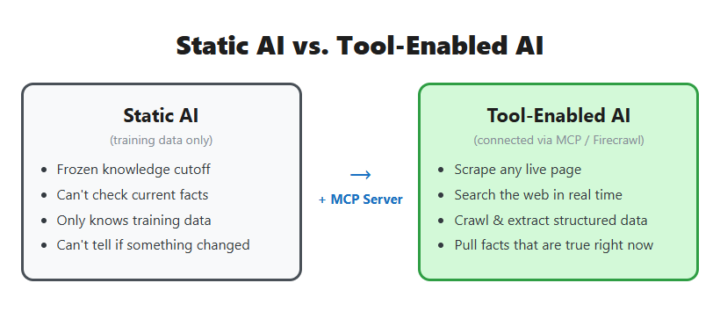
I thought Day 2 was going to be pretty straightforward. Get Firecrawl connected, learn how MCP servers work, scrape a few pages, check the box, and move on. That lasted about five minutes. Once I had access to real web data inside Claude, I stopped thinking about the tool and started thinking about actual problems I could solve. The setup took less time than expected. What I didn't expect was how fast I stopped thinking about "the MCP server" as the thing I was building, and started just using it. The first real test wasn't a demo page — it was a problem already sitting on my desk. I needed actual product data: door styles, colors, finishes, starting prices, for close to 100 cabinet collections on a supplier's site, for an intake app I'm building for my own home-services business. Before Firecrawl, my plan was to open every page and copy it by hand. Once Firecrawl worked, I pointed it at all 97 pages with a schema telling it exactly which fields to pull, and let it run. One pass, and I had a clean, structured dataset instead of a stack of browser tabs — collection name, brand, door style, color, finish, price range, ready to use instead of retyped by me one page at a time. That's the moment the assignment stopped being "set up a tool" and turned into "the tool just did three hours of my work in one request." The credit system bit me. A search costs 2 credits, and you get 1 back by calling a separate feedback function right after — but only if you remember to. I didn't, more than once, and burned through more of the monthly allowance than I needed to before I noticed the balance dropping faster than it should. A tool only does what you actually tell it, not what you meant. While I was poking at test pages that didn't matter much. Once I pointed it at a real problem with real data going into a real product, every shortcut I skipped showed up as a real cost or a real gap. Has an assignment that was supposed to be "just set this up" ever turned into you solving an actual problem before you even finished reading the instructions?
1-30 of 19,851

skool.com/ai-automation-society
Learn to get paid for AI solutions, regardless of your background.
Leaderboard (30-day)
1

🔥
+8249
2

🔥
+6663
3

🔥
+5999
4

+2050
5

+1836
Powered by