Activity
Mon
Wed
Fri
Sun
Jul
Aug
Sep
Oct
Nov
Dec
Jan
Feb
Mar
Apr
May
Jun
What is this?
Less
More
Memberships
AI Automation Society
407.2k members • Free
9 contributions to AI Automation Society

12h •
Build Log: Day 3 — I Thought I Was Building One Skill
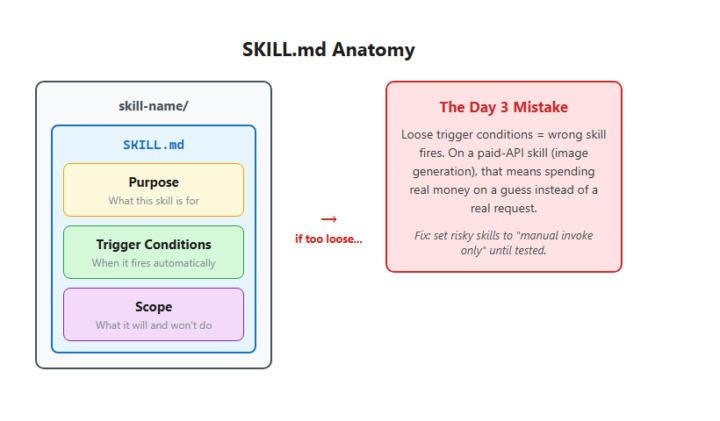
🤷♂️ Install Skill Builder, make one skill, check the box, move to Day 4. That's not what happened. Once skill anatomy clicked — a skill is just a folder with a SKILL.md that says what it's for and when to fire — I couldn't stop. I had workflows sitting around that deserved their own trigger: drawing diagrams, generating hand-drawn visuals, building frontend pages, scanning disk space, tracking AZQ status. By the end of the day I'd built nine of them, not one. [Image: day3-publication-image.png — SKILL.md Anatomy diagram] **What worked:** the structure itself. Every skill follows the same shape — purpose, trigger, scope — so they're consistent and easy to hand off to next-week me. The disk cleanup and AZQ status tracker skills are already doing real work. **What broke:** I let a couple of skills auto-trigger before they earned it. One generates images through a paid API, and its trigger conditions were loose enough to fire on the wrong request and spend real money on a guess. I caught it before it ran wild, but had to go back and switch it to "manual invoke only" until it's tested. **The lesson:** a skill is only as good as its trigger conditions. Loose triggers don't just mean "wrong tool fires" — when the tool costs money per call, a loose trigger is a bill waiting to happen. **Next:** actually test the experimental skills instead of trusting they'll behave. Anyone else build more than the assignment asked for once the pattern clicked?
2d •
Build Log: Day 2 — I Thought I Was Setting Up Firecrawl
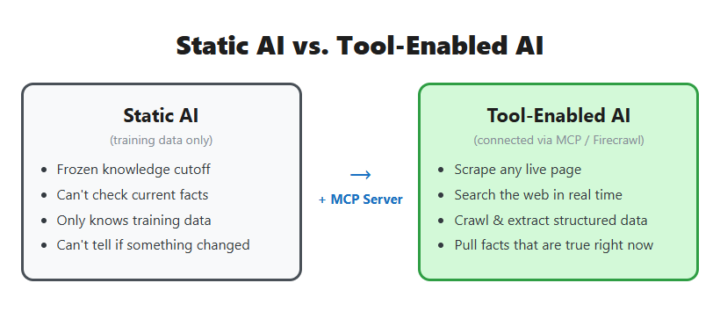
I thought Day 2 was going to be pretty straightforward. Get Firecrawl connected, learn how MCP servers work, scrape a few pages, check the box, and move on. That lasted about five minutes. Once I had access to real web data inside Claude, I stopped thinking about the tool and started thinking about actual problems I could solve. The setup took less time than expected. What I didn't expect was how fast I stopped thinking about "the MCP server" as the thing I was building, and started just using it. The first real test wasn't a demo page — it was a problem already sitting on my desk. I needed actual product data: door styles, colors, finishes, starting prices, for close to 100 cabinet collections on a supplier's site, for an intake app I'm building for my own home-services business. Before Firecrawl, my plan was to open every page and copy it by hand. Once Firecrawl worked, I pointed it at all 97 pages with a schema telling it exactly which fields to pull, and let it run. One pass, and I had a clean, structured dataset instead of a stack of browser tabs — collection name, brand, door style, color, finish, price range, ready to use instead of retyped by me one page at a time. That's the moment the assignment stopped being "set up a tool" and turned into "the tool just did three hours of my work in one request." The credit system bit me. A search costs 2 credits, and you get 1 back by calling a separate feedback function right after — but only if you remember to. I didn't, more than once, and burned through more of the monthly allowance than I needed to before I noticed the balance dropping faster than it should. A tool only does what you actually tell it, not what you meant. While I was poking at test pages that didn't matter much. Once I pointed it at a real problem with real data going into a real product, every shortcut I skipped showed up as a real cost or a real gap. Has an assignment that was supposed to be "just set this up" ever turned into you solving an actual problem before you even finished reading the instructions?
1 like • 13h
@Vedant Heda t ended up pointing back at my cabinet business. I started learning Firecrawl, then got distracted solving real workflow problems with it. Once the data started flowing, the tool became less interesting than what I could build with it. 😄
1 like • 13h
@Jason Elam NOTE TO SELF: Thank You!!

0 likes • 2d
@Bhavesh Parihar Honestly, I think a lot of people look for pain points that are too big. Most of the useful things I've built started with something that annoyed me. A task I kept repeating. Information I had to look up over and over. A process that took too many steps. For example, I didn't wake up and say, "I'm going to build an AI operating system." I just kept solving the next problem in front of me, and eventually those solutions started connecting together. If you're not seeing a huge pain point yet, that's okay. Start paying attention to the little frustrations in your day. Those are often where the best ideas come from.
0 likes • 13h
@Bhavesh Parihar I wasn't looking for a startup idea—I was trying to make my own work easier. Every time I solved one pain point, the next one became obvious. Start with something that annoys you personally and build the fix. You'll learn faster and you'll know if the solution is actually useful. Keep going. 👍
2d •
Build log: Day 1 of the AIS Challenge Was Supposed to Be Simple.......
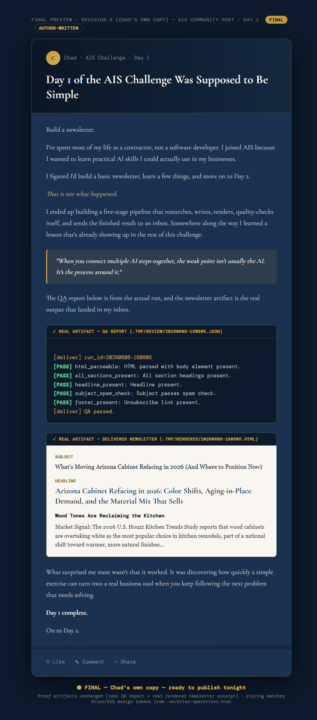
Build a newsletter. I've spent most of my life as a contractor, not a software developer. I joined AIS because I wanted to learn practical AI skills I could actually use in my businesses. I figured I'd build a basic newsletter, learn a few things, and move on to Day 2. *That is not what happened.* I ended up building a five-stage pipeline that researches, writes, renders, quality-checks itself, and sends the finished result to an inbox. Somewhere along the way I learned a lesson that's already showing up in the rest of this challenge: > When you connect multiple AI steps together, the weak point isn't usually the AI. It's the process around it. The QA report below is from the actual run, and the newsletter artifact is the real output that landed in my inbox. ``` [deliver] run_id=20260608-160805 [PASS] html_parseable: HTML parsed with body element present. [PASS] all_sections_present: All section headings present. [PASS] headline_present: Headline present. [PASS] subject_spam_check: Subject passes spam check. [PASS] footer_present: Unsubscribe link present. [deliver] QA passed. ``` > **Subject:** What's Moving Arizona Cabinet Refacing in 2026 (And Where to Position Now) > **Headline:** Arizona Cabinet Refacing in 2026: Color Shifts, Aging-in-Place Demand, and the Material Mix That Sells > > **Wood Tones Are Reclaiming the Kitchen** > Market Signal: The 2026 U.S. Houzz Kitchen Trends Study reports that wood cabinets are overtaking white as the most popular choice in kitchen remodels, part of a national shift toward warmer, more natural finishes... What surprised me most wasn't that it worked. It was discovering how quickly a simple exercise can turn into a real business tool when you keep following the next problem that needs solving. **Day 1 complete.** On to Day 2.
11d •
I Was Supposed to Build a Newsletter... Things Escalated Quickly. 😅
Day 1 took me 2 days. 😅 I joined the AIS Challenge expecting to build a simple newsletter automation. What I didn't expect was how much I'd learn by actually getting my hands dirty. Over the last couple of days I: - Learned the WAT (Workflows, Agents, Tools) framework - Connected Claude Code, Perplexity, Anthropic, and Gmail - Fought through API keys, environment variables, and OAuth - Built my first end-to-end AI workflow - Successfully delivered my first AI-generated newsletter to my inbox What started as a challenge project quickly became something much bigger. Instead of just completing the exercise, I began adapting it to fit my own business goals and exploring how it could evolve into contractor market intelligence, content automation, and lead generation. The biggest lesson for me was that building teaches faster than consuming. Every roadblock forced me to learn something new, and every small win built confidence. Huge thank you to @Nate Herk for creating a challenge that encourages people to actually build instead of just watch videos. The hands-on approach made all the difference. Looking forward to seeing where the next 6 days take me. #AISChallenge
0 likes • 4d
@Dionny Chejito Honestly, neither yet. 😆 I started with the lead-gen adaptation, but the project kind of took on a life of its own. The biggest traction so far has actually been in building the systems around it — intake flows, automation ideas, dashboards, branding, and figuring out how all the pieces connect together. One thing I've learned is that finding leads is usually the easy part. Building a process that can consistently handle, qualify, track, and follow up with those leads is where most of the real work is. So I'm still experimenting, but I think the outreach piece is ultimately where the biggest leverage will be once the foundation is in place.
1-9 of 9

@chad-clark-8639
Entrepreneur building digital businesses and exploring AI automation. Joining to learn, connect, and turn ideas into scalable systems.
Active 10h ago
Joined Jun 7, 2026
INTJ
Portland ME
Powered by