
Pinned

💎
⭐
9h •
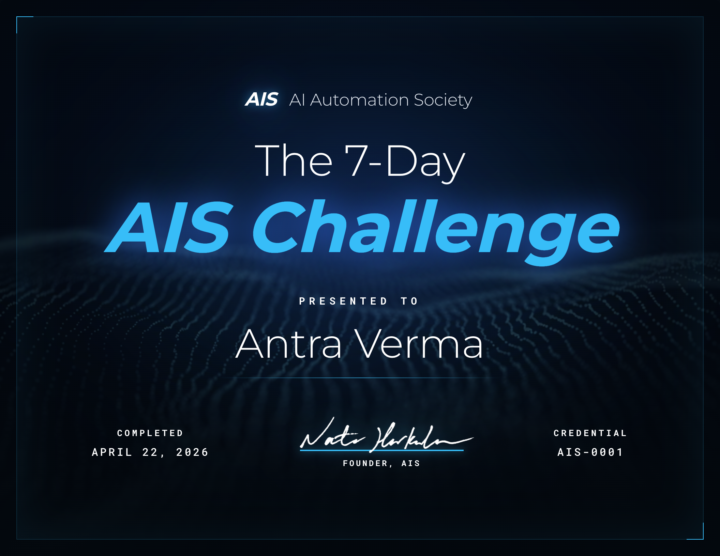
🎉 We have our FIRST graduate of the 7-Day Challenge!
Huge congrats to @Antra Verma for being the first to cross the finish line 👏 To celebrate, we're hooking her up with a FREE AIS shirt, and her official completion certificate is attached below 🏆 Let's give her a massive round of applause in the comments, she set the bar! Can't wait to see more of you submit your projects and join the graduate club. 👉 Want to take on the challenge? Head to the Classroom section or jump in HERE 👕 And if you want to grab some AIS merch for yourself, check it out HERE Cheers everyone! - Nate
Pinned
💎
⭐
14h •
🚀New Video: 32 Claude Code Hacks in 16 Mins
I went from complete beginner to mass-producing workflows, websites, and AI agents in real time. This video covers 32 Claude Code hacks I actually use, sorted from beginner to pro. The best ones are saved for the end
Pinned

🔥
3d •
🏆 Weekly Wins Recap | Apr 18 – Apr 24
From high-ticket deals and agency SaaS launches to client systems, websites, and real-world automations - this week inside AIS+ was packed with serious builder energy. 🚀 Standout Wins of the Week 👉 Michael Wacht closed a $10K AI Readiness Assessment deal, sponsored by finance with training and system-integration readiness included. 👉 @Uros Pesic signed a £9K UK agency client for a 3-month ops audit and used multi-agent Claude Code to prep 20+ interviews in parallel. 👉 @Fernando Gómez turned a corporate social-media automation system into an agency SaaS with €2.5K setup + €100/month per client. 👉 @George Mbajiaku closed his first $1,300 client by shifting his pitch from “n8n builder” to “problem solver.” 👉 @Josh Holladay wrapped a 30-day client sprint and earned a retainer offer for ongoing strategy, builds, and AI education. 🎥 Super Win Spotlight | Balaji Iyer Balaji joined AIS+ knowing he could build something useful - but he needed structure, clarity, and confidence. Since joining, he has: • Set up his own cloud instance, Docker, Postgres, and self-hosted n8n • Built a real backend workflow from scratch • Created an app he now improves daily • Moved from “Can I really do this?” to “How can I make this better?” His biggest shift? Going from sitting on the sidelines → to finally building something he’s proud of. Balaji’s journey is proof that once you take the first step, momentum starts to build. 🎥 Watch Balaji’s story 👇 ✨ Want to see wins like this every week? Step inside AI Automation Society Plus and start building assets that compound 🚀


🔥
3h •
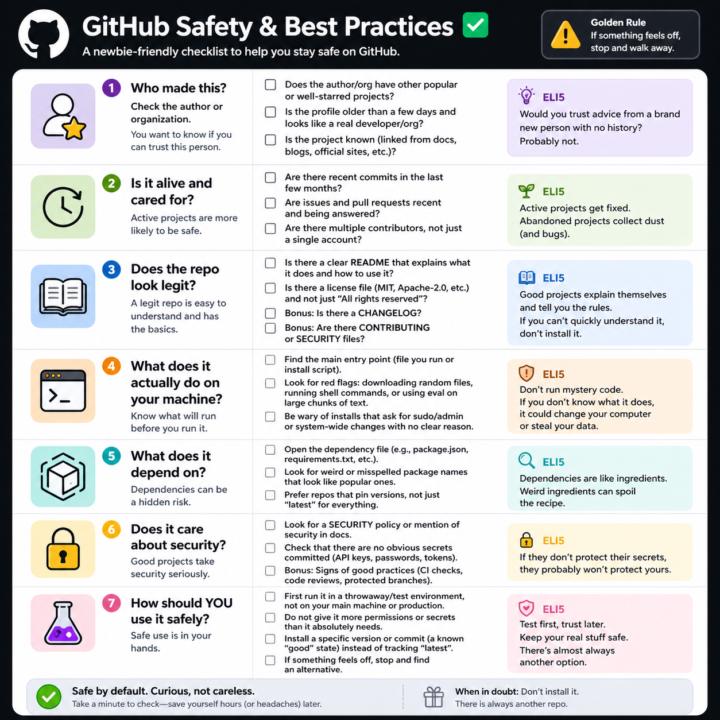
GitHub Safety and Best Practices Checklist
Here’s a simple, newbie‑friendly safety checklist you can run through every time you look at a GitHub repo. ## 1. Who made this? - Does the author or org have other popular or well‑starred projects? - Is the profile older than a few days and look like a real developer/org? - Does the project feel “known” (linked from docs, blogs, official sites, etc.)? If it’s a totally new account with one flashy repo, be extra careful. ## 2. Is it alive and cared for? - Are there recent commits in the last few months? - Are there recent issues and pull requests being answered? - Do you see multiple contributors, not just a single throwaway account? Abandoned projects aren’t always bad, but they age poorly from a security angle. ## 3. Does the repo look legit? - There is a clear README that explains what it does and how to use it. - There is a license file (MIT, Apache‑2.0, etc.), not just “All rights reserved”. - Optional but nice: CHANGELOG, CONTRIBUTING, SECURITY files. If you can’t quickly understand what it does, don’t install it. ## 4. What does it actually do on your machine? - Find the main entry point (the file you run, or the install script). - Look for obvious red flags: downloading random files, running shell commands, or calling `eval` on big chunks of text. - Be wary of “install” steps that ask for sudo/admin or system‑wide changes with no clear reason. If you don’t understand the install steps, don’t run them yet. ## 5. What does it depend on? - Open the dependency file (like `package.json` for Node, `requirements.txt` for Python). - Scan for weird or misspelled package names that look like popular ones. - Prefer repos that pin versions (not just “latest everything forever”). If the dependency list looks messy or huge for a simple tool, treat it carefully. ## 6. Does it care about security? - Look for signs of security features: security policy, mention of security in docs, or badges for scans/CI. - Check that there are no obvious secrets committed (API keys, passwords in plain text).

3d •
How do you build workflows in n8n without getting stuck?
It's an odd question, because I never struggle with this. So I had to figure out why. This is not the conventional approach. Most devs write down the entire system before building. I don't. What I do is walk through every single step as if it's happening live. Let's say I'm building a WhatsApp lead nurturing system. First, leads have to enter n8n from the CRM. But on what rules? We don't want all leads to enter the flow. So we set up rules based on why they should enter. Then we figure out when and how they should receive a message. We don't want to send messages during holidays, weekends, or late at night. So we block those times out. Then we decide how many messages to send. When do we stop the automation? What if someone responds? What if someone asks us to stop? Yeah, it's a lot to think through. But if you skip this step, you'll miss things. The first time I built a lead nurturing system, I didn't think about holidays at all. Once a client flagged it, I added it to every build by default. Experience fills in the gaps. Writing it down and thinking through every step makes building easier. It also helps to understand the full process from start to finish. If you can't explain what's supposed to happen between A and B, you can't build it. If you can, building it is 10x easier
1-30 of 16,056

skool.com/ai-automation-society
Learn to get paid for AI solutions, regardless of your background.
Leaderboard (30-day)
1

+5400
2

🔥
+3896
3

+3256
4

+2173
5

+1136
Powered by