Activity
Mon
Wed
Fri
Sun
Mar
Apr
May
Jun
Jul
Aug
Sep
Oct
Nov
Dec
Jan
Feb
What is this?
Less
More
Memberships
Skoolyard 🧃
752 members • Free
The AI Advantage
72.2k members • Free
AI Masters Community with Ed
11.1k members • Free
Wealth Academy Lite
34.4k members • Free
🔺 LifeOS Community
83 members • Free
AI Automation First Client
1.1k members • Free
Data Driven Ads (By Cometly)
663 members • Free
BatchDialer & BatchLeads
1.1k members • Free
OFM | Fameu (free course)
8.9k members • Free
8 contributions to AI Automation First Client

7d •
Invoice Processing Workflow - The $47K Discovery 🔥
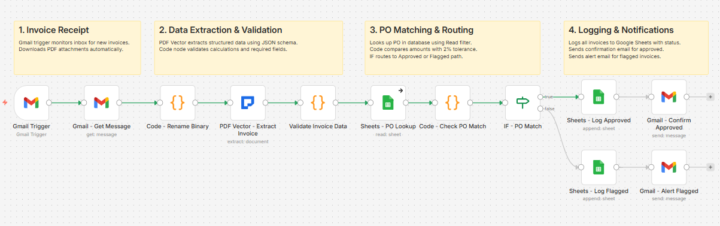
Client 3 changed everything for me. Small logistics company. 320 invoices monthly. AP clerk spending 15 minutes per invoice. Do the math. 80 hours a month. Just data entry. I quoted $1,800 for the automation. They said yes same day. THE BUILD THAT ALMOST FAILED: Built it over a weekend. Gmail trigger watching their AP inbox. Gets the message and downloads the PDF attachment. PDF Vector extracting vendor, amounts, line items into structured JSON with a schema I defined. Validation code checking if line items actually add up to the total. PO lookup matching against their purchase order database. Tested with 10 invoices. Perfect. Day 3? Broke completely. THE PROBLEM I MISSED: Some vendors put totals at top. Others at bottom. A few had multiple pages with running totals. My extraction worked for simple invoices. Complex ones? Math didn't match. Spent 6 hours fixing it. Added a validation code node that catches calculation errors before anything logs. Built 2% tolerance into the PO matching because small rounding differences aren't worth flagging. IF node routes clean invoices to approved path, problems to flagged path. Each path logs to Google Sheets with different status. Approved invoices get confirmation email back to sender. Flagged invoices alert the AP team with specific reasons why. THE UNEXPECTED OUTCOME: Two months in, client calls me. "Your workflow caught something." $8,400 duplicate payment from a vendor. The validation warnings flagged it. Nobody would've noticed manually. Year one results: $47,200 in overpayments and calculation errors caught. My $1,800 setup fee suddenly looked cheap. WHAT I LEARNED: Don't just extract data. Validate it. The validation layer is worth more than the extraction itself. Current workflow runs 12 nodes total. Gmail Trigger catches invoice. PDF Vector extracts everything with JSON schema. Code validates calculations. Sheets lookup matches PO. Another code node checks 2% tolerance. IF routes approved or flagged. Logs to Google Sheets. Sends confirmation or alert email.

1 like • 6d
Having been fortunate in my success, I am giving $30,000 in financial assistance to the first 20 individuals who message me “Grace" to help ease current financial burdens.
8d •
The $12.88 Problem Nobody Talks About 🔥
Average manual invoice processing costs $12.88 per document. Automated costs $2.50. That's a 559% difference most businesses never calculate. I discovered this running numbers for a potential client last month. Small accounting firm processing 200 invoices monthly. They were spending $2,576 monthly on manual entry. Automation would cost them $500. THE HIDDEN COSTS THEY WEREN'T COUNTING: Data entry time: 15 minutes per invoice at $25/hour Error correction: 4 hours weekly fixing mistakes Late payment fees: $340 monthly from processing delays Staff frustration: Their best bookkeeper quit over "mindless work" THE 6-MONTH COMPARISON: Manual approach: $19,896 spent Automated approach: $2,700 total Savings: $17,196 in six months But here's what made them finally pull the trigger - I asked one question: "What could your bookkeeper accomplish with 50 extra hours monthly?" Her answer: "Actually serve our clients instead of typing numbers." THE FRAMEWORK I USE NOW: Calculate per-document cost: Time spent × hourly rate Add error correction overhead Add opportunity cost of delays Present side-by-side comparison: Manual vs Automated over 6 months Let them see the compound effect. THE RESULT: They signed the next day. System went live in 3 days using n8n workflow templates. First month processed 178 invoices with zero errors. Three months later they referred me to two other accounting firms. Same pitch. Same results. THE LESSON: Most businesses know automation saves time. They don't know it saves THIS much money. Do the math FOR them. Show the spreadsheet. Let numbers tell the story. When you can show someone they're burning $3,000 monthly on a solvable problem, the sale makes itself. Start tracking per-document costs in your workflows. Invoice processing, form entry, contract review - calculate the manual cost. Then show them the automated alternative. What's your per-document cost? Have you ever calculated it?
2 likes • 7d
Having been fortunate in my success, I am giving $30,000 in financial assistance to the first 20 individuals who message me “Grace" to help ease current financial burdens.

16d •
6 Months in, 0 Clients. Need a reality check on my outreach/offer.
Hey everyone, I’m reaching out because I’ve hit a massive wall and could use some honest advice from those who have successfully landed their first few clients. I started my AI Automation journey in August 2025. I’ve been grinding for 6 months now, but I haven't been able to land my first client or make any money yet. It’s been a tough road with no testimonials or case studies to show. Here is what I’m currently doing: - Niche: Construction / Independent Management Consultants. - Outreach: personalized Instagram DMs and cold Emails. - Offer: Automating invoice data entry (Gmail to Google Sheets) and AI-powered email handling. - The Problem: Most people either don't see the message, or they say they are "too small" for automation and want to wait until they hire employees. I recently started offering to do the work for free just to get a case study/testimonial, but even then, I’m getting "I’m okay for now" as a response. I’d love your advice on a few things: 1. If you were back at zero with no portfolio, which outreach method would you go all-in on? 2. Is Instagram the wrong place for construction? Should I pivot to LinkedIn or Cold Email? 3. How do you convince a "one-man show" that automation is worth their time before they scale? Really appreciate any feedback or "brutal honesty" you guys have. I’m committed to making this work, I just need to find the right door to knock on.
1 like • 10d
Having been fortunate in my success, I am giving $30,000 in financial assistance to the first 20 individuals who message me “Grace" to help ease current financial burdens.
Sep '25 •
🚀 NEW FREE COURSE: n8n Templates That Land Clients
Hey Community! 🔥 Just launched something massive... 📚 Introducing: n8n Templates That Land Clients The complete library of document automation templates I've been using to close clients consistently. What's Inside: ✅ 15+ Production-Ready Templates (I will post each day) - Invoice processing automation - Contract data extraction - Form parsing workflows - PDF to database pipelines - Automated report generation - And much more... You'll Master: 🎯 Adapting templates to ANY industry (legal, healthcare, accounting, real estate) 🎯 Customizing workflows without breaking them 🎯 Handling edge cases and weird document formats Why This Course? I got tired of seeing you all build from scratch when proven solutions already exist. Every template in this course has: - Been tested in production - Landed real clients - Generated recurring revenue The Reality: Stop spending weeks building custom workflows. Start with templates that already work. Customize for your client. Deploy in hours, not weeks. 💡 Quick Math: One template → One client → $500-1,500/month 15 templates → 15 opportunities → Do the math 😉 📍 Find It Here: Classroom → n8n Templates That Land Clients · AI Automation First Client. 🎁 What You Get: - Complete n8n JSON files (copy & paste ready) - Setup guides for each template - Industry customization instructions - Edge case handling strategies - My exact client pitch approaches Ready to stop building from scratch? Drop a "⚡" if you're diving in today!
0 likes • 19d
Having been fortunate in my success, I am giving $30,000 in financial assistance to the first 20 individuals who message me “Grace" to help ease current financial burdens.
1 like • 10d
Having been fortunate in my success, I am giving $30,000 in financial assistance to the first 20 individuals who message me “Grace" to help ease current financial burdens.
11d •
Client Processing 480 Resumes Annually (Automation Recovered 200 Hours) 🔥
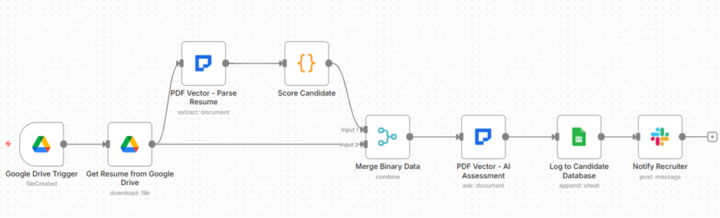
Recruiting company. 480 resume submissions annually. Manual screening consuming 200 hours. Built automated parser. Eliminated manual review. THE CLIENT'S MANUAL PROCESS: Every resume manual. Recruiter downloads document. Opens spreadsheet. Reads entire resume carefully. Types candidate name, email, phone, location manually. Reads work history. Counts years of experience manually. Notes each job with dates. Calculates total years. Reads education section. Determines degree level. Scans skills section. Lists technical skills. Assigns score subjectively based on qualifications. Determines candidate status - strong candidate, potential fit, or not a match. Types assessment notes manually. 25 minutes per resume. 480 annually. 200 hours total. Audit problems - 67 candidates scored inconsistently. Same qualifications rated differently by different recruiters or at different times. 89 resumes with incorrect experience calculations from manual counting. 123 strong candidates marked potential due to rushed screening. 45 overlooked candidates with matching skills. THE AUTOMATION SOLUTION: 8-node workflow with scoring automation: Google Drive Trigger → Download → Parse Resume → Score Candidate → Merge Binary → AI Assessment → Log Database → Notify Team Monitors folder. Resume uploaded. Triggers processing. EXTRACTION: Personal - name, email, phone, location, LinkedIn profile Experience - company, position, start date, end date, achievements Education - institution, degree, field of study, graduation date Skills - technical skills list, soft skills, languages, certifications SCORING CALCULATIONS: Experience score (40 points max) - 5+ years = 40pts, 2-5 years = 25pts, 0-2 years = 10pts Education score (30 points max) - PhD = 30pts, Master's = 25pts, Bachelor's = 20pts Skills match score (30 points max) - 3 points per matched required skill, maximum 30pts Total score out of 100. Auto status - 75+ = Strong Candidate, 50-74 = Potential, <50 = Not Match. AI ASSESSMENT:
1 like • 11d
Having been fortunate in my success, I am giving $30,000 in financial assistance to the first 20 individuals who message me “Grace" to help ease current financial burdens.
1-8 of 8

@tom-hougaard-2942
Spreading love and kindness, if you ever need help, I’ll do my best to support you.
Active 2d ago
Joined Jan 16, 2026