Activity
Mon
Wed
Fri
Sun
Jan
Feb
Mar
Apr
May
Jun
Jul
Aug
Sep
Oct
Nov
Dec
What is this?
Less
More
Memberships
Project Biohacked
8.7k members • Free
AI Automation Society
211.9k members • Free
Brendan's AI Community
22k members • Free
Voice AI Accelerator
6.7k members • Free
The Real Estate Academy
3k members • Free
Wholesaling Real Estate
60.5k members • Free
AI Automation Circle
5.2k members • Free
AI Workshop Lite
13k members • Free
AI Automation Mastery
21.8k members • Free
5 contributions to AI Automation Society

21d •
Cofounder
Hi @everyone I’m looking for a technical cofounder to run an ai agency, contact me if you’re interested, thanks 🔥

🔥
21d •
The Production Document Handling Pattern (Not Just Demo-Quality Files) 🔥
Templates work great on clean demo PDFs. Client's production documents: rotated, low-quality scans, mixed formats. Built preprocessing branch that handles real-world mess before main workflow. THE DEMO vs PRODUCTION GAP: Template testing: Clean PDFs, perfect orientation, clear text, consistent formatting Client reality: Phone photos of documents, 90° rotations, coffee stains, mixed Word/PDF/images, varying quality Template broke immediately on production data. THE PREPROCESSING SOLUTION: STAGE 1: QUALITY ASSESSMENT Check document quality before expensive processing → Flag or fix issues → Route accordingly STAGE 2: AUTO-CORRECTIONS - Rotation detection and correction - Quality enhancement for low-res scans - Format normalization (all to PDF) - File size optimization STAGE 3: PROCESSING BRANCH Clean documents → Standard workflow Questionable documents → Enhanced processing Unreadable documents → Human review queue THE PREPROCESSING NODES: NODE 1 - QUALITY CHECKER: Analyzes document: resolution, orientation, format, readability score Output: quality_score (0-100), issues_detected array, processing_recommendation NODE 2 - AUTO-FIXER (IF needed): Rotation correction: Detects text orientation, rotates to 0° Enhancement: Increases contrast, sharpens text, removes noise Normalization: Converts all formats to standard PDF NODE 3 - ROUTER: High quality (>80): Standard processing Medium quality (50-80): Enhanced processing with higher confidence thresholds Low quality (<50): Human review with original file attached WHAT THIS HANDLES: Phone photos, rotated scans, mixed formats, poor lighting, tilted documents, multi-page variations THE NUMBERS: Documents monthly: 180 Perfect quality: 95 (53%) Auto-fixed: 68 (38%) Human review needed: 17 (9%) Processing accuracy: - On demo-quality docs: 98% - On production docs (without preprocessing): 76% - On production docs (with preprocessing): 96% Cost impact: Preprocessing adds: $0.03 per document Failed extractions prevented: 40 monthly
2 likes • 21d
Great moves 🔥💯

21d •
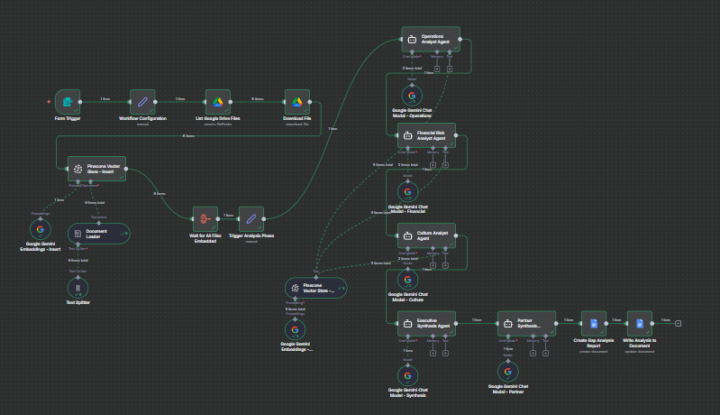
Refactoring from Parallel to Sequential Agents for better context
I recently posted V1 of my Agency Operations Engine, which used a parallel architecture where the Operations, Financial, and Culture agents ran simultaneously. After testing, I realized the final synthesis was weak because the agents weren't learning from each other. I completely rebuilt the flow to be sequential. The Logic Change: 1. Ingestion: Added a "Wait" node to ensure all files are fully embedded in Pinecone before analysis starts. 2. Sequential Chaining: Instead of running in parallel, the data now flows linearly: Operations Analyst -> Financial Risk Analyst -> Culture Analyst. 3. Partner Synthesis: In V1, I just used a Set node to combine the text. In V2, I added a specialized "Partner Synthesis Agent" that acts as a Senior Partner (McKinsey style), taking the previous outputs to generate a "Strategic Business Health Audit" before writing to Google Docs. The output quality is significantly higher when you force the LLM to build context layer by layer rather than trying to stitch three simultaneous outputs together.
2 likes • 21d
Amazing logic applied ! 🔥

2 likes • 23d
Hi everyone, I just joined the community! I’m excited to join up and start my ai automation journey 💯🔥

💎
⭐
29d •
🚀New Video: Build ANYTHING with Gemini 3 Pro and n8n AI Agents
Gemini 3 Pro is here, and the benchmarks are seriously impressive. In this video, I break down what makes Google’s new chat model stand out, where it performs best, and where it still falls short. I also run real tests inside n8n so you can see exactly how it behaves in automations and AI agent workflows. If you want to learn how to connect Gemini 3 Pro to n8n, when to use it, and how it can upgrade the systems you build, this video will walk you through everything step by step.
2 likes • 27d
Thanks for sharing
1-5 of 5

@denuwan-hitihamilage-6304
what's outside the simulator?
Active 1d ago
Joined Nov 20, 2025
Powered by