Activity
Mon
Wed
Fri
Sun
Oct
Nov
Dec
Jan
Feb
Mar
Apr
May
Jun
Jul
Aug
Sep
What is this?
Less
More
AI Automation Society
458.7k members • Free
The Profitable AI Consultant
47 members • $129/month
Automatable Free
24k members • Free
Intermediate Guitar Skool
417 members • $79/month
AI Automation Mastery
30.2k members • Free
AndyNoCode
36.6k members • Free
AI Automation First Client
2k members • Free
Million Dollar AI Deals
8.6k members • Free
AI Automation Agency Ninjas
21.7k members • Free
48 contributions to AI Automation First Client

Dec '25 •
Built Bank Reconciliation Workflow After Client Missed Fraud 🔥
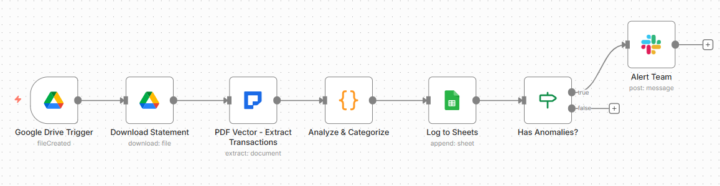
Client called me Monday morning. Frustrated tone in voice. "We keep missing problems in our bank statements. Just discovered $7,500 unauthorized transaction from 4 weeks ago. Bank's fraud protection window? Only 10 business days. We're too late to dispute now." Lost the money completely. Their reconciliation process: accountant downloads PDF monthly from bank, types every single transaction into Excel manually one by one, looks for anomalies whenever has time available. Problem: "when has time" meant 3-4 weeks after statement actually arrived each month. THE AUTOMATED WORKFLOW Built n8n workflow eliminating manual work completely. New statement uploaded to Google Drive folder? Workflow triggers automatically. Downloads file. Extracts all transaction data. Categorizes using keyword rules. Flags anomalies instantly. Logs summary to Google Sheets. Sends Slack alert if issues found. THE EXTRACTION Pulls complete data from PDF: Account number and statement period Opening and closing balances All transactions: dates, descriptions, debits, credits, running balances Transaction totals Complete structured dataset THE ANALYSIS Categorization rules: Payroll: salary, payroll, wages Utilities: electric, gas, water, internet Food: restaurant, grocery, food Transportation: uber, gas station, parking Uncategorized: manual review needed Anomaly detection: Large transactions: over $5,000 Negative balances: any occurrence Balance mismatches: validation errors All flagged with details THE RESULTS Before automation: 4 hours monthly manual data entry 3-4 weeks processing delay Inconsistent categorization Fraud found too late After automation: 30 seconds automated processing Same-day processing when uploaded 100% consistent categories Immediate fraud alerts First month deployed: Statement with 312 transactions processed in 30 seconds Flagged $4,800 charge immediately Team contacted vendor same day Discovered legitimate but unusual purchase Verified and approved within hours

1 like • Dec '25
@Duy Bui It's from the Analyze and Cat node. I'm guess I'm trying to understand if you are performing a reconciliation, why you would only input the totals to a Gsheet, especially if the Analyze node categorises each entry on the bank statement.
1 like • Dec '25
@Duy Bui I get the same as you now thanks. Is there anyway to add more detail to the slack message? Currently it doesn't give enough info to see what the transaction is (which is what you would want when carrying out a reconciliation), especially if there is more than 1 for the same amount. The date of the transaction in slack would be good as currently they all have the same date 21/11/19 which is incorrect.

Nov '25 •
Day 2
Went through the process of building the automation that captures the attachment directly from email, processes and then adds to a Google Sheet. Realized I have to pay attention to Schemas as well as the Javascript code for validation cos they might be a bit different for every project. Today I've been searching through Reddit construction groups with keywords such as "Paperwork" and "invoicing" just to understand what they're doing now. Also started a few conversations with people in my network to build automations for their businesses.
1 like • Nov '25
@Matthias Schweiker yeah I think Reddit is untapped potential. I have been experimenting with it already. Thanks for the heads up 🙏
Nov '25 •
Anyone got their first client yet?
Hi all, I've been in this group since it started and learnt a lot about what things to build and best practices. Still I've been unable to secure my first client, yet used warm outreach, cold outreach and local business Facebook groups etc. Anybody here landed that first client? Be good to hear that not only is the struggle real, but there are some success stories 😁
2 likes • Nov '25
@Chris Jadama hi. Yes tracking. Wanted to get some inspiration from the success stories 😁
1 like • Nov '25
@Duy Bui yeah I understand that, but there a lot of people that have been here since the group started but still not got a client.

🔥
Oct '25 •
Data Security when processing documents/data
Good morning automaters! Today I'll come up with another #Question ❓❓ I'm wondering who of you has dealt with the topic of data security when building stuff for clients? - How does processing the sensitive data fit together with cloud hosting? With the different AI systems? - Any experience within Europe? Switzerland? How is it in other countries across the world?
1 like • Oct '25
@Duy Bui just done a bit more research on the self hosting element. If you self host, your laptop/pc etc needs to be switched on for the automation to work, as it uses your laptop/pc to power the automation. This seems to be a huge drawback as you physically need to be there with your laptop on to run it. How do you deal with this?
2 likes • Oct '25
@Alex Feher @Duy Bui aren't those a lot more expensive than using direct with n8n?
Oct '25 •
The Notion Page That's Closed 7 Clients for Me (Template Included)
No fancy website. No $5,000 landing page. Just a simple Notion page. 7 clients signed from this page. Average deal size: $2,300. Total revenue: $16,100. THE PAGE URL: Notion public page Custom domain: [yourname].notion.site Takes 20 minutes to set up Costs: $0 THE 5 SECTIONS THAT CLOSE DEALS: SECTION 1: THE PAIN HEADLINE "Still Spending 8+ Hours Weekly on Document Data Entry?" Not: "Professional Automation Services" Not: "AI-Powered Solutions" Start with their EXACT pain. SECTION 2: THE SIMPLE SOLUTION "I eliminate document paperwork for [industry] businesses." 3 bullet points: - Your invoices/forms/contracts process automatically - Data enters your system without typing - Get 8-12 hours back weekly That's it. Don't over-explain. SECTION 3: THE PROOF "Recent Results" Client 1: Dental Practice Before: 6 hours weekly on patient forms After: 15 minutes weekly review Time saved: 282 hours annually Client 2: Construction Company Before: 10 hours weekly on invoices After: Fully automated Cost saved: $13,200 annually (Use real numbers from your projects) SECTION 4: THE SIMPLE PROCESS "How It Works" Step 1: 15-minute call to understand your process Step 2: I build a working demo with your actual documents Step 3: See it work in real-time Step 4: Go live within 1 week No confusing steps. No corporate jargon. SECTION 5: THE CALL TO ACTION "Ready to Get Your Time Back?" Calendar link (Calendly free tier) Or: "Email me: [your email]" That's the entire page. THE DESIGN PRINCIPLES: Clean and simple Lots of white space Short paragraphs (2-3 lines max) Focus on THEIR results (not your skills) Mobile-friendly automatically THE MISTAKES TO AVOID: Don't list every service you offer Don't include resume/full bio Don't add testimonials if you don't have them yet Don't use stock photos Don't write long explanatory paragraphs THE TRAFFIC SOURCES: Facebook group comments (link in comments) LinkedIn profile link Email signature
1 like • Oct '25
@Marcus Williamsley good spot missed that thanks.
1 like • Oct '25
@Duy Bui is this the kind of thing? Don't think the domain is set up properly. Suppose I could use a url shortener anyway,. https://www.notion.so/darren-gillespie/Still-Spending-8-Hours-Weekly-on-Document-Data-Entry-29245ecfcf6a801d9e44d26503ba6af7?source=copy_link
1-10 of 48

@darren-gillespie-2419
AI Transformation Partner | Agents | Automation 🤖
Active 1h ago
Joined Sep 11, 2025
Essex United Kin