Activity
Mon
Wed
Fri
Sun
Mar
Apr
May
Jun
Jul
Aug
Sep
Oct
Nov
Dec
Jan
Feb
What is this?
Less
More
Memberships
Ai Titus
885 members • Free
AI Automation Society
249.6k members • Free
AI Automation First Client
1.1k members • Free
AI Automation Agency Hub
290.5k members • Free
12 contributions to AI Automation First Client

3d •
The Loom Video That Closed a Client Without a Single Call
Sent a 3-minute Loom video. Client watched it 4 times. Signed contract without ever talking to me. Here is the video strategy that closes deals while you sleep. THE SITUATION: Prospect from Facebook group. Busy restaurant owner. "I don't have time for calls this month." Old me: Would have followed up in a month and lost momentum. New me: "No problem. Let me send you a quick video showing how this would work for your situation." THE VIDEO I SENT: Total length: 3 minutes 12 seconds MINUTE 0-1: The hook "Hey [Name], I know you are slammed so I made this quick video instead of taking your time on a call. You mentioned spending 6 hours weekly on vendor invoices. Let me show you exactly how to get that time back." MINUTE 1-2: The demo Shared my screen Uploaded a sample restaurant invoice Showed data extracting automatically Showed it flowing into a spreadsheet "This takes 90 seconds instead of 15 minutes per invoice" MINUTE 2-3: The next steps "For your volume of 40 invoices monthly, setup would be $1,400 and monthly maintenance is $120. That pays for itself in the first month. If this looks interesting, here is my calendar link to lock in 15 minutes. Or just reply to this email and we can get started." THE RESPONSE: Him: "Watched your video 4 times. This is exactly what I need. Let's do it." No call scheduled. Signed contract via email. WHY VIDEO WORKS: Prospects watch on their schedule They can replay confusing parts Your personality comes through Demonstrates competence visually Feels more personal than text They can share with partners easily THE VIDEO STRUCTURE: HOOK (30 seconds): Reference their specific pain DEMO (90 seconds): Show solution with their industry example CLOSE (60 seconds): State price and clear next step Total: Under 4 minutes. Respect their time. THE TOOLS I USE: Loom (free for videos under 5 minutes) Screen recording shows the automation Face bubble in corner adds personality Thumbnail customization for professional look

2 likes • 3d
Is it necessary to have a camera? I dont have a camera for my pc, neither have to buy a good one.
1 like • 2d
@Kelvin Olive Hey Kelvin, I am doing great. We can connect for sure, that way we can also share our ideas and build something cool together
7d •
Invoice Processing Workflow - The $47K Discovery 🔥
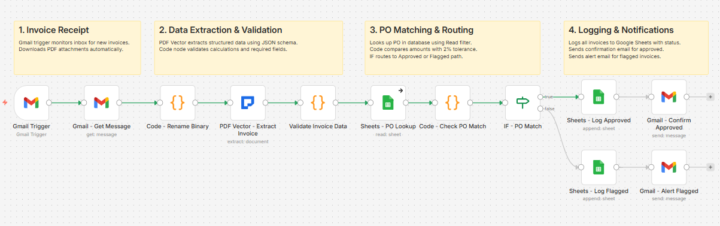
Client 3 changed everything for me. Small logistics company. 320 invoices monthly. AP clerk spending 15 minutes per invoice. Do the math. 80 hours a month. Just data entry. I quoted $1,800 for the automation. They said yes same day. THE BUILD THAT ALMOST FAILED: Built it over a weekend. Gmail trigger watching their AP inbox. Gets the message and downloads the PDF attachment. PDF Vector extracting vendor, amounts, line items into structured JSON with a schema I defined. Validation code checking if line items actually add up to the total. PO lookup matching against their purchase order database. Tested with 10 invoices. Perfect. Day 3? Broke completely. THE PROBLEM I MISSED: Some vendors put totals at top. Others at bottom. A few had multiple pages with running totals. My extraction worked for simple invoices. Complex ones? Math didn't match. Spent 6 hours fixing it. Added a validation code node that catches calculation errors before anything logs. Built 2% tolerance into the PO matching because small rounding differences aren't worth flagging. IF node routes clean invoices to approved path, problems to flagged path. Each path logs to Google Sheets with different status. Approved invoices get confirmation email back to sender. Flagged invoices alert the AP team with specific reasons why. THE UNEXPECTED OUTCOME: Two months in, client calls me. "Your workflow caught something." $8,400 duplicate payment from a vendor. The validation warnings flagged it. Nobody would've noticed manually. Year one results: $47,200 in overpayments and calculation errors caught. My $1,800 setup fee suddenly looked cheap. WHAT I LEARNED: Don't just extract data. Validate it. The validation layer is worth more than the extraction itself. Current workflow runs 12 nodes total. Gmail Trigger catches invoice. PDF Vector extracts everything with JSON schema. Code validates calculations. Sheets lookup matches PO. Another code node checks 2% tolerance. IF routes approved or flagged. Logs to Google Sheets. Sends confirmation or alert email.
1 like • 7d
I actually got to know about this on reddit. People who are complaining about their accounting/bookkeeping jobs are not actually complaining mostly about data entry but to validate the data with all the documents which is really hard to do for every single invoice where there is no uniformity of the invoices.
8d •
The $12.88 Problem Nobody Talks About 🔥
Average manual invoice processing costs $12.88 per document. Automated costs $2.50. That's a 559% difference most businesses never calculate. I discovered this running numbers for a potential client last month. Small accounting firm processing 200 invoices monthly. They were spending $2,576 monthly on manual entry. Automation would cost them $500. THE HIDDEN COSTS THEY WEREN'T COUNTING: Data entry time: 15 minutes per invoice at $25/hour Error correction: 4 hours weekly fixing mistakes Late payment fees: $340 monthly from processing delays Staff frustration: Their best bookkeeper quit over "mindless work" THE 6-MONTH COMPARISON: Manual approach: $19,896 spent Automated approach: $2,700 total Savings: $17,196 in six months But here's what made them finally pull the trigger - I asked one question: "What could your bookkeeper accomplish with 50 extra hours monthly?" Her answer: "Actually serve our clients instead of typing numbers." THE FRAMEWORK I USE NOW: Calculate per-document cost: Time spent × hourly rate Add error correction overhead Add opportunity cost of delays Present side-by-side comparison: Manual vs Automated over 6 months Let them see the compound effect. THE RESULT: They signed the next day. System went live in 3 days using n8n workflow templates. First month processed 178 invoices with zero errors. Three months later they referred me to two other accounting firms. Same pitch. Same results. THE LESSON: Most businesses know automation saves time. They don't know it saves THIS much money. Do the math FOR them. Show the spreadsheet. Let numbers tell the story. When you can show someone they're burning $3,000 monthly on a solvable problem, the sale makes itself. Start tracking per-document costs in your workflows. Invoice processing, form entry, contract review - calculate the manual cost. Then show them the automated alternative. What's your per-document cost? Have you ever calculated it?
0 likes • 7d
@Duy Bui bro, would you mind checking out my dm?

10d •
Good to be back
Hello everyone, How is everyone doing? I hope you all had great Christmas season and a wonderful start into the new year ☺️. Happy to catch up here and excited to see what everyone was doing.

2 likes • 9d
@Duy Bui I understand you are busy but in a community if everyone is not engaging in activities, why is it even a community? Appreciate your replying man.
2 likes • 9d
@Matthias Schweiker I would say going pretty well.

14d •
n8n or Make.com?- which one do you prefer?
Hey everyone 👋I’m still learning in the automation + AI space and wanted to get some opinions from people who’ve used both n8n and Make.com. So far, I’ve been leaning a bit toward Make.com, mainly because: - the UI feels very simple and beginner-friendly - connecting apps is extremely easy - it offers 1000 free operations - it also includes a free AI model that can be used for basic workflows - overall it feels faster to prototype ideas That said, I keep seeing many builders recommend n8n, especially for more advanced AI agents and RAG systems. I’d really love to learn: - why do you personally prefer n8n or Make? - at what point does Make become limiting? - which one would you recommend for someone still learning but planning to scale later? Not trying to start a debate — just genuinely trying to understand the strengths of each platform and learn from people with more experience 🙏 Appreciate any insights you’re willing to share!
0 likes • 14d
I used make.com. If someone is just starting out, its better to use make, just to understand the flow and how everything works. But it has a monthly limit and it charges per operation. n8n is more advanced than make, in every way and if I self host it, its absolutely free to use, without any limitations. So now I am staying with n8n. 🙂
1-10 of 12

Active 2h ago
Joined Jan 6, 2026
Dhaka, Bangladesh