Activity
Mon
Wed
Fri
Sun
Jun
Jul
Aug
Sep
Oct
Nov
Dec
Jan
Feb
Mar
Apr
What is this?
Less
More
Memberships
The AI Advantage
121k members • Free
Claude Code Kickstart
535 members • Free
AI Automation Society Plus
3.6k members • $99/month
AI Automation Society
352.3k members • Free
AI for Life
28 members • $297
AI Automation First Client
1.6k members • Free
AI Automation Circle
10.5k members • Free
AI Bits and Pieces
708 members • Free
AI Automation Skool
2.2k members • Free
15 contributions to AI for Life

🔥
3d •
News: Anthropic confirms three bugs degraded Claude Code [Fixed]
Anthropic on Wednesday published a detailed post-mortem acknowledging that three separate product-layer changes caused weeks of quality degradation in Claude Code, its flagship AI coding tool, vindicating developers who had spent weeks insisting the product had gotten worse. The company traced the issues to a reasoning effort downgrade, a caching bug that wiped session memory on every turn, and an overly aggressive system prompt designed to curb verbosity. All three changes were shipped independently between early March and mid-April, but their overlap in time created what appeared to users as broad, inconsistent performance decay. The first change landed on March 4, when Anthropic lowered Claude Code's default reasoning effort from high to medium to reduce latency. The company's internal evaluations suggested the trade-off would yield only "slightly lower intelligence," but users noticed immediately. Anthropic reverted the change on April 7, calling it "the wrong tradeoff" in the post-mortem. The second issue was a caching bug introduced on March 26. An optimization intended to clear old reasoning blocks once upon session resume instead triggered on every turn, effectively erasing Claude's working memory for the remainder of any affected session. The bug also caused faster-than-expected usage limit depletion, as each request became a cache miss. Anthropic acknowledged the bug "made it past multiple human and automated code reviews, as well as unit tests, end-to-end tests, automated verification, and dogfooding." It was fixed on April 10. The third regression arrived on April 16, when Anthropic added a system prompt instructing Claude to keep responses between tool calls to 25 words or fewer — a response to the chattiness of the newly launched Opus 4.7 model. Internal testing later showed the instruction caused a roughly 3% drop on coding evaluations. It was reverted on April 20. Compensation and New Controls As remediation, Anthropic is resetting usage limits for all subscribers and rolling out several process changes: broader internal dogfooding on public builds, enhanced per-model evaluation suites, stricter system prompt auditing, soak periods for any change that could affect intelligence, and gradual rollouts. The company also launched a dedicated @ClaudeDevs account on X to provide more transparency around product decisions.
Poll
5 members have voted
![News: Anthropic confirms three bugs degraded Claude Code [Fixed]](https://assets.skool.com/f/f1f8713c199d4c3b994a02e649d607de/1c58b6e963594b2fb4b028a9a6d98ccce4f823d66aa34523bc920ccef9675b72-md.png)

1 like • 20h
How did you guys set up your AI agents? I'd like an AI buddy that I can talk to! 😄 What can this entity do for you?
🔥
4d •
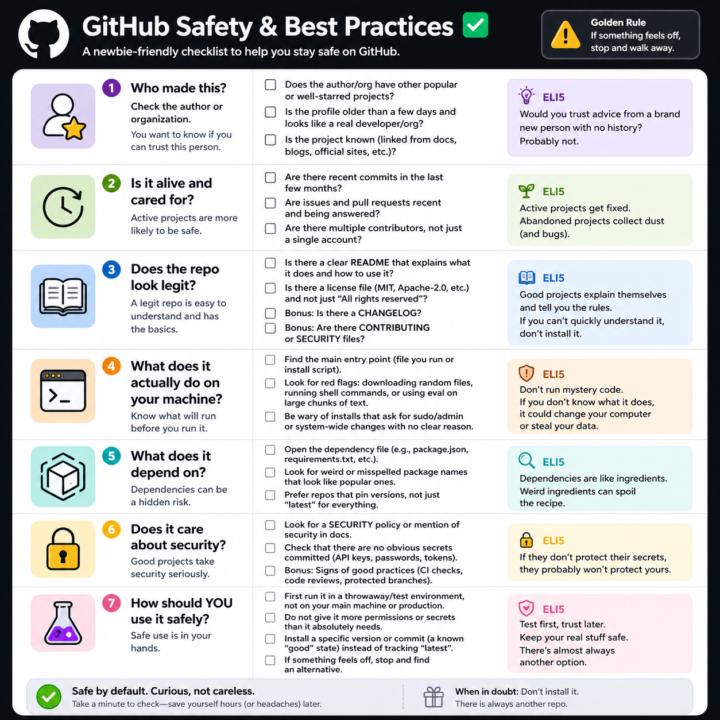
GitHub Safety and Best Practices Checklist
Here’s a simple, newbie‑friendly safety checklist you can run through every time you look at a GitHub repo. ## 1. Who made this? - Does the author or org have other popular or well‑starred projects? - Is the profile older than a few days and look like a real developer/org? - Does the project feel “known” (linked from docs, blogs, official sites, etc.)? If it’s a totally new account with one flashy repo, be extra careful. ## 2. Is it alive and cared for? - Are there recent commits in the last few months? - Are there recent issues and pull requests being answered? - Do you see multiple contributors, not just a single throwaway account? Abandoned projects aren’t always bad, but they age poorly from a security angle. ## 3. Does the repo look legit? - There is a clear README that explains what it does and how to use it. - There is a license file (MIT, Apache‑2.0, etc.), not just “All rights reserved”. - Optional but nice: CHANGELOG, CONTRIBUTING, SECURITY files. If you can’t quickly understand what it does, don’t install it. ## 4. What does it actually do on your machine? - Find the main entry point (the file you run, or the install script). - Look for obvious red flags: downloading random files, running shell commands, or calling `eval` on big chunks of text. - Be wary of “install” steps that ask for sudo/admin or system‑wide changes with no clear reason. If you don’t understand the install steps, don’t run them yet. ## 5. What does it depend on? - Open the dependency file (like `package.json` for Node, `requirements.txt` for Python). - Scan for weird or misspelled package names that look like popular ones. - Prefer repos that pin versions (not just “latest everything forever”). If the dependency list looks messy or huge for a simple tool, treat it carefully. ## 6. Does it care about security? - Look for signs of security features: security policy, mention of security in docs, or badges for scans/CI. - Check that there are no obvious secrets committed (API keys, passwords in plain text).
1 like • 3d
@Matthew Sutherland Good stuff! What is the likelihood that some kind of bad situation - virus, some backdoor to control PC or obtain PII, etc. - can be baked into codes? How can I filter or prevent them? Or are the apps in the github trustworthy?
1 like • 2d
@Matthew Sutherland Appreciate the detailed and thoughtful response as usual.
Mar 28 •
Multiple CLAUDE.md files?
If I have CLAUDE.md file in a global folder, e.g., a folder that contains all my Claude Code projects, then create another CLAUDE.md file in a project specific folder, does one supercede the other? Is it even necessary to have project specific file? When I watch Nate's videos, he always has a CLAUDE.md file in a project folder. If multiple CLAUDE.md files are needed, then how do you keep them separate and maintain them?
1 like • Mar 28
@Matthew Sutherland Thanks Matt!
🔥
Mar 25 •
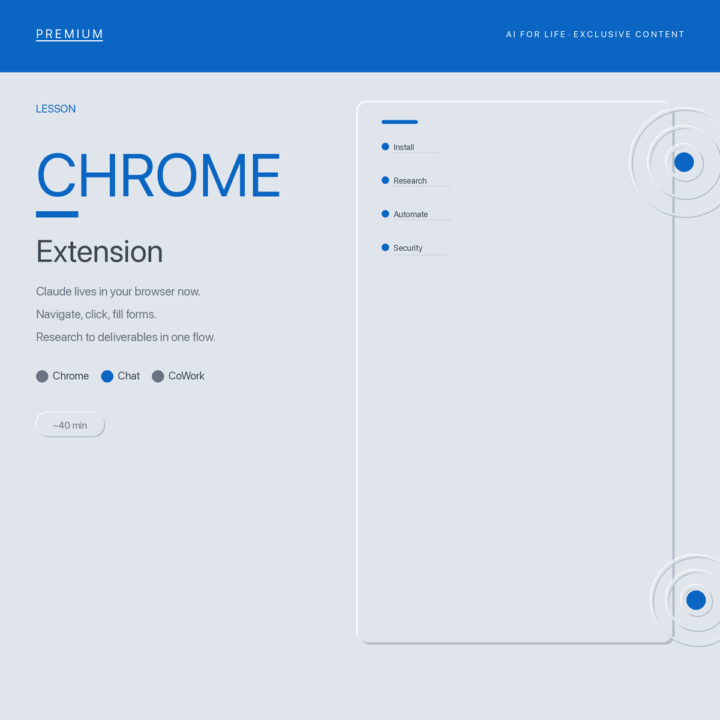
New lesson live: Chrome Extension: A Helping Hand Across All Your Tabs.
BEWARE! 25 Min of Agentic Workflow + 3 Terminals running simultaneously Maxed my Max account for the week +$54 in API calls. No Terminal unless I want to Pay-As-I-Go, Ouch! I was running Opus 4.6 (Quick) In all fairness I have been crushing the double output all week and created a massive amount of content. Quick question: how many times this week did you open the same 3-4 tabs, pull the same numbers, and paste them into the same document? That loop is what Claude for Chrome replaces. This is not a chatbot in a sidebar. The Chrome extension is an agent that operates your browser. It navigates to sites, reads the content, clicks buttons, fills forms, and pulls data. You can start a task and switch to another tab while Claude finishes in the background. The real power is the CoWork handoff. Chrome gathers the information. CoWork produces the deliverable. Competitor research turns into a formatted comparison deck. Dashboard metrics turn into a weekly summary. No tab switching. No copy-paste. No manual formatting. This lesson covers: - Installing and configuring Claude for Chrome (permissions matter) - The Chrome-to-CoWork research pipeline - Dashboard extraction without CSV exports - Form filling and email triage - Background tasks that run while you do other work - Scheduled workflows that repeat daily or weekly - Security basics: prompt injection, boundaries, and what not to automate 40 minutes, 7 blocks, three phases. You leave with your first working Chrome workflow. Open the classroom and start Block 1.
1 like • Mar 27
@Matthew Sutherland What info is being shared with Anthropic - do you know? Like the idea of efficiency and convenience, but what's the tradeoff?

🔥
Mar 20 •
🎉 Completed First Claude Code App - Thanks Matt!
I successfully completed my first customer support app that features: - FAQ database - AI question with 3 tiers response (primary preferred, secondary RAG knowledge base and open LLM generalized knowledge). - In addition it can perform marco level pareto of common issues, and deep dives with sentiment analysis of individual categories. If that wasn’t enough, @Matthew Sutherland was instrumental is helping me understand best practices for keeping my claude.md file up to date and healthy, both global and local, and starting healthy habits of ending with session backups. It is like eating broccoli at dinner (I happen to like broccoli), you get my point. Ok, Spinach. 🍃 Where Matt and I have taken different paths is that I use VSC in Windows. I am sure Matt will win me over to the dark side, but here is the good news. Everyone one in the world is buying new and used Macs and prices are skyrocketing globally - windows PC are going cheap!! 😂 @Nick Mohler
2 likes • Mar 23
@Michael Wacht Congratulations! A qq... what is 'marco level' of issues?
1-10 of 15

Active 17h ago
Joined Feb 27, 2026