
Write something

3h •
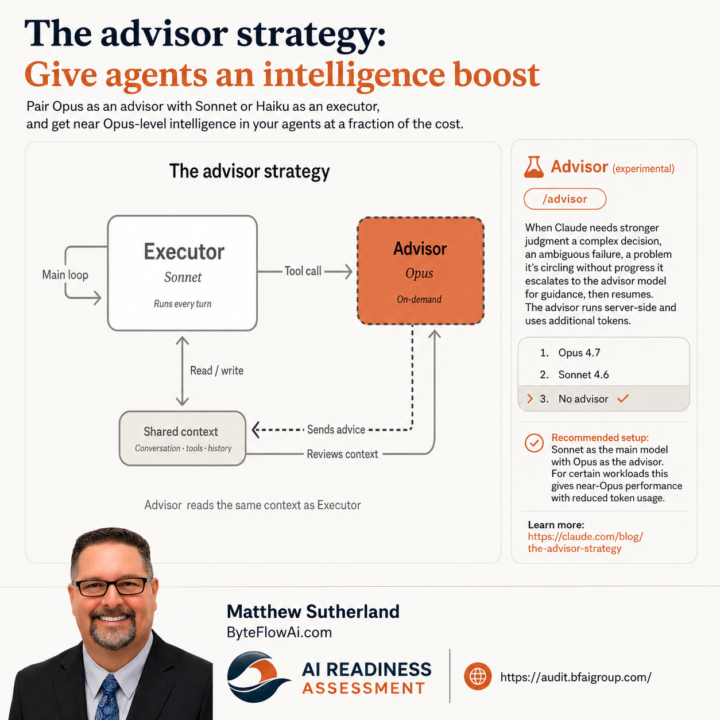
Claude Code /advisor
/advisor (experimental) When Claude needs stronger judgment a complex decision, an ambiguous failure, a problem it's circling without progress it escalates to the advisor model for guidance, then resumes. The advisor runs server-side and uses additional tokens. 1. Opus 4.7 ❯ 2. Sonnet 4.6 3. No advisor ✔ Recommended setup: Sonnet as the main model with Opus as the advisor. For certain workloads this gives near-Opus performance with reduced token usage. ✅ Glad to see I'm contributing to Anthropic's build philosophy. 😆
6h •
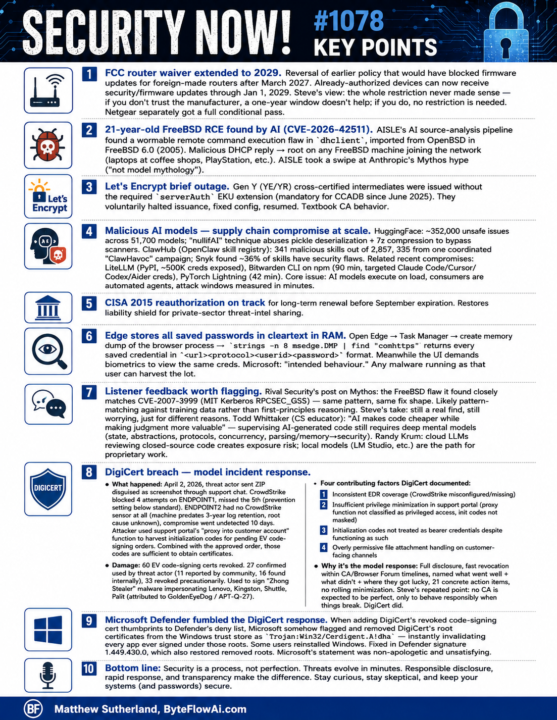
Security Now episode #1078 Key Points
Security Now! #1078 — Key Points ================================= FCC ROUTER WAIVER EXTENDED TO 2029 Reversal of earlier policy that would have blocked firmware updates for foreign-made routers after March 2027. Already-authorized devices can now receive security/firmware updates through Jan 1, 2029. Steve's view: the restriction never made sense — if you don't trust the manufacturer, a one-year window doesn't help; if you do, no restriction is needed. Netgear separately got a full conditional pass. 21-YEAR-OLD FREEBSD RCE FOUND BY AI (CVE-2026-42511) AISLE's AI source-analysis pipeline found a wormable remote command execution flaw in dhclient, imported from OpenBSD in FreeBSD 6.0 (2005). Malicious DHCP reply -> root on any FreeBSD machine joining the network (laptops at coffee shops, PlayStation, etc.). AISLE took a swipe at Anthropic's Mythos hype ("not model mythology"). LET'S ENCRYPT BRIEF OUTAGE Gen Y (YE/YR) cross-certified intermediates were issued without the required serverAuth EKU extension (mandatory for CCADB since June 2025). They voluntarily halted issuance, fixed config, resumed. Textbook CA behavior. MALICIOUS AI MODELS — SUPPLY CHAIN COMPROMISE AT SCALE HuggingFace: ~352,000 unsafe issues across 51,700 models. "nullifAI" technique abuses pickle deserialization + 7z compression to bypass scanners. ClawHub (OpenClaw skill registry): 341 malicious skills out of 2,857, 335 from one coordinated "ClawHavoc" campaign. Snyk found ~36% of skills have security flaws. Related recent compromises: - LiteLLM (PyPI, ~500K creds exposed) - Bitwarden CLI on npm (90 min, targeted Claude Code/Cursor/Codex/Aider) - PyTorch Lightning (42 min) Core issue: AI models execute on load, consumers are automated agents, attack windows measured in minutes. CISA 2015 REAUTHORIZATION ON TRACK Long-term renewal expected before September expiration. Restores liability shield for private-sector threat-intel sharing. EDGE STORES ALL SAVED PASSWORDS IN CLEARTEXT IN RAM
6h •
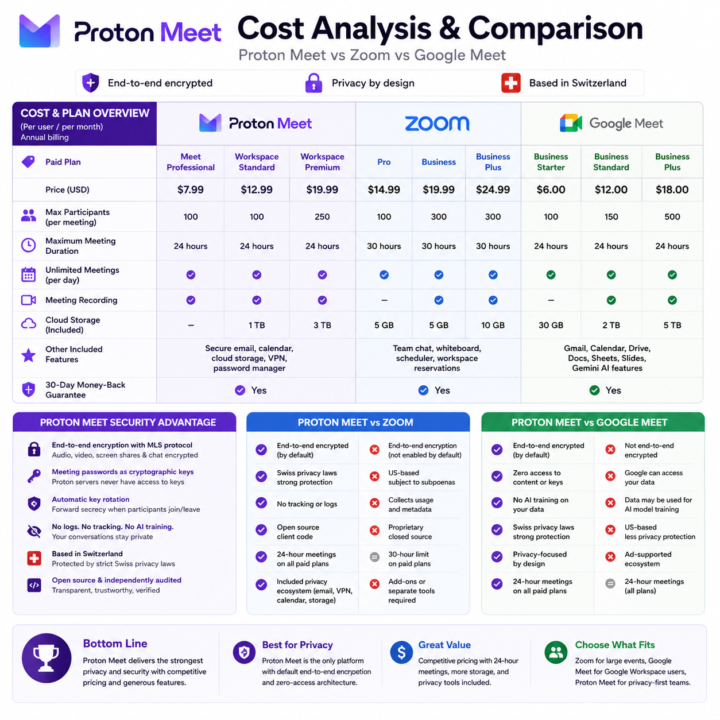
Proton Meet vs Zoom vs Google Meet
Quick note on the Proton Meet pricing, since I was initially confused. Proton Meet is Proton's new video meeting product. If you're on the Proton Unlimited bundle, Meet is included, but with a cap: 60 minutes max per meeting. You can run unlimited meetings per day, just none longer than an hour each. The standalone paid Meet product removes that cap (unlimited meeting length) and adds extra features on top. So bundle members aren't locked out, they just hit the 60-minute ceiling per session. If you regularly run longer meetings, the standalone tier is what you'd want. I put together a quick infographic on the top three features of the paid tier below.
1
0

🔥
10h •
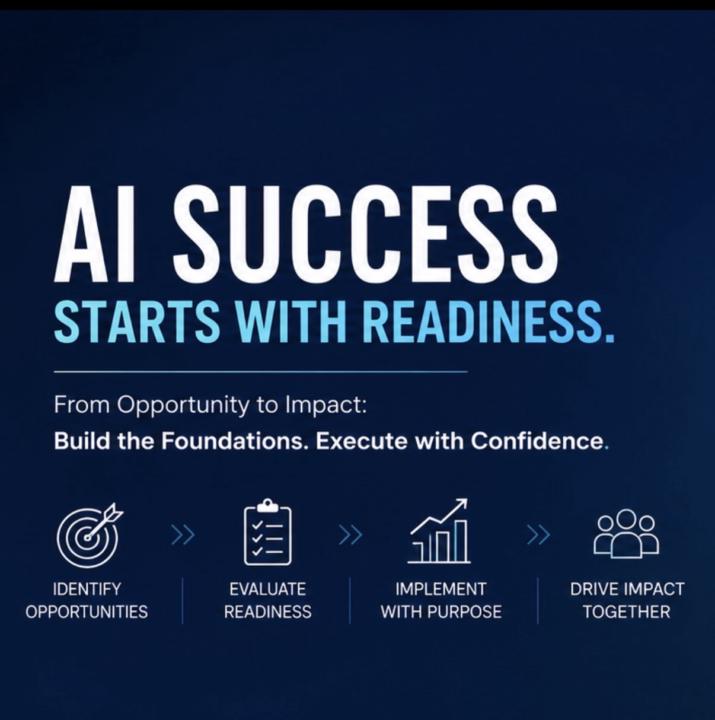
Good AI Ideas Still Need an Operational Readiness Check
One of the things I’ve learned over the last year is that identifying AI opportunities is only the beginning. Recently, I secured a multi-month engagement with an enterprise client that is moving beyond the original AI Opportunity Mapping phase and into something equally important: AI Readiness Evaluation. In other words: “Are we actually ready to implement this opportunity successfully?” Because the reality is, a good AI idea does not automatically translate into a successful AI project. Before moving forward, we’re reviewing a set of high-level readiness criteria. If the conditions are there, we move. If not, we focus on preparing the environment first. Some of the key checkpoints include: - Clear and measurable ROI - Available and reliable data feeds, integrations, and system access - Existing process documentation and workflow maps - Existing training documents and operational knowledge capture - Real operational context: call recordings emails text conversations support interactions - Security, governance, and protocol requirements - Workforce readiness and adoption potential - Executive sponsor approval - Stakeholder alignment and buy-in - Willingness to redefine the role of humans in an AI-agent-supported workforce That last point is becoming increasingly important. AI readiness is not just technical readiness. It is also organizational readiness. Many organizations are still evaluating AI through the lens of traditional software implementation, when in reality AI often changes the structure of work itself. In many future-state environments, humans may spend less time manually executing repetitive tasks and more time: - supervising AI-supported workflows - managing exceptions - validating outputs - training systems - refining processes - handling edge cases and decision-making Most enterprise AI projects do not fail because the model is bad. They fail because the organization is not ready to support implementation at scale.
20h •
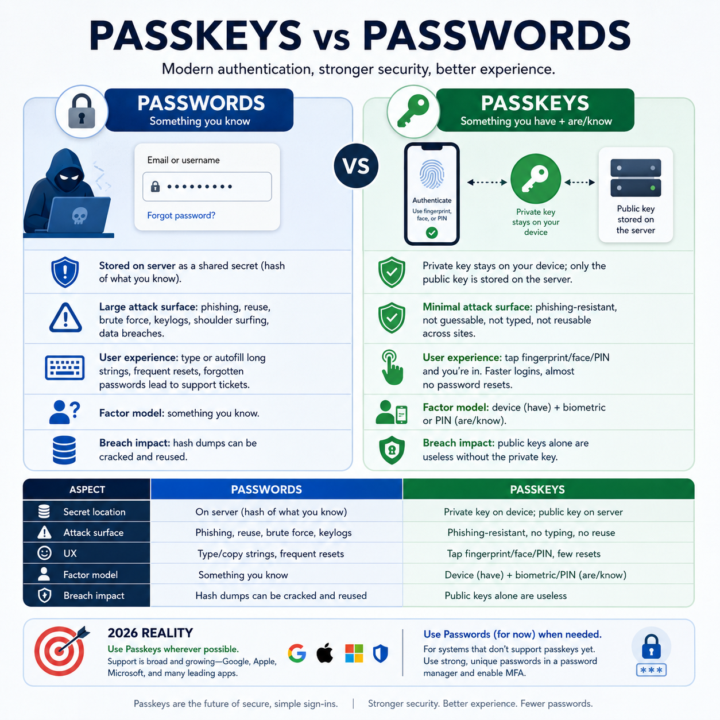
Passkeys vs passwords
• A password is like a secret word you type that a website remembers; if someone tricks you into telling it to them, they can pretend to be you. • A passkey is more like a special key stored on your phone or computer that never leaves your device; the website only sees proof that your real key unlocked the door. • Bad guys can steal or guess passwords using fake emails, keyloggers, or leaked databases, but they cannot copy your passkey because it stays locked inside your device. • With passkeys, you usually just tap your fingerprint, look at your camera, or enter a short PIN, so it’s both easier and safer than remembering long, messy passwords. • Until every site uses passkeys, you still need strong, unique passwords in a manager plus MFA, but the goal is to move toward passkeys and stop using passwords over time.
1-30 of 128
powered by
skool.com/ai-for-life-3967
Practical AI training for work and life. Hands-on lessons with Claude,
ChatGPT, and automation tools. Built for people ready to use AI.
Suggested communities
Powered by