
Write something
Pinned

Mar 15 •
Welcome to Clief Notes. Here's where to start.
1. Watch the intro video and introduce yourself in the intro post here 2. Start with The Foundation (free course). Concepts, folder architecture, prompting framework. Everything else builds on this. 3. Check in at the bottom of each lesson. Polls, discussion posts, other members working through the same stuff. Use them. 4. When you're ready to build real things, move to Implementation Playbooks (Level 2). When you're ready to build your own tools, Building Your Stack (Level 3). 5. Post your work. Ask questions. Help others when you can. What are you here to build?
Poll
4339 members have voted
Pinned
3d •
🌶️ CINCO DE MAYO FIRESALE — STARTS NOW 🌶️
Locked in for the next 5 days only. Ends May 5th at 10:00 AM EST. No exceptions. 🎉 Premium: $27 → $14/mo 🎉 VIP: $97 → $67/mo The closest you'll get to our original launch pricing. We're doing this because the community has shown up for us, and we want to show up back. 🤝 🔥 Already a member? Read this carefully. To lock in the new rate, you need to: 1. Cancel your current plan 2. Resign under the new price That's the only way the system can apply the new rate. We have way too many members for manual refunds, so we can't refund anyone who just signed up at current pricing. But the savings stack month over month, so if you plan to stick around (and you should 😁), the math works out fast. 🚫 A few ground rules: Please do not DM myself or Jake about pricing, exceptions, or extensions. We love you, but we're a small team and we need to stay focused on building. Everyone gets the same window. Everyone gets the same deal. If you miss it, you miss it. We'll do more things for the community down the road. ⏰ The clock: 🟢 LIVE NOW 🔴 Locks May 5th, 10:00 AM EST - Premium gets you The Vault and Afternoon Tea calls. - VIP gets you The Drawing Room, High Tea, and bespoke folder builds from Jake himself. If you've been on the fence, this is the moment. 🚀 Tag a friend who needs to be in here. Let's make Cinco a movement. 🎊 🌶️🌶️🌶️

2d •
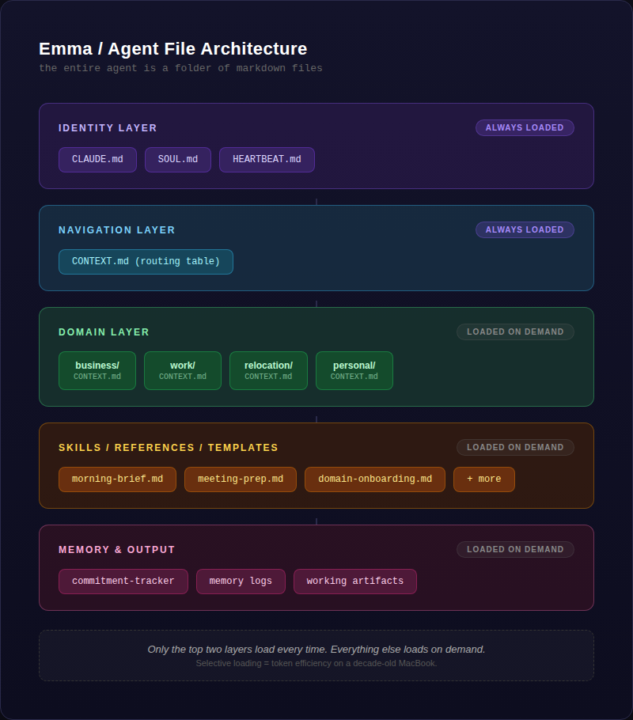
Built an always-on AI Chief of Staff that texts me.
I've been in this community for about a month now and wanted to share where things stand with one of my builds. This isn't polished by any stretch. I do have a few other workflows like content-creator, document-creator, but I needed something to help me navigate my day-to-day as I begin a couple side quests outside my normal 9-5. The goal was simple: I didn't want another chat window I have to remember to open. I wanted something that knows my priorities, reads my calendar, checks my email, and texts me when I need a nudge. Not a chatbot, more like a Chief of Staff. And the goal is to operate within the bounds of the subscription with no extra costs, while also maximizing token efficiency. The other thing I didn't want to do is implement an orchestrating harness yet (OpenClaw, Hermes, etc). The challenge for myself was to keep this as simple as possible without inflating scope. Someone in this community said once: 'constraints are just as, if not more, important than your requirements. What do you NOT want your build to do?' I've definitely taken this to heart in my workflows. ## Planning I've made a few posts about this in comments, but I cannot stress the importance of planning before you build. My method was simple: - First I brain dumped context via voice dictation and transcribed this. Simple tools: VoiceMemos, copy, paste. - Next, I worked through the planning phase with the chat function of Claude in Opus 4.6. I wanted pushback, challenge, and for the model to force me to think deeper and keep me honest. This produced the product requirement document, or PRD. This was a multi-day process (a week?) in my free-time. - For the architecture build, I used Cowork. Handed it the PRD, answered a few basic questions, and then it went on it's way. Got it uploaded to a private git repo. - Currently, I'm working thru further debugging and walking thru the checklist within the PRD in a phased approach. As you'll see below, I have setup a remote screenshare so I can also let Cowork see what I'm doing. This was the most essential because we work TOGETHER to make things happen. it's like working side-by-side with my developer and engineer.

5d •
Do you use AI for your hobby?
I'm curious what everyone here likes to do for fun (of course building stuff with Claude is fun too lol), and if you've applied any AI to your hobby. For me it's been super useful for DND planning and I find I get to stay in creative flow more. Curious what other people are doing

1d •
Why your cold emails get ignored (and how I fixed mine to book 9 calls/week)
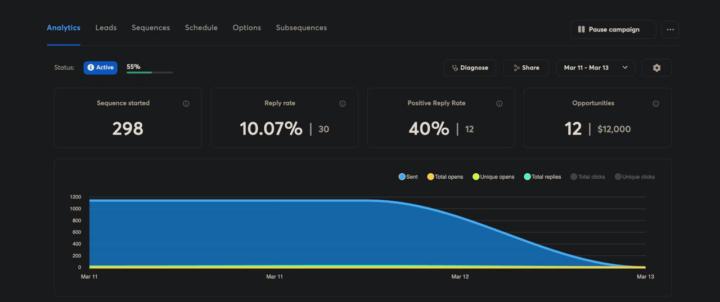
I've been running cold email campaigns for clients for 3 years and the biggest shift I've seen isn't the tools. It's what actually gets a reply. Personalization used to mean scraping a name and company from LinkedIn, dropping it in the first line, and hitting send. "Hey {FirstName}, I noticed {Company} and thought..." That worked in 2022. It's dead now. Everyone's doing it and prospects can spot a mail merge from the subject line. What changed for me was treating personalization like actual research instead of a data field. Here's what I started doing: → I scrape the prospect's entire website. Not just the homepage. Blog posts, service pages, case studies, about page, even their contact form if it's there. → Then I feed all of that into OpenAI and have it analyze what they actually do, who they serve, and what problems they're likely dealing with. The AI doesn't just summarize. It finds the specific details nobody mentions in generic outreach. So instead of "I saw you work in logistics," the email opens with "Noticed you handle cross border freight into Mexico. Your blog mentioned customs delays eating 15% of delivery windows." That's the kind of line that gets opened because it doesn't sound like 500 other emails they got that week. The reply rates went from 2-3% with generic personalization to 8-10% with actual research. One prospect replied last week: "Your email won because you actually read our site. Everyone else sent the same template." The system I built does this automatically. Scrapes the website. Analyzes every page. Generates icebreakers that reference non-obvious details. It writes openers like a human who spent 20 minutes studying their business, except it does it for 1,000 prospects in an hour. Here's what I learned building this: Small prompt details make a massive difference. Having OpenAI shorten company names naturally (say "Stripe" not "Stripe Inc.") and reference specific pages beyond the homepage makes it feel real. The difference between "I saw your website" and "I saw your freight tracking dashboard lets customers get ETAs without calling" is everything.
1-30 of 935

skool.com/quantum-quill-lyceum-1116
Jake Van Clief, giving you the Cliff notes on the new AI age.
Leaderboard (30-day)
1

+773
2

+725
3

+459
4

+398
5
+392
Powered by