
Write something

🔥
5d •
Totally Tuesday!
So i've basically been ill for the last three days and pushing through it with a nasty sinus infection. I spent half of today resting and the other half adding what I think might be the best totally necessary two weeks ago feature. A freakin MANUAL. OMG. it's extensive and detailed and hidden quite cleverly at the top of the Binder. Please read the Preamble, to learn "Michael's Rule of Manuals". This technique is a decades old secret I have passed on to anyone who has ever tried to read a manual and ended up looking haggard with eyes glazed understanding less than when they started. The Quick Start is there if you think you know what you are doing and the rest is all there. I will be doing a line by line edit of it starting tomorrow as there are some things that are a bit off. Claude and the nonfiction room are good but nothing like a full read through by someone who actually uses it. This is actually version 9 since I started and will be the canonical master copy ongoing. There will eventually be a print addition, but probably not before I hire a better graphic designer than I am (not a very high bar to reach). Screenshots and graphics will be added as well. There are call outs for screenshots already in the text but please let me know if you think others should be added as well. I've already found a few and made hasty notes on my handy dandy Notepad also cleverly hidden in the Binder. If you hit a snag somewhere reading through you need me to address ask and I'll jump to that section and add the graphics needed there . I built this in the Binder so I can edit it live and work with it just like the live document it is. Please critique this, let me know if there is more (or less) that you need. I published it rough ths way because of some of the questions I have been asked recently. I should be able to add links here to videos elsewhere to explain things better as well, **** And if you have read this far I did make it into BIAM this month and will be running through it like everyone else, Just with WCP to see how well it works with Colm's method. I'll post here and on Storyhackers about it.

🔥
10d •
Series Bible Creator
In which our hero shows how to work on a new book in a series in WCP if you already have the previous book(s) written and want to continue on with the PWS process. The basics: Create your series file Create your book files import or create the files you need in the binder for each book and copy/paste from another program select the files you want the skill room team to see as context select the series bible creator skill room and talk to the team conversationally " here is book 1, I want to start on the next book and need a continuation document" and go from there. Watch the video for more detail and some workflow and new feature tip and tricks

🔥
13d •
Feedback Replies Sunday 4-26-26
Did anyone ever read the self help columns in the Newspaper (when we had one.. in print)? I read through these sometimes And I want to answer them in that fashion...but I won't..maybe.. First Order of Business..I;m working on an alternative solution but it you are using WCP go to your settings under your username in the upper right hand corner and add you SKOOL handle there as well so I can directly reach out ot you about some of the feedbacks I've gotten or repost them here so I can respond to it directly here too. Feedback: Hey Michael, I have continued to write the past couple of days but haven't sent any feedback. I'm putting this under comments, because I haven't found any bugs per se, but I've noticed certain quirks, if you will. 1) When I "create the Folder" and bring the generated content into the editorial window in the middle, and make changes, the AI doesn't read the changes. I have to explicitly write it into the input area on the right hand side or explicitly ask it to read the edited (by me) doc and treat it as canon. Otherwise it defaults to whatever it came up with. 2) The writing quality is really not great. I don't know whether the humanizer skill is running (classroom lesson 5 behind a pay wall) or not, but I have to constantly prompt it to do this or don't do that, and also AI just forgets! That's just AI. I'm aware! :) Response: We have quirks. Yes. I have a fancy little box on my desk to hide them in but they have a habit of sneaking out. 1)Each filename in the binder has a check box after it. The AI Chat Window uses this for context. If it is checked, that file is seen, you do not need to copy the whole text into the chat window. This will also solve your forgetting issue. 2) Which Skillroom are your writing in? If you select the files you want to use for context (worldbuilding, characters, story bible, lore, outline, etc..) and you select the Writers Room Skill Panel in the Upper left hand dropdown. You put in the chatbox something like "Hey Writer's Room" or "Hey Team". I want to discuss Chapter 1". or add more "Hey Team, I need to discuss Chapter 3. John has to ride the motorcycle for at least ten minutes before the front wheel comes off? What could he be seeing on a back road i Lousianna at 4pm on a sunday". You do not need that much detail if all of that is already in one of your checked files, but the more you give them to work with the better. I haven't talke with you yet directly so I do not know how you are trying to work here.

🔥
9d •
Wordcrafter.Pro Feedback report 4-30-26
Known Bug Q: I selected 12pt in Size but I decided I wanted 14pt. There wasn't a way to effectively change that. I clicked in the field, expecting to see the drop down choices again, but I didn't. The selection was highlighted, so I pressed Delete. Nothing happened. I put the cursor in front of the 1 and deleted and then typed in 14pt. A: The way type works is kind of messy. I had not intended to put it in the edit window at all to keep people focused on actually writing and not making things pretty, but neglected to think about accessibility issues with certain typefaces. This will be fixed in the next couple of day and you will be able to pick from the entire catalog of Google typefaces (adding a custom font you own will come later). Misunderstanding (3 questions related) Q1. As in my post, I kept clicking the yellow folder icon to save the conversation. Not getting any feedback or seeing the text in the document window, I poked around. I then did fine "Create file in binder" and "Insert into editor. " Q2. How do I then save the additional conversation in the document? Does "Insert into editor" also save the new content? Q3. Somehow, I think by clicking the Hamburger menu, the binder got sent back into Choose a Series and my hierarchy for the Brainstorm disappeared. There was no way to get out of the Choose a Series without creating a series, which I didn't want to do. I copied the URL into a new tab and everything returned as I wanted to the Binder. A: Everything works around the Binder System. to work with the Skill Rooms you have to have a file open and a file has to exist in a book/type container and a book/type container has to exist in a Series/Group container. I've made the analogy before that Series/Group is like a File Cabinet, Book/Type is like a File Drawer and all of your files and folders fit into the filedrawer for that Book/type. This is why I change the names. The Binder system is a pretty powerful organization system that can be used differently for different purposes, but you have to work from a basic file and a file has to have a book/type or Series/Group to live in. The other way to think of it is a Series/Group could be general research with the books/types within it being different ideas or genres to explore and the files/folders specific ideas or directions. I also added the ability to move files/folders between books and Series easily as well to make organization even easier

🔥
12d •
Something fun and useful!
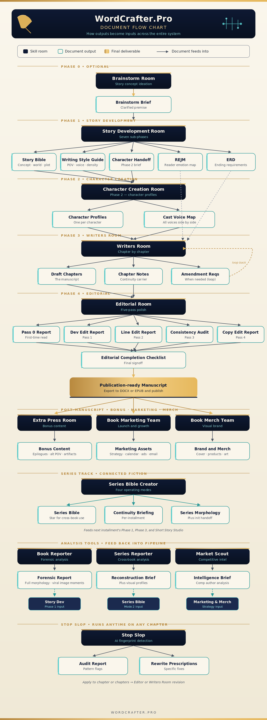
in working on our classes and WCP Manual today (with screenshots!) I had to play and created these. The flow chart is the complete system flow and the org chart was just fun.
1-20 of 20
skool.com/pws-community-for-writers-8447
The Home for AI-Powered Authors. Master story,prose, and marketing with expert AI personas to finish and sell your book fast. Never write alone again
Leaderboard (30-day)
1

🔥
+371
2

🔥
+347
3

+280
4

🔥
+245
5

+242
Powered by