

🔥
6d •
This is a story...For the past 2 years, I’ve been on Skool every single day.
In total, it’s already been 2.5 years, but for the last 2 years, the fire has really been burning.Every day, I pick up another small piece of knowledge. For me, it’s the 1% method:getting just a little bit better every day. And honestly: I’m proud of myself for that. Sometimes we should allow ourselves to celebrate our own consistency.Because I believe that showing up every single day for 2 years is something not many people on Skool have done. I can only encourage everyone:Stay curious. Keep learning. Keep exchanging ideas. At some point, it will pay off.Maybe financially. Maybe professionally.Or maybe simply because it feels good to understand more about this world. But knowledge is only one side of it. The network is the other. Over the past years, I’ve met so many great people.People to learn with, laugh with, discuss ideas with, or even share a beer with. I’m truly grateful to be part of such a large international network full of inspiring people. Thank you. Holger And now: back to learning.


Jun '25 •
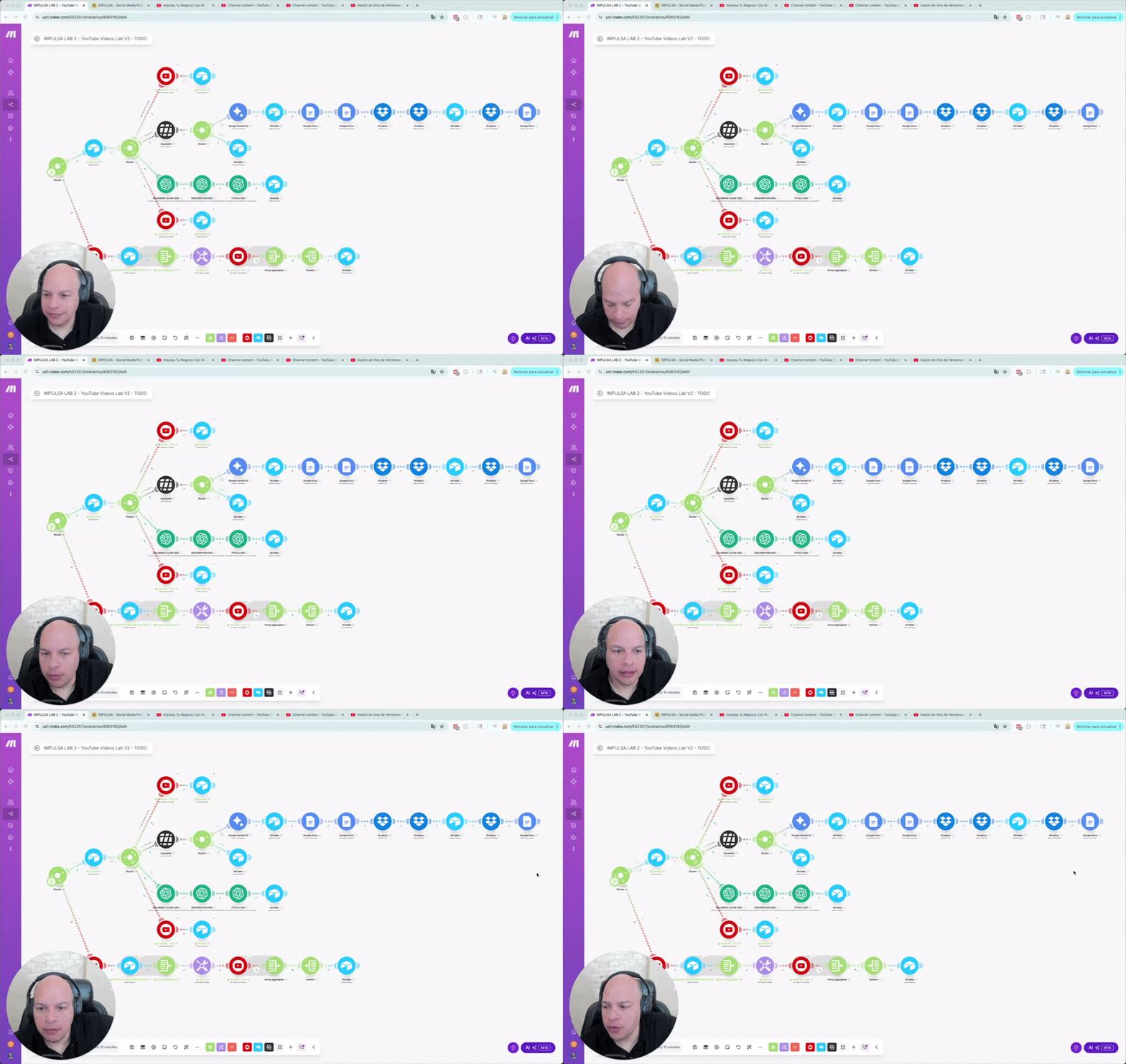
🚀 I Just Built a YouTube SEO Automation – Here's What It Does!
Hey everyone! 👋 Super excited to share a new automation I've been working on over the past few weeks. If you're looking to revive or optimize your YouTube channel, this might give you some inspiration! 🎯 The GoalAutomatically update titles, descriptions, and keywords for all my YouTube videos — using data, transcripts, and SEO best practices. 🔧 What It Does 1. Pulls all videos from my YouTube channel via the YouTube Advanced API. 2. Checks which ones haven’t been processed and creates records in a tracking table. 3. Grabs video stats (views, comments, likes) and full transcriptions (even for 2hr+ videos). 4. Generates summaries and full transcripts, saved to Google Docs via Dropbox (to get public URLs). 5. From the transcript, it creates: 6. Updates the tracking table and pushes the content live to YouTube! 💡 Why I Built ItI have a lot of long-form content that still has potential but wasn’t optimized for discovery. This automation helps me breathe new life into those videos — at scale. 📊 Stack Used - YouTube Advanced App - Supabase (Trial subscription) - OpenAI - Google Docs + Dropbox integration - Automation and logic flows with a tracking table (Airtable) If you’re interested in automating your content workflows or want to see a walkthrough, let me know — happy to share more!

🔥
Apr 27 •
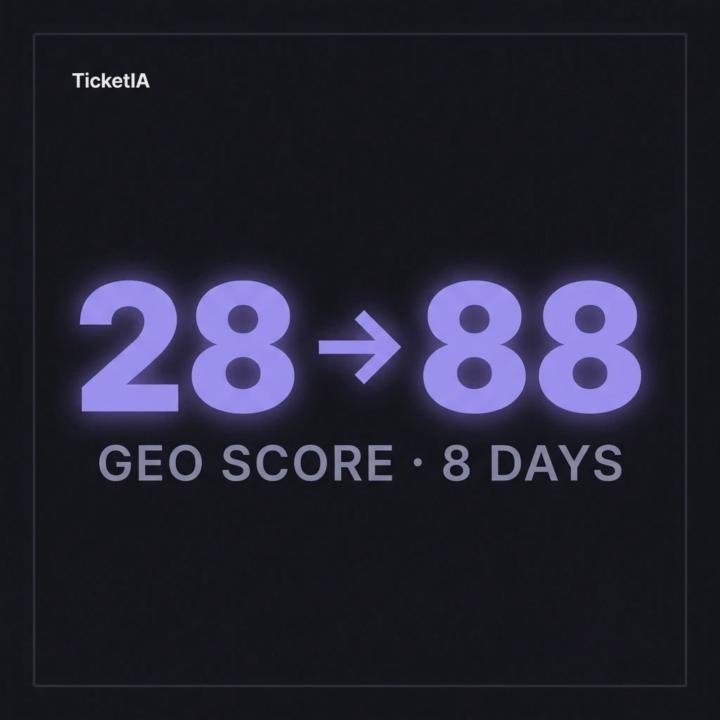
⚡📈 Spanish B2B SaaS client: GEO from 28 → 88 in 8 days
Not an exaggeration. Numbers from the April 16 audit vs the April 24 one. Progress: - SEO: 48 → 89 - GEO: 28 → 88 - Combined: 40 → 89 - Critical errors: 5 → 0 The 4 things we closed in this sprint: 1️⃣ Cleaned up how Google reads the homepage: clear title hierarchy, no duplicates. 2️⃣ Told the AIs in their own format exactly what the product is, how it works, and what it costs. 3️⃣ Opened the site to ChatGPT, Claude, Perplexity and Gemini crawlers. They were unintentionally blocked. 4️⃣ On every blog post, made it clear who wrote it and what it's about, in a format AIs understand. But the good part wasn't that. The good part: the client shipped EXTRA improvements unprompted: - Reorganised the "About us" page introducing the team. - Cleaner navigation on the home and on every blog post. - Trimmed 10 KB off the homepage. This is what separates GEO projects that grow fast from the ones that stall: a client who takes ownership and contributes beyond scope. TicketIA now sits in the top tier of Spanish GEO. Next audit: May 8. Is your website getting cited in ChatGPT, Perplexity, Google AI Overviews? Have you measured your GEO baseline? 🔥
3
0

Mar 20 •
Cloudinary: Canva alternative for LLMs and automated workflows
My multiple wins this week included the Cloudinary discoveries I describe further down. In this short video I'll try to show you the wins in action: 1. We now execute the VA task with a few button clicks (with no mistakes or micro-managing of the VA to get the details right! editing, resizing, compressing, adding alt-text and uploading to WordPress) 2. How we can automate adding branded text overlays (e.g. to a featured image) 3. How we can use a quick human in the loop URL edit to change the look and feel of the featured image 4. I don't show it in the video, but I now have Cloudinary hooked up to Claude so I can tell Claude to change things or create custom images such as branded thumbnails. My Multiple Wins Post - An image preparation and management task we've outsourced for years, involving resizing, compressing, editing text overlays, and publishing to WordPress with Alt Text, was fully automated this week. That means much more consistent results and real dollar savings. Now means we can do it with a click of a button (all via Make/Airtable) and easy human-in-the-loop checkpoints. I just needed to put aside a couple of days to make sure I nailed all the parts and make it so simple that I can give it to my wife! (Who's never used Airtable and hates tech!). - Discovered Cloudinary can do way more than I ever imagined when it comes to on-brand image editing and management. (As nuts as this may sound, Cloudinary is the equivalent of Canva, but you EDIT VIA THE URL! This means you can pass all the URL parameters to an LLM and have it edit your images with consistent results. (It's NOT an AI image generation tool but it does have AI image editing functionality). In the attached image, you can ignore the key at the bottom. That was for our workflow. Every part of the URL is editable, and you can even use AI to clean it up (all via the URL)! - Above discovery and that Cloudinary has an MCP effectively means I can bring any branded graphic design need straight into Claude. (Till now, I've still always felt I needed to go to Canva, and attempts to use Canva via LLMs have not been fun. Claude and Cloudinary could remove Canva from our tech stack).
2
0
Mar 10 •
Getting Claude to Actually Work WITH Google Drive
I want to share what I feel could be a big win I just had. Especially as I think many people believe they can just plough ahead with AI tools, only to hit frustrating tech challenges! A bit of context first, because it shapes the whole problem. I’m a Claude Pro subscriber and primarily use Claude via the MacOS Desktop app, rather than in a browser. Like many, I have been looking to take more advantage of Claude Cowork mode, which is relatively new. And get it working with my (free account) Google ecosystem. If you use Claude Chat via the web interface or desktop, the native Google Drive connector works reasonably well for ‘fetching’ and ‘reading’ files. It's not perfect, but it connects and does a reasonable job of making it seem as if Claude and Google are working together. Important points: - Claude Desktop and Claude via a browser are not the same - Claude Chat and Claude Cowork are not the same The nuances between each mean you’re likely to hit different obstacles at different times depending on what you’re doing. Cowork runs inside a sandboxed Linux VM, and direct web fetching to Google's domains is blocked by design. Paste a Google Docs URL and Claude just stares at it. That's not a bug - it's how the sandbox is built. So the browser connector and the Desktop connector behave differently, and that gap is where this whole challenge lives. Worth noting: even if you're happy to stay in the browser, the native Google Drive connector is read-only across both modes. There's no built-in write capability. - No creating Docs - No updating Sheets - No folder management. (I believe) That gap exists regardless of whether you're using the Desktop app or in a browser session. First stop: Troubleshoot possibilities with Claude’s native Google Drive connector... It shows as "Connected" in settings. Looks fine. But in Cowork sessions, any attempt Claude made to collect the desired tools proved fruitless! A workaround was to download the Google Drive app to my MacOS (and set it to streaming so that you don’t clog up your desktop storage). Then you can choose ‘Drive’ files and folders that Claude can work with. But you must do that at the beginning of a task session!
1-30 of 110
Leaderboard (30-day)
1

+216
2

+120
3

+99
4

+87
5

+73
Powered by