

Apr 23 •
Fun with Claude/AI
I've been experimenting with Claude and Notion, and have come up with some interesting use cases/skills that I'm playing with. Currently, the one I'm excited about is using Claude as an admin assistant. Right now that looks like a weekday standup meeting where AI is pulling my calendar items, getting tasks and projects from Notion that are due that day or soon, and helping me triage my emails. I did spend quite a bit of time in a "getting to know you" conversation, so my priorities and priority projects are in memory. I also hashed out my scheduling, which was helpful. Mainly - it surfaced that the reason that I can't assign batch days is because my work revolves around the day of the month, not the weekday. (This means that it's always changing - for example, the first isn't always on a Monday.) So it also references where I am in that monthly cycle as well and pings me if I've over scheduled or over committed. I've not been finding as much value in habit tracking at the moment (it feels like a lot), however the projects structure and tasks and many of the other components that go along with those have enabled me to play with this AI integration. Best analogy is that the underlying Notion design is well-thought out, so the two computers can talk and understand each other without me having to explain how things work. (Trust me, I've not exactly been an early AI adopter, so I'm very careful with what I let it do, and I try to keep it in its box.)
Apr 28 •
The notion update I'm most excited about...tabs!
I went in and updated some of my notion page templates today to use the new inline tabs feature. I love this so much more than the toggles because it looks so much cleaner. It makes focusing a little easier too because I'm not distracted by other things. Is anyone else using this yet? (create a new block and use /tabs to see what it looks like)

Sep '25 •
Greetings! Introduce yourself + share your interests 😊
I noticed some you sharing bits of your stories and I absolutely love reading those! Thought it’d be cool to have one place where we can all get to know each other🙌 Here’s a simple format you can follow (but feel free to freestyle if you want): Hey, I'm from _____________. My main interests include _________, __________. (plus would love to hear your background with Notion and goals with LifeOS!)

Feb 24 •
Taking Life Admin analogue again
I'm still reflecting on what the trigger is - most likely when life feels really busy - but I'm taking my Life Admin routines analogue again. For me, this is a set of 3x5 cards and month/day card dividers in a box (a bit like a 43 folders tickler file, but the idea is from the Sidetracked Home Executives book). When I'm busy, out of sight = out of mind, so the 3x5 cards are a tangible representation what I routinely need to get done and what I have left to do. Having my home and daily routines tucked into Notion means that I tend to be inconsistent when I am offline. Prior to integrating the LifeOS system, I had added checkboxes to my days to indicate that I had completed routine sets, so likely I'll go back to using those and also surface those to the higher levels. I suppose this is just encouragement to do what works for you to make sure things that need to be done...get done.
Dec '25 •
Data moving option
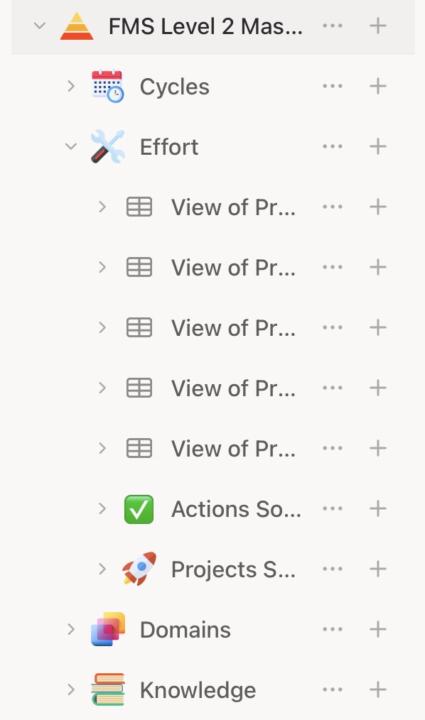
I'm watching Level 2 and wanted to mention that you should be able to click the down arrows next to pages in the menu bar down to expand them to the point where you can see the individual databases and then drag and drop the items from the database you're in to the one you want it to go to. Just make sure you're dropping into a database and not a page. (Though, if you do, you can just drag into the database from the containing page - usually they're things you've moved are just sitting below the database as blocks.) Just another option if "move to" isn't working. Here's a screenshot, so you can see what I mean by expanding the page:
1-19 of 19
skool.com/lifeos
You already know the best advice. What you need is a system. 𝗝𝗼𝗶𝗻 𝘂𝘀 and run your life with smartest 𝗟𝗶𝗳𝗲𝗢𝗦 in Notion🔥
Leaderboard (30-day)
1
+4
Powered by