
Pinned

👑
⭐
58m •
🛠️ New tool: ICM Architect
I explain the details about it on today's high tea . I built a Claude skill that turns a process, an idea, or a messy folder into an ICM workspace. The folder structure does the orchestration. Numbered folders carry the order, the hierarchy scopes context, and plain markdown files hold state. One agent walks the right files at the right time and does the work a multi-agent setup would. Repo: github.com/RinDig/icm-architect 📦 What it does Two modes. 🔨 Build. You describe your work and it pulls out the structure already sitting in how you talk about it. The stages, the points where you stop and check, what stays the same every run versus what is new. Then it picks one of five proven forms and scaffolds the smallest workspace that carries the job. ♻️ Restructure. Point it at a folder, repo, or vault you already have. It reads every file, sorts each one by role, shows you a migration map, waits for your yes, then moves and checks the result. 🧩 The five forms Pipeline, umbrella, record library, knowledge bundle, context map. They mix and nest, so most real workspaces use more than one. ✅ The walk test Every result gets checked cold. An agent with no memory has to open the root, find its way, act, and report status from the files alone. If it can't, the structure gets fixed until it can. ⚙️ How to use it You can honestly just tell claude to download it from the link, but if you're using codex or something else it will just have to restructure the claude.md to agents.md Or if you want to do more Hands-On install Claude Code: drop the folder in ~/.claude/skills/icm-architect/, then say "ICM this" or "build me a workspace for X." Claude apps: zip the folder and upload it under Settings, then Capabilities. Fork it, break it, tell me what you built. 👇
Pinned
👑
⭐
17d •
Welcome to Clief Notes. Here's where to start.
1. Go check out 📚Navigating The Course to see how to get around and what's here. 2. Start with The Foundation. Concepts, folder architecture, prompting framework. Everything else builds on this. 3. Check in at the bottom of each lesson. Polls, discussion posts, other members working through the same stuff. Use them. 4. When you're ready to build real things join in on our Biweekly competitions and win some real cash. ⭐ Competitions Mega Thread 5. If you are wanting to dive into the masterminds, grab all the past templates, artifacts and resources. Upgrade and head into the The Vault for Premium and The Drawing Room (VIP) for VIP 6. Post your work. Ask questions. Help others when you can. What are you here to build?
Pinned

2d •
🏆 WEEKLY COMP #9: THE EDITOR 🏆
🎟️ PRIZE: FREE SEAT IN THE LYCEUM 🎟️ Pick your cohort. Technical, Business, or Creator. Your call. 🎯 PICK YOUR DOMAIN The domain is yours. Pick something specific. Pick something you'd actually use. A few sparks to get you thinking: - 💻 Code review editor for a specific language and level (junior TypeScript, senior Python) - 📊 Pitch deck editor for pre-seed founders - 🎨 Grant application editor for arts nonprofits - 📄 Resume editor for career switchers into tech - 📰 Op-ed editor for policy publications - 🎙️ Podcast script editor for interview shows - ⚖️ Legal brief editor for civil litigation - 📋 Product spec editor for early-stage PMs - 🎓 Academic paper editor for one specific field The more specific, the better. "Writing editor" is too broad. "Op-ed editor for tech policy publications targeting a policy audience" is right. 🗂️ THE METHODOLOGY If this is your first comp, welcome. Here's what you need to know: This week (and every week) you're learning interpretable context methodology. Folders as architecture. Each file does one job well. Your editor is a folder with five things: - 📄 identity.md (who the editor is, what work they review) - 📐 rules.md (how they critique) - 💬 examples.md (what good critique looks like) - 📚 reference/ (style guides, checklists, frameworks the editor uses) - 📖 README.md (how to use it) Drop the folder into a Claude project. Claude becomes the editor. Reusable. Shareable. Portable. 🔥 THE ANGLE THIS WEEK An editor is NOT a rewriter. An editor doesn't do the work for you. An editor surfaces what's weak and pushes you to fix it. That distinction is the whole assignment this week. When someone hands the editor a draft, the editor shouldn't produce a "fixed" version. The editor should point at the three lines that don't work, explain why, and hand it back to the writer to solve. ✍️ Generic feedback like "consider strengthening your intro" is a fail. Specific feedback like "your intro assumes the reader already knows what a Series A is, but this pub is read by generalists, so lead with the stakes instead of the jargon" is what a real editor does.


3d •
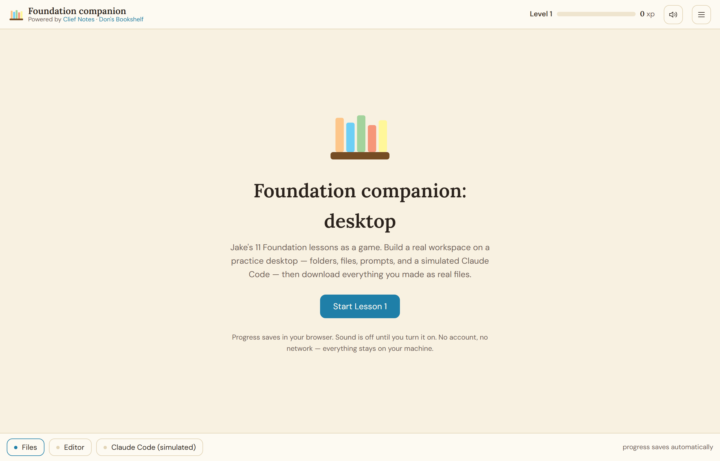
New V2 Foundations Tutor ! 🎓- For anyone struggling to learn ICM
Given the popularity of the original foundations tutor I wanted to see if I could take it a step further. I present V2 of the Clief Notes Foundations Tutor: https://github.com/donroy26/Clief-Notes-Foundations-Tutor The original tutor structure remains intact to use with Claude directly but for beginners (or for fun) there is now a standalone game that will walk you through the courses in a simulated desktop environment. Just like the original tutor, the files you create here will be available for you to take and use for yourself once you create them! Disclaimer: I am not a game developer. This was a fun side project so I expect someone will run into some bugs. Please let me know if you run into anything and I will be sure to address it! V1 Foundations Tutor: https://www.skool.com/cliefnotes/a-foundations-tutor-for-those-who-need-more?p=b5403a30
1-30 of 2,571

skool.com/cliefnotes
What we give away free beats most paid courses. Build durable AI systems with a Marine vet and Edinburgh researcher. 40+ lessons, growing.
Leaderboard (30-day)
1

🔥
+1725
2

+1048
3

+842
4

+768
5

+644
Powered by