
Write something

Aug 24 •
Photography and AI Fun!
For those of you who dabble in photography here are some tips for using AI. I took the first image a couple of days ago on my morning walk and it was a touch out of focus so I uploaded it to Grok Imagine and prompted it to copy the exact image but put an oil painting filter on it. Here are the before and after images. You can then take the AI image and ask it to make several more with different settings in the same style if you wanted to make graphics for a children's book or anything else you can imagine. Posters, greeting cards, etc. The third image the squirrel is larger and I had it add a deer in the field.

Jul 21 •
AI IMAGERY: BUILDING YOUR CHARACTER STARTS WITH THE RIGHT PROMPT
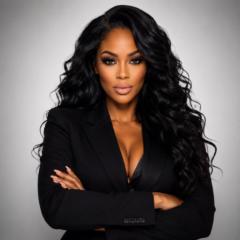
AI imagery is one of my areas of focus, particularly creating consistent characters for AI-generated content and video. One of the first steps in my workflow is establishing the character. If that character is based on you, a clear reference photograph combined with a precise prompt is essential. When using your photograph as a reference, clearly identify what must remain unchanged. For example: “Use the uploaded photograph as the primary reference. Preserve my facial identity and overall likeness. Maintain my facial structure, skin tone, eyes, nose, lips, and other distinguishing facial features. Do not alter or reinterpret my facial features. Only modify the clothing, hairstyle, pose, environment, lighting, or other elements specifically requested.” Why is this important? AI image generation involves interpretation. If your instructions are too broad, the model may make creative decisions you did not intend — including changes to your appearance. This is particularly important when using instructions such as “beautify me,” “make me more attractive,” or “glamourize this image.” Those instructions are subjective. By giving the AI permission to determine what “more beautiful” means, you may also unintentionally give it greater freedom to modify facial characteristics. A more controlled instruction would be: “Enhance the professional lighting, makeup, skin finish, styling, and overall photographic quality while preserving my existing facial features and recognizable likeness.” BEGINNER PROMPTING FRAMEWORK: When creating an AI character from your photograph, define: 1. SUBJECT — Who or what is being created? 2. IDENTITY — Which characteristics must remain consistent? 3. CHANGES — What specifically should be modified? 4. STYLE — What visual aesthetic are you trying to achieve? 5. ENVIRONMENT — Where should the character be placed? 6. RESTRICTIONS — What should the AI NOT change? The more precise your instructions are, the less the AI has to interpret on your behalf.

Apr 22 •
ChatGPT Image 2 is Here....Wow!
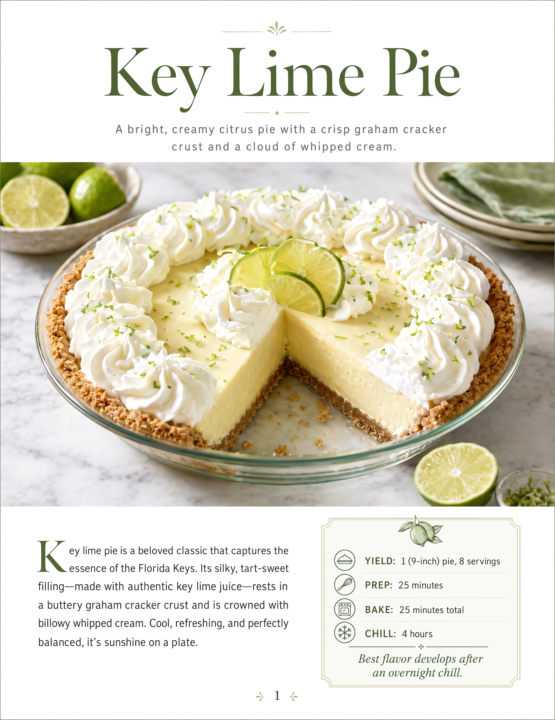
We’ve just had a pretty big update drop with ChatGPT Image 2… and it’s seriously impressive. I’ve been testing it over the last day, and the quality of the images it’s producing is on another level compared to what we’ve seen before. The detail, lighting, realism, and consistency are all noticeably better - no more gibberish text too! What stood out most for me: - Much more realistic faces and expressions - Better text handling inside images (still not perfect, but a big step forward) - More consistent styles across multiple images - Stronger understanding of prompts without needing loads of tweaking I’ve attached a bunch of examples to this post so you can see exactly what it’s capable of 👇 If you’re creating content, ads, thumbnails, product visuals, or even just experimenting… this is definitely worth spending some time with. 🤩 Curious to hear what you all think once you’ve tried it. Have you managed to get anything particularly good out of it yet that's going to be useful to your business? Cheers Jason 🙌

Apr 20 •
Image Editer Suggestions
Hi all, Im hoping someone is able to advise as to the best AI for making edits to uploaded images. currently using Chat GPT. I ask for an item to be changed/added and not to change anything else and it always changes something!! its so frustrating....wasting time and credits!! any suggestions would be greatly appreciated

Jan 17 •
I Used ChatGPT to Create the Best Web Hosting Featured Image
I used ChatGPT to design a high-quality featured image for my Web Hosting services page. The image highlights modern server infrastructure, top hosting providers, and key benefits like speed, reliability, and beginner-friendly performance—making the article more visually engaging and professional.

1-30 of 91

skool.com/chatgpt
A home for entrepreneurs who use ChatGPT to discuss, discover, and connect with others using this incredible AI technology. ⭐️ Invite your friends ⭐️
Leaderboard (30-day)
1
+19
2
+18
3

🔥
+17
4
🔥
+15
5

+13
Powered by