
Write something
Pinned

2d •
Custom Instructions: the 5-minute setup that makes every ChatGPT chat better
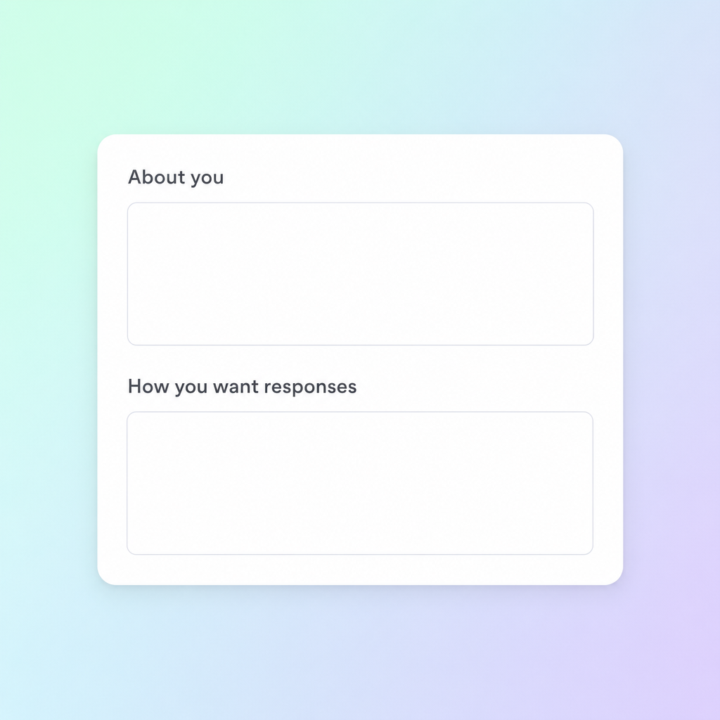
Most people open ChatGPT, fire off a prompt, get an OK answer, and move on. The thing that quietly separates the people getting incredible results from everyone else isn't a secret prompt — it's that they spent 5 minutes on Custom Instructions and never had to repeat themselves again. Custom Instructions sits in your settings. It's two text boxes ChatGPT reads silently before every reply, in every chat. Set it up once and the model already knows who you are and how you want to be answered. Here's the 5-minute setup that actually moves the needle: Box 1 — "What would you like ChatGPT to know about you?" Drop in three things: what you do, who you serve, and what you're working on right now. Example: "I run a SaaS business in customer support automation. My audience is small-business owners and marketing teams. I'm focused on growth and content right now." Skip hobbies and personal trivia — keep it work-focused. Box 2 — "How would you like ChatGPT to respond?" This is where most people leave money on the table. Tell it the tone, the format, and the things you don't want. Example: "Be direct and concise. Skip disclaimers and preambles. When I ask for copy, give me three variations. When I ask strategy questions, push back if my thinking is weak. Use plain English, not corporate-speak." Save it, open a new chat, ask the same question you've been asking for weeks. The difference is immediate. Two things to watch out for: don't stuff it with everything you can think of (the model weighs it heavier than you'd expect, and bloated instructions make answers worse not better), and revisit it every couple of months as your work shifts. What's in your Custom Instructions right now? Drop a line or two below — happy to suggest tweaks. Jason 🙌
Pinned
9d •
ChatGPT 5.5 is now live 👀
I’ve been digging into it today, and it’s definitely a noticeable step forward from 5.4 in a few key areas. GPT-5.5 is the strongest agentic coding model to date. On Terminal-Bench 2.0, which tests complex command-line workflows requiring planning, iteration, and tool coordination, it achieves a state-of-the-art accuracy of 82.7%. Here’s what stood out straight away: • Stronger reasoning and accuracy It feels more reliable when working through complex tasks, especially anything that involves multiple steps or deeper thinking. • Better at real-world work Writing, research, analysing data, structuring ideas… it just handles these more smoothly without needing as much back-and-forth. • Improved coding + technical help If you’re building apps, automations, or workflows, the responses feel cleaner and more usable first time. • More consistent outputs Less randomness, fewer weird replies, and generally more predictable results when you give it a clear prompt. • Handles larger context even better Great if you’re working with long documents, big prompts, or ongoing projects. What this actually means for us For most people here, it’s not about “new features”… it’s about getting better results faster. • Fewer prompt tweaks • More usable first drafts • Better outputs for clients • More reliable automations If you’re using ChatGPT daily for business, content, or building tools… this should make things noticeably smoother.

2h •
Gemini Now Generates Files Directly in Your Chat →
Google added native file generation to Gemini. Ask for a budget, a brief, or a deck, and Gemini produces the actual file: PDFs, Word docs, Excel sheets, Google Docs, Sheets, Slides, plus formats like CSV, LaTeX, RTF, and Markdown. No more copying chat output into a blank document and reformatting it manually. You can download the file directly or push it to Drive. The feature is rolling out to all Gemini users globally, free or paid. Why it matters: - Skip the copy-paste-reformat dance entirely. - Supports PDFs, Office files, Google Workspace, and more. - Available now to all Gemini users worldwide.
1
0
2h •
Claude Now Connects to Your Favorite Creative Tools →
Anthropic just released a wave of new connectors that plug Claude directly into the software creative pros already use. These include Adobe Creative Cloud, Blender, Autodesk Fusion, Ableton, Splice, SketchUp, Affinity by Canva, and Resolume, covering design, 3D, audio, and live visuals. The integrations let Claude do real production work inside these apps: modeling 3D objects through conversation in Fusion, batch-processing files in Affinity, searching Splice samples without leaving the chat, or scripting custom shaders and plugins. The pitch is simple: hand off the busywork so you can focus on the creative part. Why it matters: - Claude now works directly inside Adobe, Blender, Ableton, and more. - Handles the tedious production work so you can focus on creating. - Acts as an on-demand tutor for complex creative software.
1
0

1d •
ChatGPT vs Claude: Which is better?
Ive been using ChatGPT for a while now but never really looked into Claude, but Ive been hearing a lot about Claude recently. thoughts?
1-30 of 2,759

skool.com/chatgpt
A home for entrepreneurs who use ChatGPT to discuss, discover, and connect with others using this incredible AI technology. ⭐️ Invite your friends ⭐️
Leaderboard (30-day)
1

+31
2

+26
3

+26
4

+24
5

🔥
+14
Powered by