
Write something

Jun 29 •
Using "portable" Blender
Just started the "Blender Python for Artists Part 1". I use Blender on Linux (currently Kubuntu distro) and like to maintain strict control over which version I am using. To do this I use a “portable” installation which sets up a separate copy of the blender software for development. This way I can explore changes and scripts without impacting my main Blender application.


Jan 31 •
Finally a Late December Mini-Challenge Project Good Enough to Share
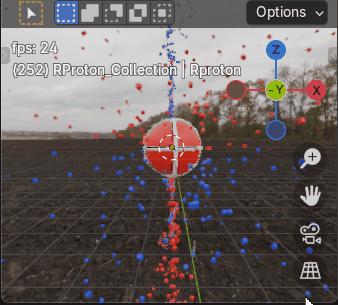
Here’s my late December Mini-Challenge Project. Originally Charge field 'Tornado and Debris’, now a Blender python Charge field physics, Proton with Charge Recycling model that contains top and bottom charge and anti-charge intake vortices, that I developed with ChatGPT help, good enough to share. All matter constantly recycles charge and anti-charge. It may not look like it at the moment, the animation shows a red, right spinning proton in Earth’s northern hemisphere’s vertical emission field, with a downward spiraling vortex of blue, left spinning anti-charge cubes (CW toward -z) entering the proton’s top spin axis pole while a vortex of red, right spinning cubes (charge) spirals upward (CW toward +z) into the proton’s bottom pole. After some delay, both charge and anti-charge is re-emitted by the spinning proton back into space, radially outward from the proton’s opposite hemisphere’s 40deg latitude, closer to the proton’s higher angular momentum equator. At this scale, with respect to the proton, I believe most charge would be too small to see, although electrons are essentially overgrown charge. Take it from this old has been engineer, Miles Mathis' Charge field physics makes much more sense than Quantum Theory, The proton spins with a driver function, add_continuous_rotation(thank you Victor). There are four particle systems, two with handlers and two without. HDRI functions are included, again thank you Victor (not to mention a gif), you’d need to provide a properly located hdri image to use them. The ps’ settings could use some changes. Please enjoy.
Nov '25 •
Circle and Sphere Packing
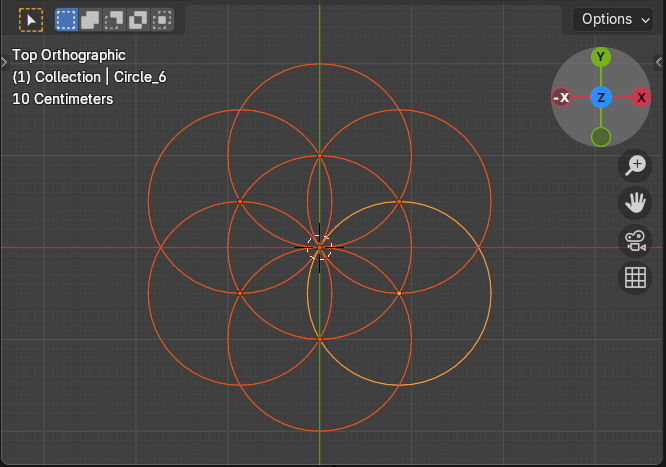
I’ve yet to figure out how to go about turning my main Charge field atomic modeling project into a molecule maker, then into an Addon. In the meantime, here’s some proof of life, a quick and easy Blender project, with AI help of course. Circle and sphere Packing. Still, it took me a few hours to request and understand it, make notes and changes, then find and correct a bad initial y_offset value suggested in the sphere packing section. 1. A 2d hexagonal close packed array of overlapping circles, 7 circles; 2. A grid of circles with variable rows and columns; 3. 3d hexagonal close packed spheres consisting of two alternating layers. First un-comment (remove) the pair of triple ( ''' ) quotes at the top and bottom of the section you wish to mess with. Here’s the AI instructions for creating the Blender python SG grid. AI wrote. QUOTE How to use the script Open the Scripting Workspace: Open Blender and switch to the Scripting workspace via the tabs at the top. Create a New Script: In the text editor window, click the New button. Paste the Code: Copy the code above and paste it into the editor. Adjust Settings (Optional): Change the variables at the top of the script (circles_across, rows_down, circle_radius, overlap_factor) to get your desired grid. Run the Script: Click the Run Script button (the "play" icon) in the text editor header. How it works Variable Control: The top section provides a clear way to control the grid's dimensions and overlap. Clear Scene: The script first deletes any old circles from previous runs to ensure a clean slate. This is a best practice for re-running scripts. Hexagonal Spacing: The core of the hexagonal grid is in the x_spacing and y_spacing calculations. A hexagon's geometry dictates that the vertical distance between row centers is a multiple of $\sqrt{3}/2$. Row Offset: A hexagonal pattern requires every other row to be horizontally shifted. The if row % 2 == 1: statement handles this by adding x_offset to odd-numbered rows.
1-13 of 13

Leaderboard (30-day)
1

+3
2

+2
3

+1
4

+1
5

+1
Powered by