Activity
Mon
Wed
Fri
Sun
Sep
Oct
Nov
Dec
Jan
Feb
Mar
Apr
May
Jun
Jul
Aug
What is this?
Less
More
AI Bits and Pieces
857 members • Free
AI Automation Society
440.3k members • Free
50 contributions to AI Bits and Pieces

🔥
25d •
Part 1 of 2 - 🐠 Chat is Dory. Cowork is Spock.
Since I started using Claude Cowork more regularly, I noticed something strange: My creative writing seemed to suffer. The ideas were still there. The information was accurate. The structure was often better. But the writing felt more formal, organized, and buttoned up. It did not always sound like me. So I asked Claude Cowork: “Why does my creative writing seem to suffer in Cowork compared with Chat?” The answer helped me realize that I was not necessarily using the wrong AI. I was using the wrong environment for that stage of the work. Chat is Dory. 🐠 It follows ideas wherever they go. It: explores, wanders, changes direction, and occasionally stumbles into something unexpectedly good. That makes Chat especially useful for brainstorming, finding your voice, testing language, and developing an idea before you know exactly where it will end. Cowork is Spock. 🖖 It wants the facts, the files, the instructions, and the desired outcome. It is, more structured, logical, organized, and focused on completing the assignment. In other words: Chat is often better for finding the voice. Cowork is better for turning that voice into finished work. Neither one is better. They are simply better at different stages of the process. My current approach is simple: - Use Chat to discover what I want to say. - Use Cowork to organize, refine, research, and complete the work. The mistake was expecting Spock to think like Dory. In Part 2, I will look at why Chat and Cowork feel so different from a feature and product-design perspective.


1 like • 21d
Dory. Love it. Way to break it down into bits and pieces !
🔥
Jul 8 •
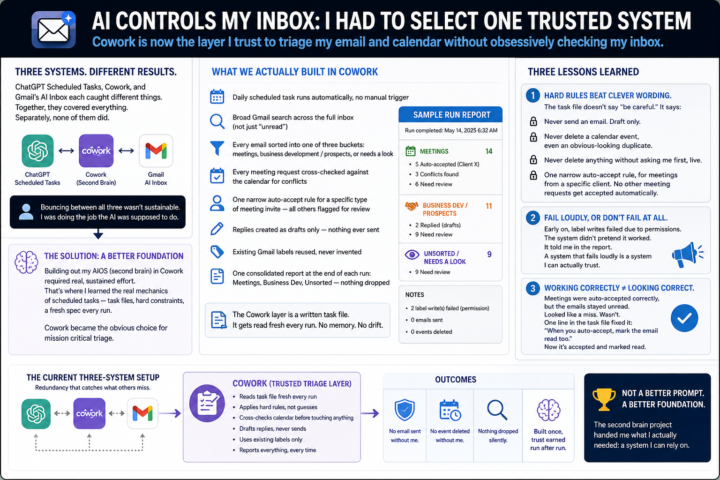
📬 AI Controls My Inbox: I Had to Select One Trusted System
The results across the three systems weren't consistent. ChatGPT Scheduled Tasks, Cowork, and Gmail's own AI Inbox each caught different things. Together, they covered everything. Separately, none of them did. So I found myself doing something I hadn't planned on: bouncing between all three, cross-checking one against another, instead of trusting any single one to just handle it. That's not sustainable. That's a person doing the job the AI was supposed to do. Around the same time, on an unrelated but related project, I started building out my AIOS — what I've been calling my second brain. Getting that set up required real, sustained effort inside Cowork. That's where I actually learned how Cowork's scheduled tasks work. Not the surface version. The real mechanics — task files, hard constraints, a run that reads a fresh spec every time instead of carrying memory forward. It was clear to me that Cowork was the best choice for mission critical triage at this point, and therefore the scheduled task is much more robust. 📝 What we actually built in Cowork - A daily scheduled task that runs the inbox triage automatically, no manual trigger - A broad Gmail search across the full inbox, not just "unread" — misclassified emails don't show up if you only look at unread - Every email sorted into one of three buckets: meetings, business development / prospects, or needs a look - Every meeting request cross-checked against the calendar for conflicts before anything gets touched - One narrow auto-accept rule for a specific type of meeting invite — all other meeting notices get flagged for review, not guessed on - Replies created as drafts only — nothing ever sent automatically - Existing Gmail labels reused, never invented on the fly - One consolidated report at the end of each run: Meetings, Business Dev, Unsorted — nothing dropped silently That's the skeleton. Here's what happened once it actually ran. The Cowork layer is a written task file. It gets read fresh every run. No memory of the last one. Nothing to slowly drift.
1 like • Jul 9
As someone who has been fortunate to see demos along the way of this “second brain” it has been mind blowing 🤯. It also made it crystal clear how AI isn’t always a replacement for people, it’s a superpower for curious people!
🔥
Jun 20 •
🐺 Builders Build Perfection. Sellers Sell Imperfection. New Community Preview
I’m excited to announce the upcoming launch of "Lone Wolf AI League", a new premium Skool community for people determined to become the AI resource inside their company, agency, executive room, board room or marketplace. Inside Lone Wolf AI League, I will share real-world AI strategy, deal strategy, wins, losses, client conversations, consulting realities, business execution, and what it actually takes to compete in the AI economy. This post is an example of the type of content and conversations we will explore inside the community. 🐺 Last night, I came across the Reid Hoffman quote: “If you’re not embarrassed by the first version of your product, you’ve launched too late.” I have seen this quote many times, but last night it brought back a wave of nostalgia because it connects directly to something I have experienced over 30 years of building software, launching companies, and surviving technology disruption. Over the last 30 years, I have built more than 100 software applications, large and small. I have started four technology companies. My first startup, in 1999, raised $100,000 in capital. At the time, that was big money to me. We spent six months building a highly specialized eCommerce SaaS model for the brand merchandising industry. We financed an $80,000 server running Windows NT 4, built on a Classic ASP stack, and later moved to .NET. We wanted to go open source, but MySQL was still in its infancy. Java felt like space-age technology. JSON was just starting to look promising. We were in the middle of a 10-year browser war, and you could not practically email a file larger than 1 MB. After a successful launch, we invested another $100,000 in servers and software. We sold SaaS eCommerce subscriptions for $2,500 per month. We thought we were building the future. Then Yahoo launched website and shopping cart capabilities for about $25 per month, and overnight, the industry shifted beneath our feet. Our model was not only under attack. It took a direct hit because customers saw price, but often did not understand the nuance between small retail websites and enterprise eCommerce.

0 likes • Jun 22
Great insight!
🔥
Apr 29 •
🩺 AI in Real Life: Proud Parent Edition
Sometimes AI helps with productivity. Sometimes it helps with workflows. And sometimes… it helps two very proud parents create the perfect swag gift for their daughter’s first job as a nurse. In this case, Mommy was the art director — with the vision, the eye, and the “nope, that’s not quite right” authority. ❤️ And Daddy was prompting his heart out, trying to get every detail just right for a one-of-a-kind gift to celebrate a huge milestone. Not just any gift. A first job gift. A you worked for this gift. A we are so incredibly proud of you gift. That’s one of the things I love about AI. It is not always about big business use cases or fancy automation. Sometimes it is simply about helping you bring an idea to life faster… more creatively… and with a little more heart. A custom gift. A meaningful moment. A daughter stepping into her calling. And two parents smiling behind the scenes, trying to make it special. Here is the full prompt trail — images, typos, revisions, “almost there” moments, and all: https://chatgpt.com/share/69f202f5-7a30-83ea-a591-cb97fd8246b2 That is AI in real life. Because sometimes the best use of AI is not just getting something done. It is helping you show someone you love just how much they mean to you.

4 likes • Apr 29
It’s perfect!
🔥
Apr 26 •
📦 Out of The Box in 90: Suno Turns My Poem Into AI Song for Daughter
Welcome to the Out of The Box Series — where I test how far curiosity and AI can take you in 30, 60, or 90 minutes using today’s best no-code and low-code tools. No studio. No production team. No advance training. Just exploration to see what we can do — right out of the box. 🎧 Finished Song*: I Got Your Six Little Girl 🎬 This Episode: Suno.com – AI Song Creation 🕒 Time Limit: 90 Minutes 📂 Category: AI Music & Personal Creativity 🎶 What Is Suno? Suno is an AI music generation tool that can create songs from prompts, lyrics, and style direction. In this case, Suno did the musical composition. I uploaded my original lyrics. 🎧 Finished Song*: I Got Your Six Little Girl Because rights and ownership matter, I started with lyrics I had written myself and kept the words original. With Suno Pro, you can publish what you create, so I wanted to be thoughtful about what I uploaded and refined. 📝 Backstory In February 2020, I wrote a poem for my daughter called I Got Your Six Little Girl. It was written from the perspective of a father looking back on all the firsts: - first heartbeat - first breath - first steps - first bike ride and moments in between The poem was already written. But I cannot sing. I cannot play instruments very well. I was never in the band. So I wanted to see if I could use AI to help turn the poem into a song to give her as a graduation present. ⏳ What I Built in 90 Minutes: Within one focused session, I: 🎼 Uploaded my original lyrics into Suno 📝 Converted the poem format into a song lyric format 🎚️ Used Suno’s interface presets to guide the style 🔁 Generated multiple versions 🎧 Listened for tempo, transitions, hooks, and continuity 🎵 Created a strong working version of the song 🎧 Finished Song*: I Got Your Six Little Girl The prompt was less of a traditional instruction and more of a music style descriptor.

1 like • Apr 27
@Matthew Sutherland your words are so true and very kind. I have always told my daughter that I picked him for you and there really is truth in that. There is a long list of why I love this man but I knew someday I would have a daughter, and I was also blessed with a really good dad, and wanted that for her. I knew he would without a doubt be that man.
1-10 of 50

@michele-wacht-4215
Committed wife 💍 | Dedicated mama 💕 | Loyal friend 🤝 | Lifelong learner 📚
Active 6d ago
Joined Aug 24, 2025
Powered by