
Pinned

💎
⭐
22h •
🚀New Video: How Anthropic Engineers Actually Prompt Fable 5
Fable 5 is back, and it's the strongest model I've used. It's also expensive and won't stay free on your Claude plan for long, so this video breaks down the six habits I'm using to get the most out of it without burning tokens. Everything from giving it the right context, to matching effort levels, to knowing when it quietly hands your task off to Opus.
Pinned
💎
⭐
29d •
What do you get if you upgrade to AIS+?
Some of you have never heard of the AIS+ community. Others have but the part that trips you up is the actual difference between the two. Either way, this post will give you clarity. This free group is a bundle of quick resources pulled from my YouTube videos, plus a massive open community that anyone can join. It's a great place to get your bearings and see what's possible. But it's open to everyone, it can be noisy and overwhelming, and there's no path through it. You can get help from other members, but I rarely answer questions here. AIS+ is the opposite: - A step by step roadmap with a clear order, so you're never guessing what to do next - A much smaller community of people who are seriously committed to building and selling AI agents - I answer questions every day and run a weekly Q&A call where you can get direct access to me For the course material: The roadmap takes you from zero to building and selling AI agents, and the whole thing is built on the latest tech like Claude Code and Codex. We update it constantly. The old n8n material has been archived. It's still there if you want it, but it's no longer the focus, because the way you build today has moved on and the courses moved with it. Here's the actual roadmap inside, in order, with when each piece opens up: 1. Start Here (opens the moment you join). Gets you oriented. How the community works, the path ahead, and how to get help when you need it. 2. Build Your Portfolio (opens the moment you join). Why a portfolio matters, beginner level tutorials, and what types of projects to focus on. You end up with real work you can show a client. 3. Claude Code (opens the moment you join). This is now its own dedicated course. Build faster, turn ideas into working automations, and go deep on the tool serious builders are using right now. This takes you from beginner to advanced, step-by-step. 4. Get Your First Clients (opens after 30 days). Getting your first clients is hard, because you don’t have any case studies yet. So, we analyzed all of the success stories from our members and found they get their initial clients with two different techniques: warm outreach and Upwork. So, we teach both techniques in detail with exactly what to say, exactly how to position yourself when you have no proof.
Pinned
💎
⭐
Apr 11 •
📚 Looking for a YouTube video resource?
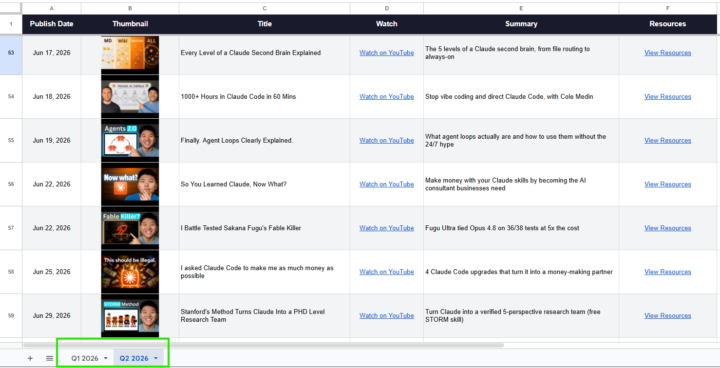
Hey everyone, I built a Google Sheet that has every video I've published in 2026 along with the links to all resources, tools, and files mentioned in each one. If you're ever looking for something I referenced in a video, start here: 📌 YouTube Video Database This will get updated as new videos drop. Bookmark it. Check the tabs at the bottom to make sure you're on the right sheet. - Nate

just now •
Day 2 Building a MCP
Just set up Firecrawl MCP and scraped a real site without writing a single line of code 🔥 Spent the morning connecting Firecrawl to Claude Code and honestly, it's a game-changer for anyone doing data extraction work. Here's what I did: 1. Connected Firecrawl's MCP server to Claude Code (literally just pasted an install command) 2. Added my API key to .env and reloaded 3. Tested it on a simple site — got clean markdown back instantly 4. Created a Firecrawl cheat sheet (Claude wrote it for me) explaining each tool and when to use it 5. Went for a real use case — found a job board and asked Claude to extract structured data into CSV 6. Used Plan Mode first — let Claude map out the approach before executing The result: A clean CSV with hundreds of job listings, extracted and formatted automatically. No web scraping libraries, no parsing logic, no manual API wrangling. What blew my mind: - You literally just describe what you want extracted and Claude handles it - Firecrawl's smart enough to handle pagination and messy HTML - The structured data output is actually usable (not garbage text) - Switching to Plan Mode first saved me from mistakes — Claude thought through the approach before executing The setup was smooth: - Free plan gives 500 credits (plenty to test with) - MCP integration is seamless once you reload the window - The cheat sheet Claude generated is actually useful for future projects If you're doing any data extraction, lead scraping, or competitive research, this cuts the time in half. No coding required. Anyone else using Firecrawl? Curious what use cases you're tackling with it.
💎
⭐
6h •
Congrats to our June graduates! #AISChallenge🎉
Huge shoutout to everyone who finished the 7-Day Challenge this month and got certified. Seven days, zero to your own executive assistant in Claude Code. Step by step, from nothing to shipped. These 46 members put in the reps and walked away with a working assistant they built themselves: Larry Crane, Al Mulrooney, Hassan Eid, Brandon Claeys, Marc-Antoine Siewe, Neelima Rani, Javier Yranzo, Elmuntasir Mukhier, Cristian Victoria, Alberto Galdames, Harena Juan Rabarijaona, Greg Faysash, Logan Clegg, Paul Forster, Estefania Tidwell, Vuk Simić, Iain Littlejohn, Mark Moran, Julius Waggoner, Michael Wijaya, Ilias Kirbashev, Leviticus Kinchen, Duy Nguyen, Vina Egg, Žiga Kalan, David Richardson, Lesetša Mutchinya, Abrie van Wijk, Firoz Shaikh, Farel Viaho, Alberto Camacho, Tito Burga, Chad, Peter Lukacsi, Sanjana N, Ayhan Bulut, Jerry, Hamza Sajjad, Tim van Kollenburg, Elias B., Ismoiljon Farhodov, Tim Metzner, Java Hardge, Philippe, Papa, Robin Pinchard If you haven't started yet, the challenge is completely free and it's right here: https://www.skool.com/ai-automation-society/classroom/dda699b7?md=08b046f630344596b864d1cd4304bda0 One lesson, one build, each day. By the end you'll have your own Claude Code assistant up and running. See you in the next cohort. - Nate

1-30 of 20,675

skool.com/ai-automation-society
Learn to get paid for AI solutions, regardless of your background.
Leaderboard (30-day)
1

🔥
+7367
2

+5967
3

🔥
+5799
4

🔥
+4533
5

+1315
Powered by