
Pinned

💎
⭐
Apr 11 •
📚 Looking for a YouTube video resource?
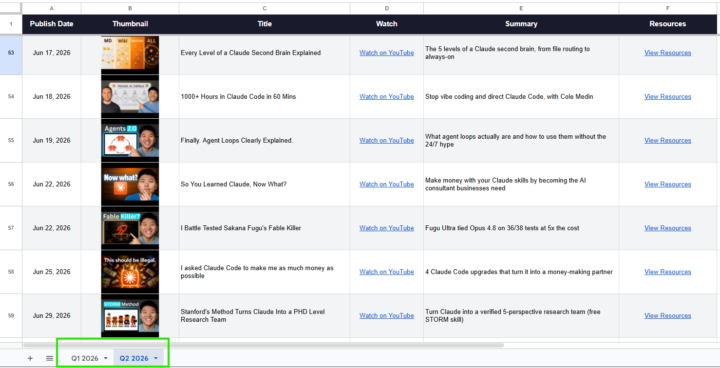
Hey everyone, I built a Google Sheet that has every video I've published in 2026 along with the links to all resources, tools, and files mentioned in each one. If you're ever looking for something I referenced in a video, start here: 📌 YouTube Video Database This will get updated as new videos drop. Bookmark it. Check the tabs at the bottom to make sure you're on the right sheet. - Nate
Pinned
💎
⭐
30d •
What do you get if you upgrade to AIS+?
Some of you have never heard of the AIS+ community. Others have but the part that trips you up is the actual difference between the two. Either way, this post will give you clarity. This free group is a bundle of quick resources pulled from my YouTube videos, plus a massive open community that anyone can join. It's a great place to get your bearings and see what's possible. But it's open to everyone, it can be noisy and overwhelming, and there's no path through it. You can get help from other members, but I rarely answer questions here. AIS+ is the opposite: - A step by step roadmap with a clear order, so you're never guessing what to do next - A much smaller community of people who are seriously committed to building and selling AI agents - I answer questions every day and run a weekly Q&A call where you can get direct access to me For the course material: The roadmap takes you from zero to building and selling AI agents, and the whole thing is built on the latest tech like Claude Code and Codex. We update it constantly. The old n8n material has been archived. It's still there if you want it, but it's no longer the focus, because the way you build today has moved on and the courses moved with it. Here's the actual roadmap inside, in order, with when each piece opens up: 1. Start Here (opens the moment you join). Gets you oriented. How the community works, the path ahead, and how to get help when you need it. 2. Build Your Portfolio (opens the moment you join). Why a portfolio matters, beginner level tutorials, and what types of projects to focus on. You end up with real work you can show a client. 3. Claude Code (opens the moment you join). This is now its own dedicated course. Build faster, turn ideas into working automations, and go deep on the tool serious builders are using right now. This takes you from beginner to advanced, step-by-step. 4. Get Your First Clients (opens after 30 days). Getting your first clients is hard, because you don’t have any case studies yet. So, we analyzed all of the success stories from our members and found they get their initial clients with two different techniques: warm outreach and Upwork. So, we teach both techniques in detail with exactly what to say, exactly how to position yourself when you have no proof.
Pinned
💎
⭐
7d •
🎉LIMITED TIME try Glaio FREE, then 40% off.
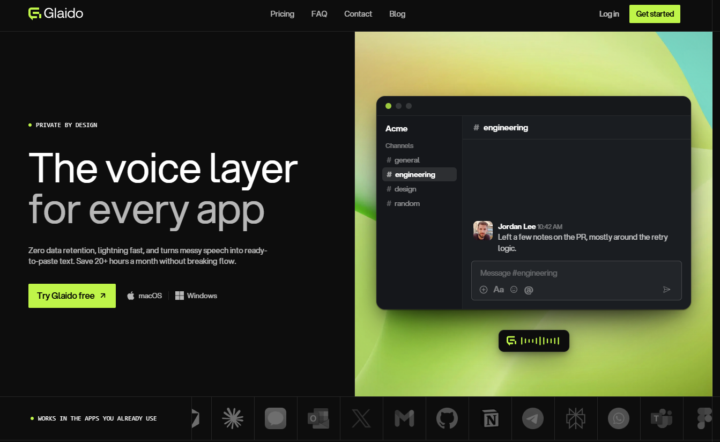
I'm a co-founder of Glaido, building it with Jack Roberts, Dave Ebbelaar, and Jannis Moore. It's a voice tool built around two things: speed and privacy. Fastest on the market, completely private. It used to be Mac only. It's now on Windows too, so all of you can use it. You get 40% off your first 3 months ($20/mo → $12/mo) with this code: D5J6BIF8K4P Next 30 days only 👉 https://get.glaido.com/nate I switched from Wispr Flow a few months ago and it just felt better. If you're on Wispr, try Glaido free, use the code, and tell me if you feel the difference. If you want to switch back after, no hard feelings. Good to know - Mac + Windows - Snippets: insert any text instantly with one word - Dictionary: save your own words, import straight from Wispr Flow - Agentic Mode: manipulate any text on your screen with your voice - Webhooks coming to Agentic Mode soon (huge) - We action feedback almost immediately Give it a shot and drop your thoughts in the community.

2h •
AIS 7 DAY CHALLENGE - DAY 5 COMPLETE
For day 5 of my challenge, I decided to build a portfolio website 🚀 Since I'm currently job hunting, I figured why not use AI to build something that actually shows what I can do instead of just telling people. Went through a lot of ideas and phases (more than I'd like to admit), took a few days longer than planned, but here's where I landed. Still a few tweaks left, but it's about 90% there. Would love any feedback if you have a minute to check it out 👇 https://robertk-tk2i.vercel.app/index.html

3d •
How to step up a second AI brain?
I've been using Claude Pro for a while and I want to build an "AI second brain" with it at the core. A few specific problems I'm trying to solve: - Remembering what I've already learned or researched - Speeding up how I consume and retain information - Getting help with writing and content — not just one-off prompts - Staying on top of tasks and projects without losing context I'm leaning toward combining Obsidian with Claude, and possibly using Claude Code to build automations around it (things like scripts to summarize notes, surface past research, or sync context). But I'm not sure how to connect these pieces in a way that actually works day-to-day. For anyone who has built something like this: → Where did you start — notes, tasks, writing, or something else? → Has anyone integrated Obsidian with Claude to auto-summarize notes or pull up past research? How did you set that up? → What's one thing you wish someone had told you before you started? Looking for real-world experience, including the parts that don't usually get talked about.
1-30 of 20,704

skool.com/ai-automation-society
Learn to get paid for AI solutions, regardless of your background.
Leaderboard (30-day)
1

🔥
+7342
2

+6039
3

🔥
+5834
4

🔥
+4680
5

🔥
+1327
Powered by