
Pinned

💎
⭐
Apr 11 •
📚 Looking for a YouTube video resource?
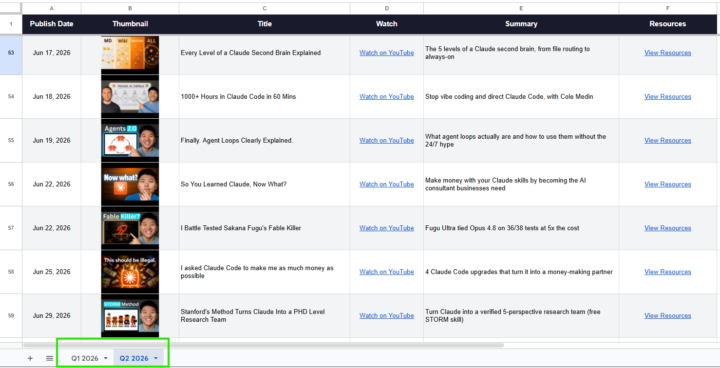
Hey everyone, I built a Google Sheet that has every video I've published in 2026 along with the links to all resources, tools, and files mentioned in each one. If you're ever looking for something I referenced in a video, start here: 📌 YouTube Video Database This will get updated as new videos drop. Bookmark it. Check the tabs at the bottom to make sure you're on the right sheet. - Nate
Pinned
💎
⭐
30d •
What do you get if you upgrade to AIS+?
Some of you have never heard of the AIS+ community. Others have but the part that trips you up is the actual difference between the two. Either way, this post will give you clarity. This free group is a bundle of quick resources pulled from my YouTube videos, plus a massive open community that anyone can join. It's a great place to get your bearings and see what's possible. But it's open to everyone, it can be noisy and overwhelming, and there's no path through it. You can get help from other members, but I rarely answer questions here. AIS+ is the opposite: - A step by step roadmap with a clear order, so you're never guessing what to do next - A much smaller community of people who are seriously committed to building and selling AI agents - I answer questions every day and run a weekly Q&A call where you can get direct access to me For the course material: The roadmap takes you from zero to building and selling AI agents, and the whole thing is built on the latest tech like Claude Code and Codex. We update it constantly. The old n8n material has been archived. It's still there if you want it, but it's no longer the focus, because the way you build today has moved on and the courses moved with it. Here's the actual roadmap inside, in order, with when each piece opens up: 1. Start Here (opens the moment you join). Gets you oriented. How the community works, the path ahead, and how to get help when you need it. 2. Build Your Portfolio (opens the moment you join). Why a portfolio matters, beginner level tutorials, and what types of projects to focus on. You end up with real work you can show a client. 3. Claude Code (opens the moment you join). This is now its own dedicated course. Build faster, turn ideas into working automations, and go deep on the tool serious builders are using right now. This takes you from beginner to advanced, step-by-step. 4. Get Your First Clients (opens after 30 days). Getting your first clients is hard, because you don’t have any case studies yet. So, we analyzed all of the success stories from our members and found they get their initial clients with two different techniques: warm outreach and Upwork. So, we teach both techniques in detail with exactly what to say, exactly how to position yourself when you have no proof.
Pinned
💎
⭐
7d •
🎉LIMITED TIME try Glaido FREE, then 40% off.
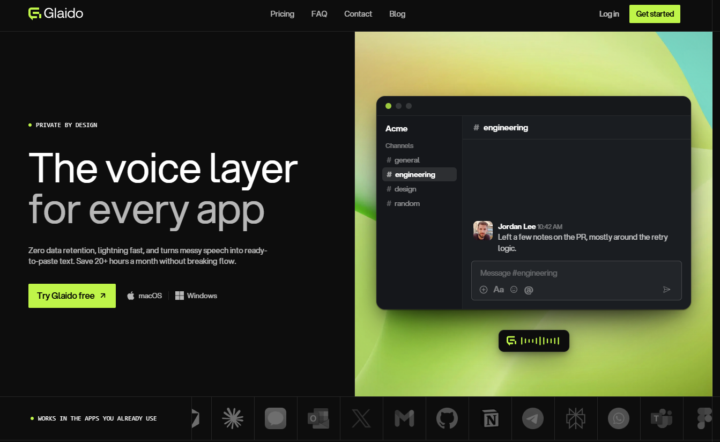
I'm a co-founder of Glaido, building it with Jack Roberts, Dave Ebbelaar, and Jannis Moore. It's a voice tool built around two things: speed and privacy. Fastest on the market, completely private. It used to be Mac only. It's now on Windows too, so all of you can use it. You get 40% off your first 3 months ($20/mo → $12/mo) with this code: D5J6BIF8K4P Next 30 days only 👉 https://get.glaido.com/nate I switched from Wispr Flow a few months ago and it just felt better. If you're on Wispr, try Glaido free, use the code, and tell me if you feel the difference. If you want to switch back after, no hard feelings. Good to know - Mac + Windows - Snippets: insert any text instantly with one word - Dictionary: save your own words, import straight from Wispr Flow - Agentic Mode: manipulate any text on your screen with your voice - Webhooks coming to Agentic Mode soon (huge) - We action feedback almost immediately Give it a shot and drop your thoughts in the community.

4h •
🔥 AIS+ Chill, Chat & Chaos Recap — June 27, 2026: A $3,000 Lesson, an Overnight Agent Army, and Why We're All Posers 🔥
👋 New here? Start with this. Every week inside AIS+, a bunch of us hop on a live call we call CCC — Chill, Chat & Chaos. No agenda. No slides. No guru talking at you. Just builders — total beginners and seasoned pros side by side — thinking out loud about AI and automation. What's working, what broke, what we're figuring out in real time. People show up with a question and leave with a plan. Some weeks it gets deeply technical, some weeks it's just honest talk about building a business with this stuff. It's messy on purpose — and that's exactly why it works. Here's a taste of what you missed at the last one 👇 🔥 This week's Chill, Chat & Chaos 🔥 💸 I'll own this one — a mistake I made last year quietly cost me around $3,000. The kind nobody warns you about until it's too late. We walked through exactly how to make sure it never happens to you. 🤖 One builder runs a small army of AI agents overnight, goes to sleep, and wakes up to a finished project. Yes, really. We got into how that actually works. 🛌 Someone shared how they now get their heaviest work done on their hardest days by letting AI carry the load — the kind of thing that quietly changes a life. Easily the most moving moment of the night. 🕵️ Why asking AI to "check its own work" is a trap — and the one small change that actually catches the bugs it hides from you. 🧾 How one member taught AI to read a stack of messy handwritten receipts like it was decoding the Rosetta Stone. 💳 And the idea that split the room clean in half: should you ever lend a stranger your unused AI credits? The reason nobody could agree is the interesting part. Oh — and the honest line of the night: "we're all posers." 😅 Not one person in that room pretends to have it all figured out. That's exactly why it works. 💬 More than one member has told me that a single one of these calls is worth the entire monthly subscription. I didn't say it — they did. If you're out here on the free side, this is what's happening every Saturday on the inside. The tools, the exact how-tos, the resource guide, and the recording all live in AIS+ 🔒. Consider this the trailer.

23h •
Multiagent Systems
Hi everyone, I'm trying to understand the best way to set up multi-agent systems and would love to hear how you do it. Mainly on structure and orchestration, I'm torn between two models: 1. One main agent that directly controls subagents, so a single layer. 2. One main agent that coordinates several full agents in their own sessions, which in turn have their own subagents, so a nested setup. What do you use in practice, and when is each one better? And how do you handle the orchestration itself (handing off tasks, sharing context, collecting results)? On tooling: do you keep everything in Claude (Claude Code, Agent SDK), or bring in external orchestrators? I often hear n8n, LangGraph, CrewAI and Claude Flow, but I'm not sure what people actually use and for what. Thanks for any tips!
1-30 of 20,721

skool.com/ai-automation-society
Learn to get paid for AI solutions, regardless of your background.
Leaderboard (30-day)
1

🔥
+7376
2

+6059
3

🔥
+5870
4

🔥
+4717
5

🔥
+1333
Powered by