
Pinned

💎
⭐
13h •
🚀New Video: The Playbook for a $100M AI Agency
I sat down with Devin Kearns, co-founder & CEO of Custom AI Studio, to break down what it actually takes to build an AI agency with real enterprise value, not just another lifestyle business. We get into why most AI work being sold today won't survive 2027, why the mid-market is the prime opportunity (not SMBs or enterprises), the 11 ways AI experts are actually making money right now, how to position with frameworks instead of being just another vendor, and the five things Devin wishes he knew sooner. If you're building, running, or thinking about starting an AI agency, this is the strategic conversation I wish I'd had two years ago.
Pinned
💎
⭐
1d •
The real problem with AI slop.
So I'm sure you guys have heard the term "AI slop", and everyone sorta defines it differently. Maybe you think it's those TikToks of AI-generated fruits going on dates. Maybe it's infographics with misspelled words. Maybe it's something else entirely. But I want to talk about it in the context of communication. Internal, external, content you put out into the world. I write my LinkedIn posts with AI. My agent knows my business, how I write, how I speak. That's just how I work now. And there's nothing wrong with that. I think everyone should be using AI to write if it makes them more efficient. But this isn't a binary yes or no. It's a spectrum. Sometimes AI can draft and send automatically. Most of the time, I want it to just draft. Then I review. If someone sends me an email with em dashes everywhere, I don't actually care at all that they used AI. The fact that I can clearly tell it's AI-generated isn't the problem. What I do start asking is: → Did they proofread this? → Is this completely accurate? And subconsciously, I might start losing trust. Not just in the email but in the person who sent it. Our job here has changed from writer to reviewer. This quote has really stuck with me: "You can outsource your thinking, but you can never outsource your understanding." When your name is attached to the content, you take credit if it lands, as you should. But that also means you need to take accountability if it's incorrect. Taste and reviewing are becoming more important than ever. AI is super intelligent and powerful, but I don't want to see a world where we trust AI so much, that we stop reviewing things, and then the human on the other end of the content starts losing trust in us. That's why even though I write with AI, and people know that, I still try my best to disguise it and make it sound as "Nate" as possible. Check out the LinkedIn post I just wrote about this HERE
Pinned

🔥
3d •
🏆 Weekly Wins Recap | May 16 – May 22
From first client wins and live workflows to AI voice agents, portfolio momentum, and production-level fixes - this week inside AIS+ showed what happens when builders keep stacking reps consistently. 🚀 Standout Wins of the Week inside AIS+ 👉 @Michael Garcia closed his first major deal with a wholesale real estate automation engine handling property sourcing, Claude-based deal scoring, and investor pipeline management. 👉 @Luca Giovinazzo delivered his first full client project live — including 11 n8n workflows, CRM systems, Telegram bots, inventory tracking, booking systems, and KPI dashboards for an auto detailing business. 👉 @Paulo Calpatura built a fully automated AI voice receptionist using Vapi, n8n, Claude, Google Maps, Google Calendar, Google Sheets, and ElevenLabs. 👉 Bo Gonzales presented two AI builds internally, stood out in front of 79 employees, and ended up in a 30-minute AI strategy conversation with his CEO. 👉 @Shatadru Majumdar joined just 7 days ago and already completed multiple AIS+ modules while shipping a customer-support workflow using n8n + Claude. 🎥 Super Win Spotlight | @Griffin Maklansky Griffin joined AIS+ after getting laid off and within a month and a half, landed a new AI-focused role. What started it all? Watching Nate’s “Master 95% of Claude Code in 36 Minutes” video and realizing how quickly AI could turn ideas into real products. Since joining, Griffin has: - Built his own personal website to stand out while job hunting - Started learning AI automation seriously despite having no traditional dev background - Used Nate’s templates and systems to level up his Claude workflows - Connected with builders inside the community and started taking real conversations around opportunities - Went from laid off to employed again with a strong salary in under 45 days

💎
⭐
Oct '24 •
Welcome! Introduce yourself + share a career goal you have 🎉
Let's get to know each other! Comment below sharing where you are in the world, a career goal you have, and something you like to do for fun. 😊

39m •
Bye-Bye Claude Design? 👋 Meet the Free, Open-Source Alternative You Can Run Locally!
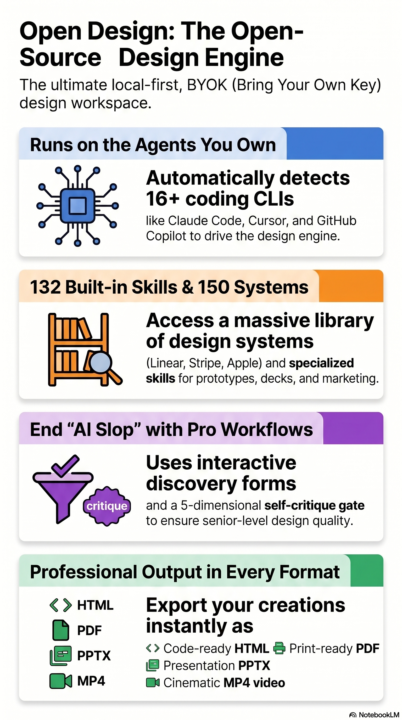
Hey everyone! Have you seen those cool videos of people using Anthropic's Claude Design to build apps and websites designs and prototypes just by chatting? It's amazing, but it can be expensive, locked to one cloud, and strictly paid and limited usage. I just found a game-changer called Open Design. It's a completely open-source alternative that you can run right on your own computer. Think of it as a senior designer who lives on your laptop and helps you create professional-grade work in seconds. Why is this better than Claude Design? While Claude Design is great, it's a "closed" system. Open Design gives you more freedom: - It's Local-First: Your projects and conversations stay on your computer, not in the cloud. - Works with Your Tools: If you already use Al tools like GitHub Copilot or Cursor, Open Design can "plug into" them to become your design engine. - Totally Customizable: Unlike Claude, which is locked to one style, Open Design comes with 150 brand-grade design systems like Apple, Notion, Airbnb, and Stripe. Why it's perfect for beginners: One of my favorite features is the Question Form. Instead of the Al just guessing what you want (and getting it wrong), it starts every project by asking you simple questions about your audience, tone, and brand. This helps you get a professional result on the very first try. When you're finished, you can export your work as an HTML file, a PDF, a PowerPoint (PPTX), or even a Video (MP4) to share with others. How to try it out 👇: The easiest way to start is to download the Desktop App from open-design.ai. You just open it, type in what you want to build, and watch the Al start "shipping" your design artifacts right in front of you. Whether you're building a side hustle, a portfolio, or just want to play with the latest Al tech, this is definitely worth a look. What would you build first? Let's chat in the comments!👇
1-30 of 17,562
skool.com/ai-automation-society
Learn to get paid for AI solutions, regardless of your background.
Leaderboard (30-day)
1

🔥
+6976
2

🔥
+4568
3

+4200
4

🔥
+2389
5

+1093
Powered by