
Pinned

💎
⭐
20h •
🚀New Video: 100 Hours Testing Claude Code vs ChatGPT Codex (honest results)
I spent 100 hours testing Claude Code vs ChatGPT Codex and what I found genuinely surprised me. Same prompts, same builds, both tools side by side, and one of them hit way harder than I expected. If you're picking between coding agents right now, then this video is the breakdown you actually need before you commit.
Pinned
💎
⭐
1d •
The skill clients pay $5000+ for (and it’s not automations)
I’ve been watching our 3,700 students in AIS+, and I noticed the people making the most money are all doing this: https://app.aiautomationsociety.ai/10-hours The people charging $5,000, $10,000, even $50,000 per engagement weren't better builders. Before they ever opened n8n/Claude Code, they did one thing differently: → They found the automations worth building first. It’s like a mini audit. Just by asking a few questions and mapping out the opportunities, they were able to get clients excited and also choose the right projects to work on. And the best part is you can practice by running this same system on YOURSELF. I call it 10 Hours to 10 Seconds, because doing this can easily save you or your clients 10 hours a week by automating the right things. Get all the details here: https://app.aiautomationsociety.ai/10-hours Talk soon, Nate PS: If you’re in AIS+, this has already been updated and provided to you at no cost. You can find it in the classroom
Pinned

🔥
5d •
🏆 Weekly Wins Recap | May 16 – May 22
From first client wins and live workflows to AI voice agents, portfolio momentum, and production-level fixes - this week inside AIS+ showed what happens when builders keep stacking reps consistently. 🚀 Standout Wins of the Week inside AIS+ 👉 @Michael Garcia closed his first major deal with a wholesale real estate automation engine handling property sourcing, Claude-based deal scoring, and investor pipeline management. 👉 @Luca Giovinazzo delivered his first full client project live — including 11 n8n workflows, CRM systems, Telegram bots, inventory tracking, booking systems, and KPI dashboards for an auto detailing business. 👉 @Paulo Calpatura built a fully automated AI voice receptionist using Vapi, n8n, Claude, Google Maps, Google Calendar, Google Sheets, and ElevenLabs. 👉 Bo Gonzales presented two AI builds internally, stood out in front of 79 employees, and ended up in a 30-minute AI strategy conversation with his CEO. 👉 @Shatadru Majumdar joined just 7 days ago and already completed multiple AIS+ modules while shipping a customer-support workflow using n8n + Claude. 🎥 Super Win Spotlight | @Griffin Maklansky Griffin joined AIS+ after getting laid off and within a month and a half, landed a new AI-focused role. What started it all? Watching Nate’s “Master 95% of Claude Code in 36 Minutes” video and realizing how quickly AI could turn ideas into real products. Since joining, Griffin has: - Built his own personal website to stand out while job hunting - Started learning AI automation seriously despite having no traditional dev background - Used Nate’s templates and systems to level up his Claude workflows - Connected with builders inside the community and started taking real conversations around opportunities - Went from laid off to employed again with a strong salary in under 45 days


🔥
5d •
Claude automation for beginners
Been experimenting with Claude for automation lately — wanted to share what actually works for beginners. Most people overcomplicate this. Here's what I've learned: The only stack you need to start: → Claude = the brain (tells you what to do with the data) → claude code = the hands (actually does the action) First automation worth building: New form submission → Claude writes a personalised response using their answers → Auto-sent as email Takes 30 minutes to set up. Saves hours every week. What actually makes you better at this: → Give Claude more context, not less — it performs like the quality of your brief → Build one working thing before starting the next → The mistake everyone makes: automating something they don't fully understand manually first To go from beginner to expert: → Month 1: Prompting deeply + one simple workflow → Month 2–3: Chaining prompts, connecting APIs → Month 4+: Full agents, multi-step logic, real client work Took me a while to figure out the right order. Sharing so someone here skips the confusion. 📢Here's 1 to 2 points which even begginers should notice and do not do blindly?? Let's see if you can catch which points they're?? Happy to answer questions if anyone's building something specific ??

1h •
#7dayAISChallenge - Day 1
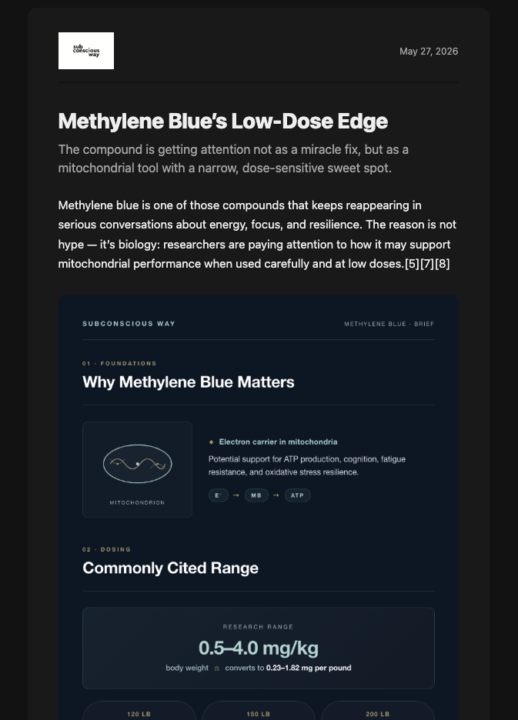
Asked AI to research newsletter on Methylene Blue based on a recent YouTube video I saw about brain health. Here was the topic prompt: The benefits of Methylene Blue and who the best suppliers are. Please be sure to include: - dosage per pound of body weight - suggested daily usage - any recommended cycling patterns (x days on, y days off). - Swapped out Key.ai for Higgsfield.ai where I already had an account - Initial prompt guardrails weren't tight enough so I re-wrote them to ensure topic input was properly handled by Perplexity - Higgsfield made a terrible infographic. Switched to Claude HTML > Playwright > Image for infographic and Higgsfield for images without words. - Had Claude translate PDF brand guidelines into md so they were more easily machine-readible in the future. Fun quick project.
1-30 of 17,681
skool.com/ai-automation-society
Learn to get paid for AI solutions, regardless of your background.
Leaderboard (30-day)
1
🔥
+7053
2

🔥
+4950
3

+3973
4

🔥
+2523
5

+1174
Powered by